

dsh-session-cleaner
Manifest validDelete a dsh Session straight from the sidebar: the Session directory, its projection cache and workspace bookkeeping go away, and a Session that is still open can be closed first.
dsh-session-cleaner


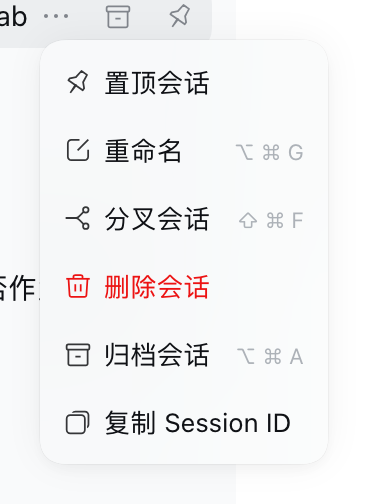
在 dsh 里直接删除会话:侧栏会话菜单 →「删除会话」,会话记录、磁盘上的 session 目录、以及所有窗口里的那一行一起消失。
为什么需要它
dsh 的侧栏只有「归档」,没有删除;Host 的 sessionPersistence 服务也只提供
create / open / flush / stat / list,没有 delete。会话本体就是普通文件:
~/.dsh/sessions/<工作区编码>/session-<uuid>/session.v4.jsonl.zstd
~/.dsh/storages/session_projcache/sessions/session-<uuid>.json
删掉它们之后,dsh 自己的会话通道(api-session/removed)会让侧栏那一行消失,
不需要改动客户端列表。
功能
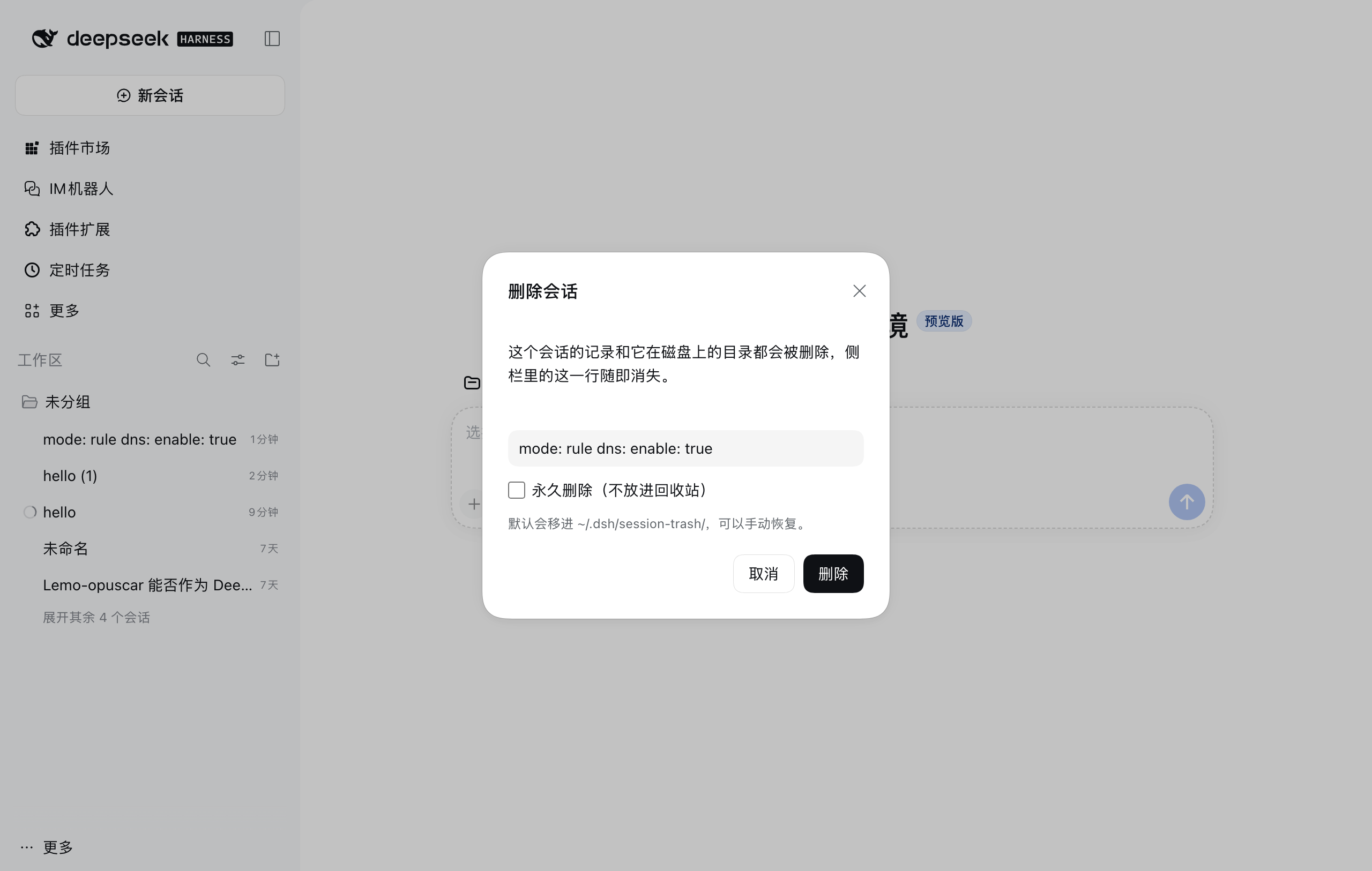
- 侧栏会话菜单:右键会话 →「删除会话」→ 原生样式的确认对话框。
- 默认移入回收站:
~/.dsh/session-trash/<ISO 时间戳>-<sessionId>/,误删可手动搬回。 - 可选永久删除:勾选对话框里的「永久删除(不放进回收站)」,或给工具传
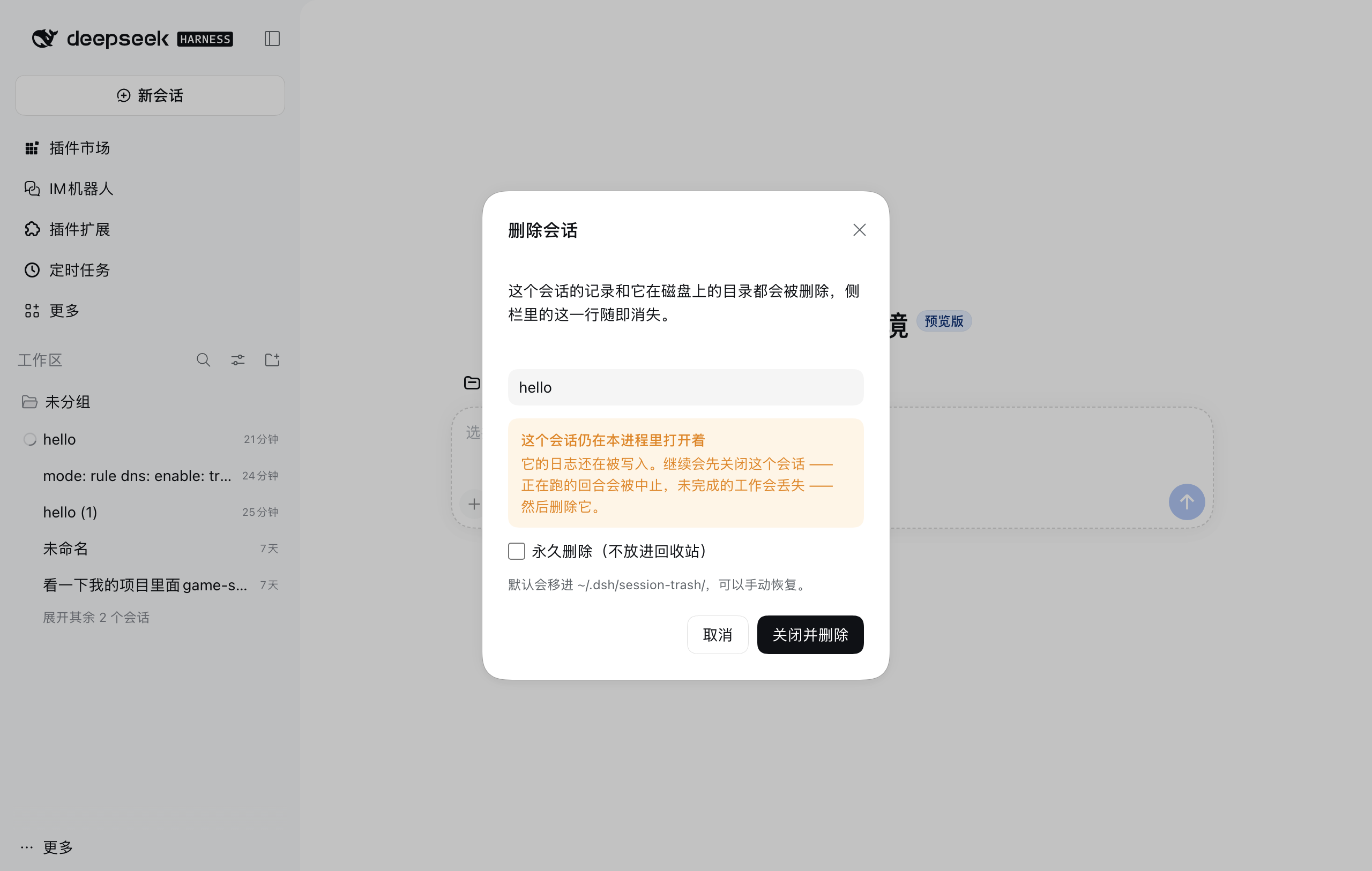
permanent: true。 - 运行中的会话也能删:第一次删除会提示它在进程里开着;按钮变成「关闭并删除」,再点一次才依次
取消进行中的回合 → 关闭会话(
session/disposed,持久化层关闭写句柄)→ 移入回收站。 - 顺手清理派生状态:projcache 里该会话的 JSON、
pinned/archived记录、所属 Workspace 的sessionIds记账。 - 两个 Agent 工具与一组 HTTP 路由复用同一套实现。
安装
dsh 的插件市场(设置 → 插件 → 添加插件)接受 npm 包名、Git 仓库地址、本地目录、.tgz 直链 四种来源。
国内网络推荐方式 1(npm 包名 + 镜像):Git 仓库地址和 GitHub 直链都要直连 github.com,
npm 包的下载可以走镜像。
方式 1:npm 包名(推荐,可走国内镜像)
在「添加插件」里填包名:
@alumos/dsh-session-cleaner
- 能直连 npm 官方源时,安装源选默认即可。
- 大陆网络:安装源选「自定义地址」,填 npm 镜像(例如
https://mirrors.huaweicloud.com/repository/npm/;npmmirror 对带 scope 的包支持不稳定,不行就换华为云)。 - 装完在插件列表里启用。
- 如果镜像里还查不到这个包(
npm view报 404),说明还没发布到 npm,先用方式 2 或方式 3。
注意:npm 上另有一个同名的无 scope 包
dsh-session-cleaner(由其他人发布,功能类似)。 本项目只发在@alumos/dsh-session-cleaner这个 scope 下,填错名字装到的不是这份代码。
方式 2:Release 里固定版本的 .tgz 直链
到 Releases 下载,或直接填某版本的资产地址:
https://github.com/Alumos/dsh-session-cleaner/releases/download/v0.2.2/dsh-session-cleaner-0.2.2.tgz
每次发版后把上面两处版本号一起改掉即可;不想手动跟版本就用下面的 nightly 固定地址。
main 每次提交都会自动重建一个 nightly 预发布,资产地址固定不变:
https://github.com/Alumos/dsh-session-cleaner/releases/download/nightly/dsh-session-cleaner-nightly.tgz
方式 3:GitHub 仓库地址(需要能连 github.com)
插件市场只接受完整地址或 github: 前缀,裸 owner/repo 会被判为非法包名:
https://github.com/Alumos/dsh-session-cleaner
github:Alumos/dsh-session-cleaner
安装时 Host 会先跑
git ls-remote探活再git clone,不经过 npm 镜像;连不上 GitHub 就会失败, 原始输出在<profile>/.plugin-manager/logs/github-connection-*/git.log。
关于
.zip:Release 里同时挂了源码.zip,但 dsh 的安装入口只认.tgz/.tar.gz直链或 Git 仓库地址 (安装规格由parseInstallSpec解析,TARBALL_SPEC = /\.(?:tgz|tar\.gz)(?:#.*)?$/i),不接受.zip。
方式 4:本地目录
git clone https://github.com/Alumos/dsh-session-cleaner.git
然后在「添加插件」里填这个目录的绝对路径(例如 /Users/you/dsh-session-cleaner)。
装好后刷新窗口即可:client.js 走 bundle 热更新,Host 半(index.js)的改动在 Harness 重启/重载插件后生效。
使用
| 入口 | 用法 |
|---|---|
| 侧栏会话菜单 | 右键会话 →「删除会话」→ 确认 |
| Agent 工具 | session_cleaner_list(列会话拿 id)、session_cleaner_delete(删) |
| HTTP | GET /dsh-session-cleaner/health、GET /dsh-session-cleaner/sessions、POST /dsh-session-cleaner/delete |
HTTP 示例:
curl -s http://127.0.0.1:3080/dsh-session-cleaner/health
curl -s "http://127.0.0.1:3080/dsh-session-cleaner/sessions?limit=50"
curl -s -X POST http://127.0.0.1:3080/dsh-session-cleaner/delete \
  -H 'content-type: application/json' \
  -d '{"sessionId":"session-...","permanent":false}'
# 会话还开着时:加 "force": true 先关闭再删除
成功返回:
{ "ok": true, "sessionId": "session-…", "title": "…", "cwd": "/…", "workspace": "…", "mode": "trash", "trashPath": "…", "closed": false, "removed": ["…", "…"] }
失败返回 { "ok": false, "error": { "code": "…", "message": "…" } }。
| 错误码 | HTTP | 含义 |
|---|---|---|
SESSION_ID_INVALID | 400 | 不是合法的 Session id |
SESSION_NOT_FOUND | 404 | 找不到对应的 session 目录 |
SESSION_LIVE | 409 | 会话还开着;加 force(或 UI 里再点一次)先关闭 |
SESSION_LIVE_UNCLOSED | 409 | 会话没能在超时内关掉(回合还在收尾),稍后重试 |
BODY_INVALID / BODY_TOO_LARGE | 400 / 413 | 请求体不合法 / 超过 64 KiB |
配置
在 profile 的 cordis.patch.yml(或重装时的 config)里覆盖:
- insert:
    - id: dsh-session-cleaner
      name: 'dsh-session-cleaner'
      config:
        basePath: /dsh-session-cleaner   # HTTP 前缀,以 / 开头、不以 / 结尾
        permanent: false                  # true = 所有删除都不进回收站
兼容性
- 开发与验证环境:dsh
0.2.1-rc.4(DSH Tauri Nightly,macOS)。 package.json声明engines.dsh: ">=0.2.0-rc.1"。- 依赖的 Host 能力:
webServer(HTTP 路由)、sessions(get/remove)、agents(get().cancel)、workspaceRegistry、sessionPersistence.root、dshHomePath(可选,缺了就退回$DSH_HOME/~/.dsh)。 少了sessions.remove的版本只会"关闭不了就拒绝删除",不会误删。
平台
| 平台 | 状态 |
|---|---|
| macOS | 已在 dsh 0.2.1-rc.4 上端到端实测(删除、回收站、运行中会话「关闭并删除」、侧栏行消失) |
| Linux | 没在真机上装过 dsh;与 macOS 同属 POSIX 路径,CI 里跑同一套离线测试 |
| Windows | 做了针对性加固,但还没有在真 Windows + dsh 上跑过端到端(我手上没有那台机器) |
Windows 上具体做了什么:
- 路径全部走
node:path;Session 根取sessionPersistence.root,而 home 独立取自dshHomePath()→$DSH_HOME→~/.dsh(sessionPersistence.root在E:这类另一个盘时也能算对回收站与投影缓存的位置)。 - 回收站目录名里的
:.会被换成-(Windows 文件名不允许:),例如%USERPROFILE%\.dsh\session-trash\2026-10-29T07-45-30-154Z-session-<id>。 - 同一磁盘用
fs.rename原子移动;跨盘时rename抛EXDEV,自动降级为「复制 → 删除源目录」。 - Explorer、杀毒、索引服务会短暂占用目录,
fs.rm/rename因此可能返回EPERM/EBUSY/ENOTEMPTY; 这些错误最多退避重试 5 次(40/80/120/160 ms)才判定失败。 session.lock在 Windows 上是命名内核信号量而不是文件,所以回收站条目里可能只有session.v4.jsonl.zstd,属正常。windows-latest上跑npm run check与npm test:manifest/语法校验 + 真实文件系统的删除、回收站、跨盘降级路径。
在 Windows 上装好后验证一次:右键一个旧会话 →「删除会话」→ 看
%USERPROFILE%\.dsh\session-trash\ 是否出现对应目录、侧栏行是否消失;对正在运行的会话再试「关闭并删除」。
如果有任何一步失败,把 dsh 日志(%LOCALAPPDATA% 下对应 profile 的日志)贴到 issue,我按真实报错修。
目录
package.json          manifest(dsh.bundle / dsh.client)
cordis.patch.yml      插入 dsh-session-cleaner 插件
index.js              Host 半:路径解析、删除、Agent 工具、HTTP 路由
client.js             Client 半:侧栏菜单项 + 确认对话框
locale/{zh,en}.json   展示元数据(meta.title / meta.description)
icon.svg              图标
docs/                 截图
scripts/check.mjs     CI 用的 manifest / locale / 产物校验
tests/offline.mjs     离线行为测试(假 Cordis 上下文 + 临时 home,三平台都跑)
.github/workflows/    CI / 版本发布 / nightly
开发
node --check index.js
node --check client.js
npm pack --dry-run        # 看安装包会带哪些文件
安装到本地 profile 请走 dsh 的插件面板(或 plugin_manager),不要手改 profile 的 package.json、也不要手工在 profile 目录里跑 pnpm。
发布
- 推
v*tag(例如git tag v0.2.1 && git push origin v0.2.1)→.github/workflows/release.yml校验 tag 与package.json版本一致, 产出dsh-session-cleaner-<version>.tgz(可直接安装)、源码.zip、SHA256SUMS.txt并创建 Release。 - 推
main→.github/workflows/nightly.yml重新构建并覆盖nightly预发布里的dsh-session-cleaner-nightly.tgz(版本号带-nightly.<日期>.<sha>)。
English
A dsh plugin that adds "Delete session" to the sidebar session menu: it removes the session
directory on disk (trash by default), clears its projection cache and workspace/pin/archive
bookkeeping, and broadcasts api-session/removed so the row disappears from every open window.
Sessions still open in the Harness get a second confirmation that cancels the running turn and
closes the session before deleting. Install it from the plugin manager using the GitHub repo
address, a release .tgz URL, or a local directory.
License
Comments
Loading…
Similar plugins
by rhl88
Deletes a session from the sidebar session menu after a confirmation dialog, removing its log directory, projection-cache record and workspace/pin/archive accounting; registry calls are timeout-guarde
★ 0
MIT
JavaScript
Oct 13, 2026
dsh plugin --profile web add dsh-session-removeby ashulam
Deletes a session from the sidebar session menu: its log and replay cache go to the Recycle Bin on Windows (a local trash folder elsewhere); a live session is queued for removal on the next start.
★ 0
MIT
JavaScript
Oct 20, 2026
dsh plugin --profile web add dsh-session-deleteby reverse-PAI
Permanently delete a DeepSeek Harness session: a sidebar session-row "..." menu item plus a hover button, a risk-consent dialog, and an authenticated Host route that removes the session log, its projection-cache row and its archive mark.
★ 1
MIT
JavaScript
Oct 19, 2026
dsh plugin --profile web add dsh-minimal-session-deleteby jerrywang21-debug
Sidebar delete action for the DeepSeek Harness (DSH) web client: removes a conversation from the Harness and moves its log + projection cache to the system Trash.
★ 0
MIT
JavaScript
Oct 7, 2026
dsh plugin --profile web add @jerrrrrywang/dsh-session-deleteby zenghang25
One-click session deletion for the DeepSeek Harness sidebar: permanently removes the session log, projection cache and its per-conversation artifact directory (.dsh-sessions/<session-id>/). · DSH 侧栏会话一键删除 + 每个对话独立产出目录
★ 1
MIT
JavaScript
Oct 18, 2026
dsh plugin --profile web add dsh-session-deleteby Linusteller
DeepSeek Harness 插件:侧栏会话菜单「删除会话」(永久删除,非归档)
★ 2
MIT
JavaScript
Oct 22, 2026
dsh plugin --profile web add dsh-delete-sessions