

dsh-personal-agent
Manifest validPersonal assistant plugin for DeepSeek Harness (DSH) on macOS: Apple Calendar, Reminders, Notes, Mail drafts, a today note and a weekly journal.
DSH Personal Agent
A personal assistant plugin for DeepSeek Harness (DSH) on macOS. It adds a Personal agent preset that works with your Apple Calendar, Reminders, Notes and Mail, keeps a 今日 (today) sticky note and a weekly work journal, and makes DSH open on your main conversation.
| 今日 note over the main conversation | Overview page |
|---|---|
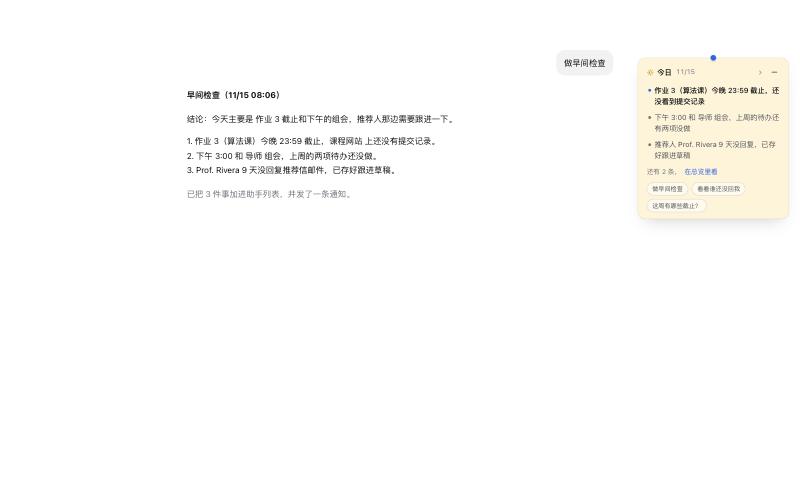 | 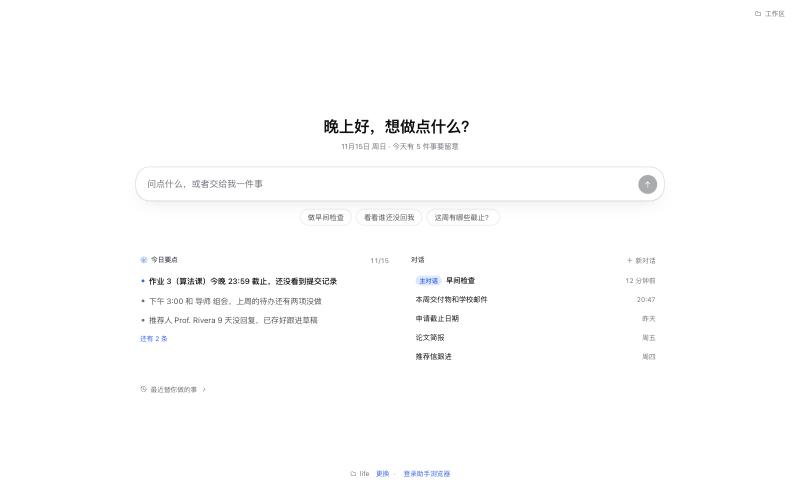 |
Screenshots use made-up sample data.
Status: early, macOS only. The persona and the interface are in Chinese for now (an English version is on the roadmap); the tools themselves work in any language.
What it does
- Apple apps through a small helper app.
- Read your calendar and reminders. New events and reminders are created only after you confirm a card in DSH.
- Add to-dos to one "assistant" list in Reminders, and mark reminders done (never deletes).
- Search, read and create notes in one assistant folder.
- Read mail that Apple Mail has synced, and save drafts and reply drafts. It never sends mail.
- 今日 sticky note.
- A small note pinned over the main conversation with today's top items and quick questions.
- Drag it to either side; it snaps to the nearer edge and remembers where you put it.
- Click the note to fold it into a small pill, and click the pill to open it again.
- Drag the grip in its bottom inner corner to make it wider or taller; a taller note shows every item and scrolls. It remembers the size, and a double click on the grip goes back to the default. Without a chosen height it shows the first five items.
- It steps aside while the left sidebar is open, and comes back when you collapse it.
- The assistant crosses items off and adds new ones as the day goes (
today_update).
- Tasks with one consistent state.
- Say "帮我记住……" (remember that I need to…) and the assistant records it as a task. The overview page and the 今日 tab show these under 记下的事, soonest due first, with the next step and who it waits on.
- Each task gets a stable id and keeps where it came from (an email's Message-ID), the next step, who it waits on and when it counts as done. The same email never makes a second task.
- Ownership is split: Reminders owns a linked reminder's done state and due time, Calendar owns events, the plugin's
tasks.jsonkeeps only links and context, and the 今日 note is a view. task_listchecks Reminders and Mail first, so a reminder ticked off or a reply sent directly in those apps shows up. It tells "draft saved" apart from "reply sent", and when a check fails it says so instead of reporting everything done.
- Rescheduling and repeats.
- Move reminders and events (
reminders_update,calendar_update), including "remind me tomorrow" or "push it a week" as relative moves that keep the time of day across daylight-saving changes. A moved reminder no longer rings at its old time. - Daily, weekly, monthly or yearly repeats with an end date or a count; for a repeating event you choose "only this one" or "this and later ones".
- End a repeating event early, or keep one occurrence and stop the rest (
calendar_updatewithrepeat). The card says how many later occurrences drop off. - Delete an event when you ask for it (
calendar_delete): a single event, one week of a repeating event, or this and all later occurrences. The card shows the event and, for a series, how many occurrences go. Deleted events cannot be restored from Calendar. - Every change shows the old and new values on a confirmation card, with overlapping events and free slots that day. The same request sent twice does not create a second event or reminder.
- Move reminders and events (
- Weekly journal.
- One Markdown file per week (
journal/2026/2026-W46.md) with a section per day. - A 本周总结 (week summary) is added on top once the week is over, plus a monthly summary. Quarterly and yearly summaries are written when you ask.
- Day entries are never deleted.
- One Markdown file per week (
- Personalities.
- Six built-in speaking styles: 助理 (assistant, default), 专业 (professional), 高效 (efficient), 搭档 (friendly partner), 直率 (candid) and 傲娇 (an elegant, cool, sharp-tongued tsundere, for fun: it sighs at you, fixes everything flawlessly, then says "don't get the wrong idea"; it drops the act only for real distress, health or bad news).
- Three tweaks: warmth, lists and emoji.
- Set a default in your workspace's
AGENTS.md, or switch mid-conversation.
- Research helpers.
arxiv_search.bib_add, which appends a paper to your BibTeX/JabRef library.- A read-only Research subagent (
ask_research) that the main agent delegates paper searches to.
- Action log. Every event, reminder, to-do, draft, note, BibTeX entry, completed reminder and note change is appended to a plain-text log you can read back.
- A home that DSH opens on.
- A launch splash, then your main conversation with the left sidebar collapsed.
- An 助理 (overview) page with today's points, recent conversations and recent actions.
It also uses DSH's own tools: files, web search, bash in the DSH sandbox, schedules, Office files, skills and memory (with the Mnemon plugin). It can optionally drive a headless Chrome through Microsoft's Playwright MCP, with a visible window only when you need to sign in.
Requirements
- macOS 14 or later.
- DeepSeek Harness desktop
0.2.2-rc.3or a later0.2.x. - To build from source: Node.js 20+ and the Xcode command line tools (
xcode-select --install) for the Swift helper.
Install
From source
git clone https://github.com/alexz949/dsh-personal-agent.git
cd dsh-personal-agent
npm run build
npm test
Then link the folder into your DSH desktop profile and restart DSH (⌘Q, then open it again):
"/Applications/DeepSeek Harness.app/Contents/Resources/runtime/cli/bin/dsh" plugin --profile desktop add link:$PWD
With a link, updating is git pull && npm run build, then restart DSH. dsh plugin forwards its arguments to pnpm in the profile folder.
From npm
In DSH, open Plugins → Add plugin and enter dsh-personal-agent, or run:
"/Applications/DeepSeek Harness.app/Contents/Resources/runtime/cli/bin/dsh" plugin --profile desktop add dsh-personal-agent
Restart DSH afterwards. The package includes a prebuilt universal helper (Apple silicon and Intel).
From a plugin index
Add https://raw.githubusercontent.com/alexz949/dsh-personal-agent/main/market.json as an index source under Plugins → Discover (DSH's experimental custom plugin market), then install from there.
First run
- Set up a workspace. Copy
template/somewhere private and fill inshared/USER_PROFILE.mdand the "This user's setup" section ofagents/life/AGENTS.md(mail accounts, folders, default personality). Your notes, journal and profile must never go into a public repository. - Add it to DSH. Add
agents/lifeas a DSH workspace and start a conversation with the Personal preset. The home asks which workspace to use the first time. - Allow permissions. The first Calendar, Reminders, Notes or Mail request opens Personal Agent Helper, and macOS asks for permission. Allow it.
- macOS ties the permission to the helper's code signature. Rebuilding the helper after changing
helper/may ask again.
- macOS ties the permission to the helper's code signature. Rebuilding the helper after changing
- Optional: Reminders list. Create a list named
Assistantin Reminders fortodo_add, or set another name (see Settings).
Settings
Optional, in ~/.dsh/personal-agent/config.json. You can override the path with PERSONAL_AGENT_CONFIG.
{
  "todoList": "Assistant",
  "notesFolder": "Assistant",
  "bibLibrary": "~/Documents/JabRef/library.bib",
  "actionLog": "~/.dsh/personal-agent/actions.md",
  "browserProfile": "~/.dsh/mcp/playwright/profile",
  "tasksFile": "~/.dsh/personal-agent/tasks.json",
  "computerModel": "gpt-6.1-terra",
  "computerProvider": "openai"
}
bib_add is offered only when bibLibrary is set. computerModel (with computerProvider, default openai) picks the model ask_computer's child uses for screen work, so a stronger vision model can drive the screen while Personal Agent keeps its own; the model must exist on that provider route in your DSH profile (for OpenAI, the @deepseek-ai/dsh-llm-pi-ai row), with its API key set in DSH. Leave it out to use DSH's default model. Restart DSH after changing it.
Browser automation (optional)
The preset starts Playwright MCP from ~/.dsh/mcp/playwright, using /usr/local/bin/node:
mkdir -p ~/.dsh/mcp/playwright && cd ~/.dsh/mcp/playwright && npm install @playwright/mcp
node node_modules/playwright-core/cli.js install chromium
The second line downloads Playwright's own Chrome for Testing (about 250 MB). The assistant uses it instead of your Google Chrome: it is a separate app with its own Dock icon, so links from other apps never open in it and quitting it never quits your Chrome. The plugin keeps ~/.dsh/mcp/playwright/Chromium.app linked to the newest installed build (setting browserApp), and both the background browser and the sign-in window start from that link. Run the install line again after updating @playwright/mcp.
On Apple Silicon with Homebrew, Node is usually /opt/homebrew/bin/node. Change command in the mcp-browser row of cordis.patch.yml. If it is not installed, the other tools keep working.
The browser runs headless, so no window opens while the assistant works. It uses its own profile in ~/.dsh/mcp/playwright/profile and never sees your everyday Chrome logins.
When a site needs you to sign in (for example a two-step school login), the assistant closes the background browser and calls browser_login. That opens the same profile in a visible Chrome for Testing window. Sign in, quit that window with ⌘Q, and the background browser reuses the saved login from then on. Many school portals sign in with session cookies, which Chrome drops on its next start; when the window quits, the plugin turns the session cookies used there into cookies that last 30 days (in the assistant's profile only, logged in the action log). It remembers those sites and does this again whenever the background browser closes, since sites like Canvas replace their session cookie on every page. The site can still end the session on its side, and two-step login may ask again. You can also start this from 登录助手浏览器 at the bottom of the overview page. The profile path can be changed with browserProfile in the settings file.
To read pages the assistant links to without leaving DSH, set DSH's chat link preference to open links in the in-app sidebar. DSH's own sidebar browser is for you only: the model cannot see or control it.
Tools
| Tool | What it does | Asks first? |
|---|---|---|
calendar_events, reminders_list, notes_search, notes_read, mail_accounts, mail_list, mail_read | read | no |
calendar_create, reminders_create | create an event / reminder (optionally repeating; shows conflicts) | yes (DSH card) |
calendar_delete | delete an event, one occurrence, or this and later occurrences | yes (the event and how many occurrences go) |
reminders_update, calendar_update | change or move a reminder / event, change its repeat rule or end a series early | yes (old and new values, and what drops off) |
task_create, task_update, task_list | record and track tasks linked to reminders and emails | no |
todo_add | add a to-do to the assistant list | no |
reminders_complete | mark a reminder done | no for the assistant list, yes for others |
mail_draft, mail_reply_draft | save a draft in Mail (never sends) | no |
notes_create | new note in the assistant folder | no |
today_update | change the 今日 note (today.md) | no |
journal_status, journal_write | read / write the weekly journal | no |
bib_add | append a paper to your BibTeX file | no |
arxiv_search | search arXiv | no |
ask_computer | hands screen work (reading a WeChat or QQ window, say) to a child on DSH's built-in ptc preset, which drives Mac apps through DSH's experimental Computer Use. Needs Computer use switched on under Plugins → More and macOS permissions for DSH Computer Use. The assistant asks you first, tells the child to read only (no typing, sending, paying or deleting), and shows what it found before recording anything | yes (in chat), plus DSH's own per-app consent |
notify | macOS notification banner | no |
browser_login | open the assistant browser's profile in a visible Chrome window for signing in | no |
browser_save_output | copy a browser screenshot into the workspace's files/ so it shows inline in the chat | no |
Claude Code (optional)
mcp/server.js is a stdio MCP server that gives Claude Code the same Apple, notification, arXiv and BibTeX tools. Confirmation cards become MCP elicitations, or the host's permission prompt with --confirm=permission.
How it plugs into DSH
-
cordis.patch.ymladds thepersonalandpersonal-researchagent presets and the client bundle. -
Host tools are ordinary DSH tool modules:
lib/apple.js,today.js,journal.jsand others. -
The client (
lib/client.js) uses DSH's public client services where they exist: layout, workspaces, sessions, workspace files, right-sidebar tabs and theshell.overlayslot. -
A few internal pieces are used with fallbacks when they are missing:
- Collapsing the left sidebar on older builds.
- Sending a question straight into a conversation (
sessions.binding(...).session.prompt). - Filling a conversation's draft.
A future DSH release may change them.
Development
npm run build   # writes lib/ and, on macOS, rebuilds the helper only when helper/ changed
npm test        # node --test; uses no network and none of your settings
License
Comments
Loading…
Similar plugins
DeepSeek Harness (DSH) plugin: read and write Apple iCloud Calendar over CalDAV, with a cross-platform credential store, request timeouts/retries, and a confirm-gated delete.
★ 0
dsh plugin --profile web add dsh-icloud-calendarby Dely0
DSH 个人工作台:日历 + 任务列表 + AI 澄清/拆解/执行/复盘 | Personal workbench for DeepSeek Harness Web: calendar + task list + AI assistant
★ 47
↓ 680/wk
MIT
TypeScript
Oct 29, 2026
dsh plugin --profile web add @dely0/dsh-personal-workbenchby hujiyo
DeepSeek Harness plugin: browse, search, copy and hide the prompts you sent to the AI across all sessions.
★ 0
MIT
JavaScript
Oct 20, 2026
dsh plugin --profile web add dsh-recent-promptsby ccr-wer
DSH (DeepSeek Harness) plugin: auto-write a first-person dev log at agent/turn-stopping. Turns context + memory into a narrative log for the developer's own review.
★ 0
MIT
JavaScript
Oct 19, 2026
dsh plugin --profile web add dsh-devlog-autoby AK-blank
Unofficial DSH (DeepSeek Harness) plugin: macOS Notification Center alerts when a session finishes or needs you — the banner carries the last reply, plays your system alert sound, and clicking it jumps back to the DSH page.
★ 1
MIT
JavaScript
Oct 3, 2026
dsh plugin --profile web add dsh-plugin-mac-notifyby disc0nct
A persistent memory plugin for DeepSeek Harness that enables agents to store and recall information across sessions — DSH-native tools with atomic storage, validation, and concurrency-safe reads
★ 0
MIT
JavaScript
Aug 22, 2026
dsh plugin --profile web add @deepseek-ai/dsh-tool-memory