

dsh-custom-plugin
Manifest valid★ 8dsh-custom-plugin is an enhancement plugin built for the DeepSeek Harness (DSH) Web GUI. It provides: background weather effects / glassmorphism, timeline tracks, project folders, prompt library, conversation export, Mermaid chart rendering, quote replies, balance query, and a daily Token usage panel — a variety of convenient features.
dsh-custom-plugin






English | 中文
Custom convenience suite for the DeepSeek Harness (DSH) Web GUI: personalization, weather FX, glass effects, a per-user-message timeline rail, project folders, enhanced prompts, conversation export/search, Mermaid rendering, quote reply, 7/30/90-day usage analytics, budget and key-free local backups, plus a Ctrl/Cmd+K command palette.
The plugin is dual-face: the host half (src/) owns the state document, registers the /api/custom-plugin routes and the custom_plugin_status agent tool; the browser half (src/client/) injects its UI through eight injections into seven official slots and talks to the host over same-origin fetch. Mounted through the official profile mechanism — no DSH source changes.

Selected screenshots
Settings → 个性化: the full-page appearance config | The same panel as a popover from the session header (light theme) |
Liquid glass (displacement refraction on Custom surfaces) | Timeline rail with hover preview |
Multi-level project folders | Mermaid mindmap rendered in place |
Balance and today's per-model usage | Rain — three depth layers |
Sakura petals | Snow |
Weather FX is shown in dark mode, where only "no color" and "aurora" backgrounds are selectable. Usage history, backup-import previews, session search, and the command palette are dynamic views of the same panel; open them inside DSH to inspect the live UI — no additional fixed screenshots are included.
What it does
Appearance
- Background colors: 20 muted low-saturation palettes (each with a matching tab color,
天青灰by default) plus "no color" (follows the GUI default theme) and the high-saturation aurora gradient. In dark mode only "no color" and "aurora" stay selectable; the other colors are disabled and the plugin text turns white for readability. - Weather FX: canvas-rendered, pointer-transparent one-click overlays — falling snow, cinematic rain (three depth layers with splashes), and drifting sakura petals; turning it off clears the canvas.
- Glass: frosted glass on every Custom surface, or liquid glass (Chromium displacement refraction, no chromatic dispersion, slight backdrop blur; Safari/Firefox fall back to frosted). A global-glass option applies backdrop blur to dialogs, menus, tooltips and listboxes.
Timeline navigation
Every direct user message gets a node on a right-side (or left-side) rail:
- hover for a preview popover (overflow-aware positioning) with LaTeX / MathML / Mermaid markers rendered inline;
- click to jump to that message (the chat scrollport is driven directly, so rows inside nested scrollers still land centered);
- drag the thumb or wheel over the rail to scroll (the rail replaces the native scrollbar);
- nodes can be starred (and the rail can show only starred ones), forked into a new session at that message, or copied in full.
Nodes are sourced from the rendered user-message rows (DOM positioning) and refresh automatically after history loads; the rail keeps up to 400 tail nodes.
Project folders
A multi-level folder tree persisted in the $DSH_HOME state file, shared across workspaces. Any workspace or session can be folded in; folders support drag-to-reorder (before / inside / after), rename, delete, and add-current-session shortcuts.
Prompts
A prompt library with add / edit / copy / delete, search, favorites, tags, drag sorting, recency and use counts. {{variable}} placeholders open a fill-in form before insertion. The library supports versioned JSON and heading-based Markdown import/export.
Conversation export
Export the current session in three formats (file names carry a date stamp):
- JSON: standard
messagesstructure (user / assistant / tool), with a meta block carrying the session title, creation time, working directory and export time — importable elsewhere; - Markdown: role-sectioned plain text;
- PDF: an A4 print-layout HTML opened in the browser and saved as PDF; images embed as base64 (up to 30 images, 12 MB total, 4 MB each).
Tool rows carry the tool name and an argument digest (resolved from the paired tool/call events).
Plugin state can be exported as a versioned JSON backup containing appearance, folders, prompts, stars, usage, and budget settings. API keys and credential metadata are excluded. Imports show a conflict preview, support merge or non-secret replacement, and create a recovery copy first.
Mermaid
```mermaid blocks anywhere in the chat — assistant replies included (mindmaps, flowcharts, sequence diagrams, …) — render in place automatically: a diagram/code toggle bar with a mermaid.live fallback link appears above the block, streaming blocks preview once their content is complete, diagrams re-render on GUI theme flips, and a failed render keeps the raw code. Detection keys off the fence language label; with a blank label (mid-stream) a content heuristic decides (keyword prefix + completeness checks, so blocks labeled with a real language are never touched). The engine loads from the mermaid 11 dependency installed with the plugin (works offline), falling back to jsdelivr / fastly / unpkg mirrors and caching in the host process; the render chips under user messages and the multi-diagram modal stay, and the mermaid.live link uses the DEFLATE-compressed #pako: format that restores the diagram on open.
Efficiency tools
- Quote reply: select text in the conversation and a "quote reply" button inserts it as a blockquote into the input box;
- Anti auto-scroll: force
scroll-behavior: autoso sends never yank the view to the bottom (off by default); - Formula copy: LaTeX / MathML copy chips under matching messages (MathML pastes into Word);
- Batch archive: select sessions and archive them in bulk; running sessions are unavailable and completion reports separate success/failure counts. DSH exposes no restore API yet, so the plugin provides no restore entry point.
- Session search: search current-session user, assistant, and tool content through DSH's official index and jump to the containing turn; superseded requests are cancelled.
- Command palette: press
Ctrl+K/Cmd+Koutside editors to search sessions, workspaces, prompts, and common actions; cross-session content search uses DSH's official API. - Reliable archive: running sessions are unavailable by default and batch completion reports separate success and failure counts.
Balance and usage
A balance badge sits in the session header (clickable to pin); the balance panel provides:
- Balance: the official
https://api.deepseek.com/user/balanceendpoint, CNY preferred, granted and topped-up balances listed separately, with the account availability flag. - Key resolution order: the system credential store (when available) → the legacy plugin state-file key → environment variables
DEEPSEEK_API_KEY/DEEPSEEK_KEY/DEEPSEEK_TOKEN(values must start withsk-) → the DSH credentials file$DSH_HOME/.credentials.yaml(reuses the DeepSeek key already configured in DSH — no duplicate setup). - Today's usage: per-model input / output / cache token counters and call counts, folded live from
session/eventrecords. - Cost estimate: DeepSeek's current official peak/off-peak table — peak hours are Beijing Monday–Friday 09:00–12:00 / 14:00–18:00; all other hours, including weekends, are off-peak at half price:
deepseek-v4-flash/deepseek-v4-flash-vision-exp¥3 / ¥9,deepseek-v4-pro¥9 / ¥27 (CNY per 1M tokens in / out, cache writes ¥0.1 / ¥0.3; the retireddeepseek-chat/deepseek-reasonerprice as v4-flash). Indicative only. - Scan: "scan today's session logs" replays every session and buckets usage events by their own timestamp (cross-midnight sessions keep contributing today's usage), reporting how many active sessions were scanned.
- History and budget: inspect 7 / 30 / 90-day trends and per-model totals, export UTF-8 CSV, and set a local monthly CNY budget with an in-plugin warning threshold.
Settings entry
The Settings → 个性化 section provides the full appearance and tool-toggle page; the 个性化 buttons in the session header and the sidebar footer open the same panel as a popover.
Agent integration
The custom_plugin_status tool reports appearance config, today's per-model usage, balance, a timeline sample, Mermaid engine state, the state file path and client diagnostics. The plugin never injects system-prompt announcements.
Install
Prerequisites: Node 22+, pnpm, and the dsh CLI (the official @deepseek-ai/dsh npm package; npx @deepseek-ai/dsh stands in for dsh when it is not installed globally).
From npm
dsh plugin --profile web add @alexpeng/dsh-custom-plugin
# restart dsh web
The registry tarball ships prebuilt output — no source build on the installing machine.
From GitHub (source install)
dsh plugin --profile web add github:AlexPeng07/dsh-custom-plugin
# restart dsh web
Git installs pull sources; the prepare script builds lib/ on the installing machine. pnpm ≥10 asks you to approve that build once — copy the exact package key it prints into the profile's pnpm-workspace.yaml under allowBuilds, then re-run the add. The npm route above skips the build-approval step.
Local link (development)
# build (run from this repo root)
pnpm install
pnpm build
# add to the web profile. The link path must not contain spaces: on Windows,
# create a space-free directory junction first and link to the junction path
dsh plugin --profile web add link:F:/dsh-plugin-dev
# restart dsh web
The package declares its manifest per the official bundle protocol: dsh.bundle.patch in package.json points at the cordis.patch.yml config layer (row id custom-plugin) and dsh.client declares the browser half. dsh plugin add forwards to pnpm inside the profile directory; the installed package joins dsh.profile.bundles automatically because of that declaration, and the browser half loads via the official client module system from the same row.
Config
The plugin reads and writes one JSON document at $DSH_HOME/custom-plugin-state.json (~/.dsh by default, overridable via the DSH_HOME environment variable): appearance config, folders, prompts, stars, legacy compatibility data, and a 90-day per-day usage ledger. Writes are atomic (temp file + rename), so a crash never truncates the document.
Appearance and feature toggles (the cfg field, all with defaults):
| Key | Default | Meaning |
|---|---|---|
bg | 天青灰 | default (no color) / aurora / one of the 20 palette names |
weather | none | none / snow / rain / sakura |
glass | true | master glass toggle for Custom surfaces |
glassMode | frost | frost frosted / liquid displacement glass |
globalGlass | true | blur global overlays (dialogs/menus/tooltips) |
timeline | true | timeline rail toggle |
timelineLeft | false | rail on the left |
starsOnly | false | show only starred nodes |
quote | true | selection quote reply |
antiScroll | false | anti auto-scroll |
mermaid | true | automatic in-place Mermaid rendering (plus render chips) |
formula | true | LaTeX / MathML copy chips |
monthlyBudgetCny | 0 | Monthly CNY budget; 0 disables warnings |
budgetWarningPercent | 80 | Monthly warning threshold (1–100) |
Security model
- The browser talks to the host only through loopback
/api/custom-pluginroutes; every route checks a loopback socket address, a loopback Host header, and browser same-origin markers (sec-fetch-site/Origin).X-Forwarded-Foris never trusted. - The browser never receives the saved DeepSeek API key. New panel keys use the OS credential store through
keytarwhen it is present; older plaintext state keys are migrated on startup when that store is available.keytarships as no dependency of this plugin (a native module would trip pnpm 11's strict build gate and silently keep the whole bundle from activating); users who want the OS keyring can add it to the profile themselves:dsh plugin --profile web add keytar. - If the OS credential store is unavailable, the plugin keeps a compatibility fallback in
$DSH_HOME/custom-plugin-state.json; protect$DSH_HOMEaccordingly. DSH's own$DSH_HOME/.credentials.yamlremains a supported plaintext fallback. - Conversation exports and timeline data stay on the local host.
Known limitations
- The Mermaid engine comes from the dependency installed with the plugin and works offline; only a missing dependency falls back to a CDN fetch (cached for the host process lifetime).
- The usage ledger folds token counts from live
session/eventrecords, retains 90 Beijing calendar days, and a manual "scan" re-reads today's session logs with four concurrent reads when live events were missed. - The balance panel shows the peak/off-peak token and cost split plus a link to the official pricing page; legacy rows without peak counters are marked inexact and excluded from cost totals until rescanned.
- OS credential storage detects a
keytarmodule present in the profile'snode_moduleswhen the host starts; when it cannot be loaded, the compatibility state-file fallback is used. - Cost estimates use DeepSeek's official peak/off-peak list prices and are indicative only.
- Dark-mode background restriction is deliberate: only "no color" and "aurora" are selectable in dark mode.
- DSH currently exposes no archive-restore API; the plugin does not bypass that boundary by editing the underlying registry.
Development
pnpm typecheck   # type check
pnpm test        # vitest unit tests
pnpm build       # build the node ESM library and the browser bundle into lib/
License
Apache-2.0. Portions of the code reference Nagi-ovo/voyager and unovue/inspira-ui.
Compatibility
Versions
| Latest version | Published | Size |
|---|---|---|
| 0.1.0 | — | — |
| 0.1.1 | — | — |
| 0.1.2 | — | — |
| 0.1.3 | — | — |
| 0.1.4 | — | — |
| 0.1.5 | — | — |
| 0.1.6 | — | — |
| 0.4.0 | — | — |
| 0.4.1 | — | — |
| 0.4.2 | — | — |
| 0.7.1 | — | — |
| 0.7.0 | — | — |
| 0.5.0 | — | — |
| 0.6.0 | — | — |
| 0.8.0 | — | — |
| 0.9.3 | — | — |
| 0.9.0 | — | — |
| 0.9.1 | — | — |
| 0.9.2 | — | — |
Comments
Loading…
Similar plugins
by sky-unicorn
DeepSeek Harness(DSH)一站式增强套件,基于公开插件扩展点构建,无需修改 DSH Core。提供 Windows Launcher、桌面通知与动态桌宠、Plugin Community、MCP Server Manager、模型输入类型配置、最后一条消息编辑与重新生成,以及 Claude Code / Codex Subagents 实时控制。所有功能均可独立安装,支持全量部署、
★ 4
MIT
TypeScript
Oct 28, 2026
dsh plugin --profile web add dsh-enhanced-pluginsby magian1127
DeepSeek Harness (DSH) plugin: A comprehensive enhancement plugin with UI polish, layout tweaks, prompt injection, and more. 综合性增强插件,界面优化、布局调整与提示词注入等更多功能。
★ 20
↓ 1.5k/wk
MIT
TypeScript
Aug 21, 2026
dsh plugin --profile web add deepseek-harness-zh_proby JoukoPuro
一个 DeepSeek Harness(DSH)插件: 在 Web 输入框的工具行中添加一个 ✨ 图标按钮。点击后选择打磨风格,已接入的大模型 会把你草稿中的提示词改写得更专业、更易被 AI 理解 。A DeepSeek Harness plugin: icon-only composer button that rewrites your prompt via the connected LLM
★ 8
↓ 101/wk
MIT
JavaScript
Oct 17, 2026
dsh plugin --profile web add dsh-prompt-polish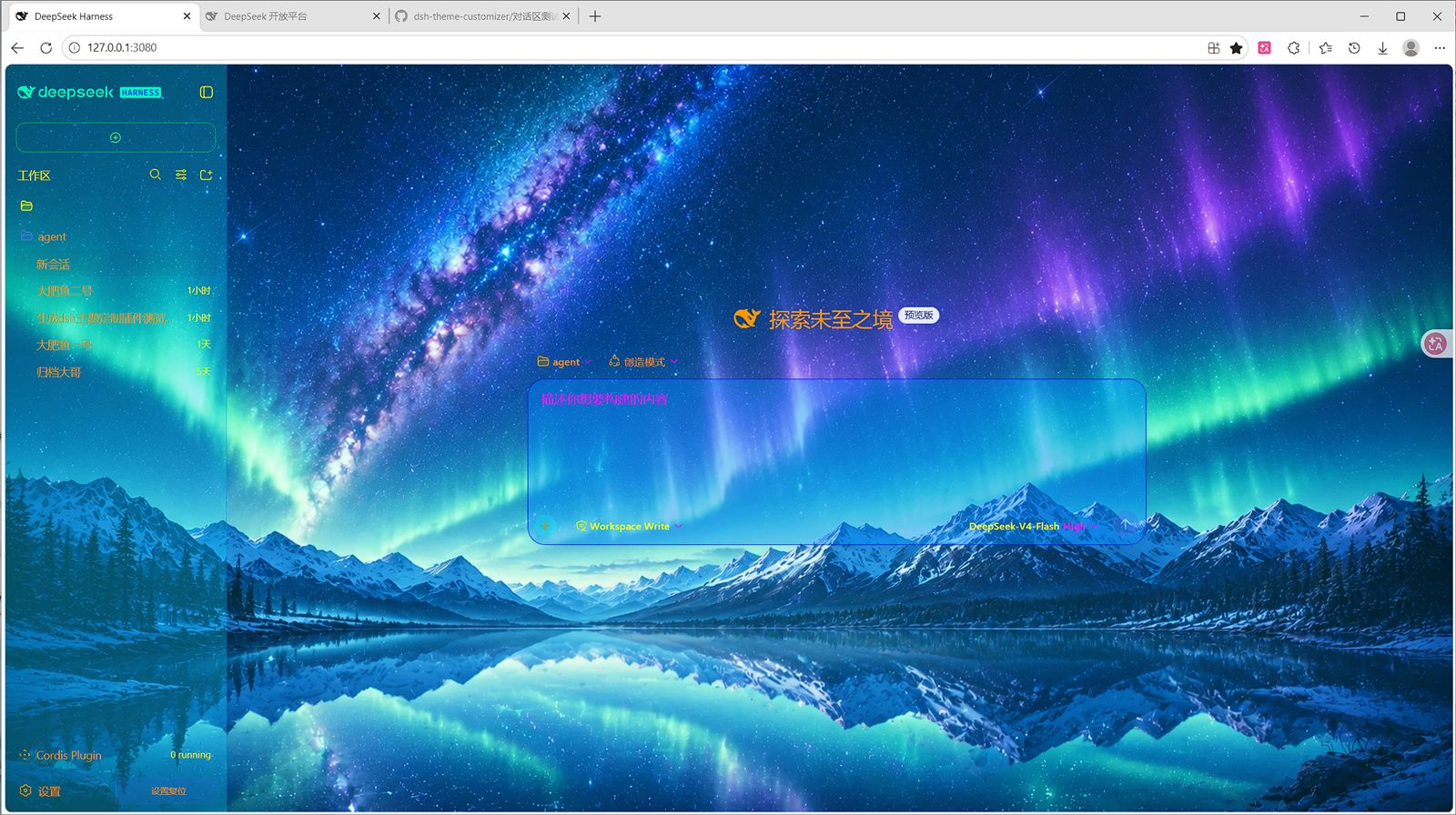 8
8No screenshots
by lxxz1918
DeepSeek Harness(DSH)Web 界面自定义主题插件:背景/文字/框线/细节全可视化调整,可导入导出预设,持久化保存。
★ 3
↓ 278/wk
MIT
JavaScript
Aug 27, 2026
dsh plugin --profile web add dsh-theme-customizerby GHJIVHIDD
DeepSeek Harness 的用量(Usage)部署级插件:会话视图环新增「用量」页签,实时跟踪输入/输出/缓存命中 tokens 与费用(DeepSeek 官方峰谷价 + OpenCode Go 套餐价),动态渐变蓝状态条、自定义价格表、CSV/JSON 导出。原生UI界面
★ 3
Apache-2.0
JavaScript
Aug 20, 2026
dsh plugin --profile web add @deepseek-ai/dsh-plugin-usageby supersealwqas
DeepSeek Harness 第三方 API 与自定义模型设置插件:支持请求头、User-Agent、模型列表、图像输入和思考等级 | WebUI plugin for third-party APIs and custom models with request headers, image input, and reasoning levels
★ 7
MIT
JavaScript
Sep 1, 2026
dsh plugin --profile web add dsh-custom-provider-settings