

dsh-context-selector
DiscoveredPer-row context checkbox selector + document/selection right-click Ask AI for DeepSeek Harness.
dsh-context-selector
Language / 语言: 简体中文 | English
dsh-context-selector 是专为 DeepSeek Harness (DSH) 打造的自定义上下文选择与管理插件。
它的核心作用是让你自由、有选择性地决定将哪些历史聊天内容发送给后续轮次的对话——无论是整轮对话、某条提问/回复、单次工具调用结果,还是系统提示词,都可以按需勾选或排除,实现真正的自定义上下文。
核心功能
- 选择性发送历史对话(整轮 / 单条 / 工具级)
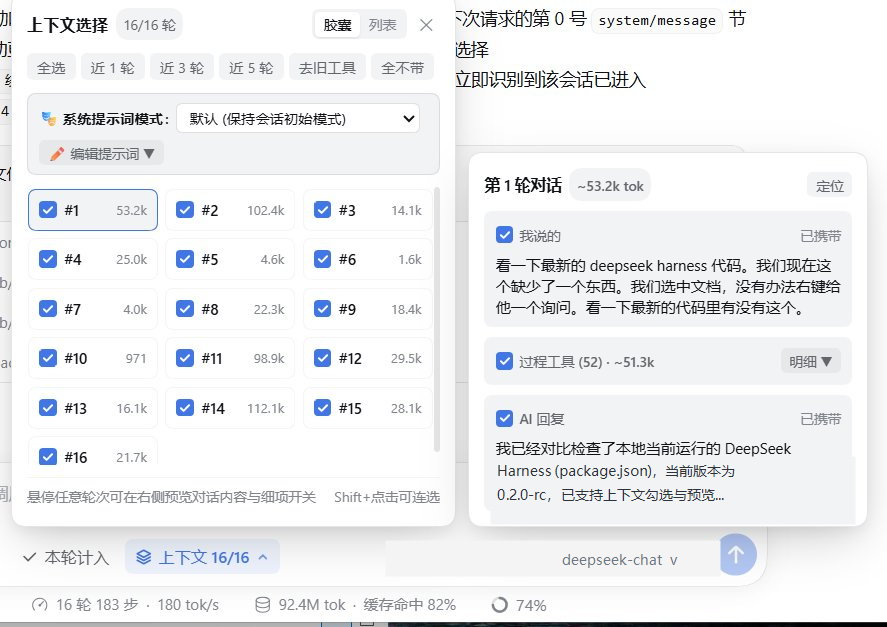
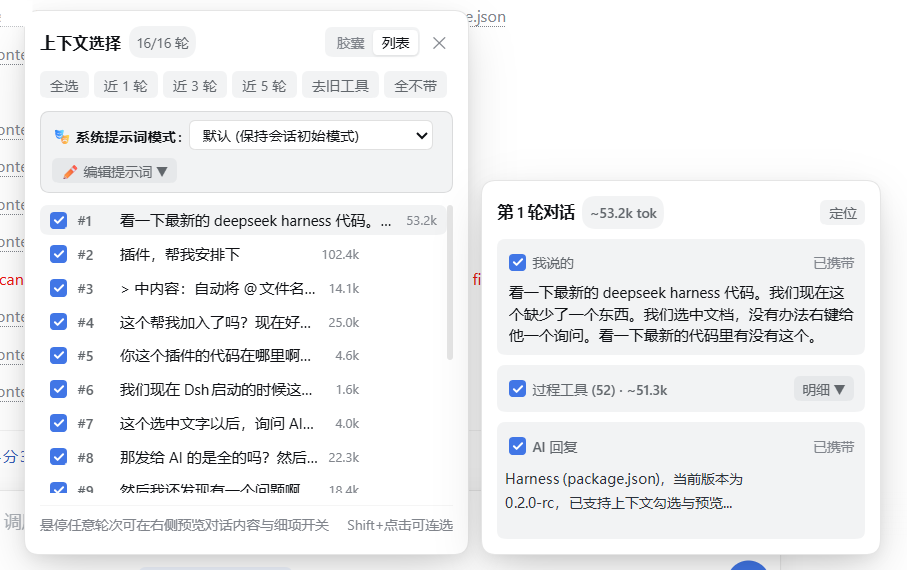
支持胶囊与列表两种视图,可按轮次一键勾选/取消,也可将鼠标悬停在任意轮次上,在右侧预览卡片中单独勾选或排除**「我说的」、「过程工具」或「AI 回复」**。提供全选、近 1/3/5 轮、去旧工具、全不带、从本轮起截断与仅本轮有效(阅后即焚)等快捷操作。 - 自定义与随时切换系统提示词
无需新建会话,可在当前对话中随时切换系统提示词预设模式,或直接追加 / 完全替换自定义系统提示词,并在提示词面板中按段落勾选需要携带的内容,下一轮对话立即生效。 - 上下文用量透视与细项开关
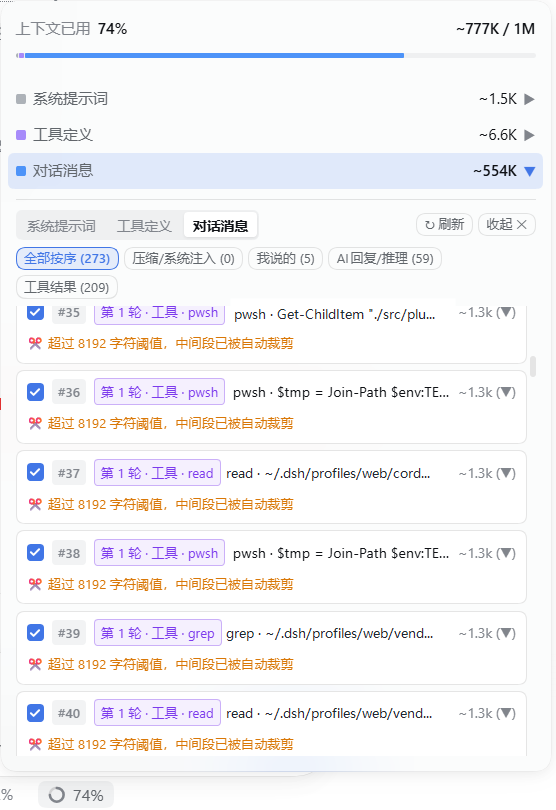
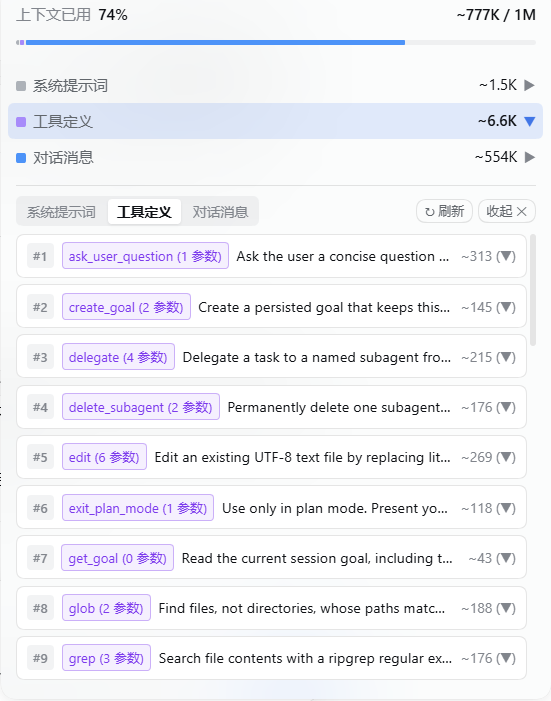
点击底部状态栏的上下文百分比环,即可直观查看系统提示词、工具定义与对话消息的 Token 占用明细,支持按分类筛选(全部按序、压缩/系统注入、我说的、AI 回复/推理、工具结果)并逐条勾选或展开查看详情。 - 文档与划词右键「询问 AI」
在文件树、文档预览区或选中任意文本时右键即可一键引用并填入输入框,配合上下文选择器高效提问。
界面预览
1. 上下文选择面板(胶囊视图 & 列表视图 + 右侧悬停细项预览)
在输入框上方打开**「上下文选择」面板,可自由切换胶囊或列表**视图;悬停任意轮次即可在右侧预览该轮对话详情,并单独控制是否携带你的提问、过程工具调用或 AI 回复:
2. 上下文透视面板(对话消息逐条开关 & 工具定义明细)
点击底部状态栏百分比即可展开上下文构成明细,按类别筛选并逐条勾选需要发送给下一轮对话的消息或工具结果,同时可查看所有注册工具的参数与 Token 占比:
| 对话消息明细与逐条勾选 | 工具定义与 Token 占用明细 |
|---|---|
 |  |
安装方式
方式一:通过 DSH 插件管理器安装(推荐)
- 打开 DeepSeek Harness 设置 -> Plugins(插件)。
- 点击上传并选择发布包
dsh-context-selector-2.4.0.tgz。 - 启用插件后刷新页面即可使用。
方式二:手动安装到 DSH Profile
- 将本仓库解压或克隆到:
- Windows:
%USERPROFILE%\.dsh\profiles\web\vendor\dsh-context-selector - macOS / Linux:
~/.dsh/profiles/web/vendor/dsh-context-selector
- Windows:
- 在
~/.dsh/profiles/web/cordis.patch.yml中添加:- insert: - id: context-selector name: 'dsh-context-selector' config: {} - 重启 DeepSeek Harness。
斜杠命令(可选)
除了图形界面外,你也可以在聊天框中使用 /ctx 命令快速控制上下文:
| 命令 | 说明 |
|---|---|
/ctx 或 /ctx list | 查看当前会话各轮次的携带状态与 Token 统计 |
/ctx all / /ctx none | 全选所有历史轮次 / 清空所有历史轮次 |
/ctx last <N> | 仅携带最近 N 轮对话(如 /ctx last 3) |
/ctx from <M> | 从第 M 轮开始截断(第 M 轮之前的历史全部不发送) |
/ctx toggle <N> | 切换第 N 轮的携带状态 |
/ctx tools [N] | 移除早期轮次的工具调用输出,仅保留最近 N 轮的工具结果 |
/ctx once [on|off] | 开启/关闭下一轮「仅本轮有效(阅后即焚)」模式 |
开源协议
Comments
Loading…
Similar plugins
by luyiheng1111
Session-scoped context window selector for the DeepSeek Harness model picker
★ 0
MIT
JavaScript
Oct 19, 2026
dsh plugin --profile web add dsh-context-window-pickerby kpl0111
Token-efficient tool-result pruning for DeepSeek Harness: compact previews, targeted recall, and long-session context control.
★ 0
↓ 24/wk
MIT
JavaScript
Aug 16, 2026
dsh plugin --profile web add dsh-context-guardby aerince
Model-authored context pruning for DeepSeek Harness through the official compaction API.
★ 2
MIT
JavaScript
Aug 15, 2026
dsh plugin --profile web add dsh-active-context-pruningby baihejiangnan
更好的右键:DeepSeek Harness 应用封装端的完整原生风格上下文菜单
★ 20
MIT
JavaScript
Sep 29, 2026
dsh plugin --profile web add @baihejiangnan/dsh-session-context-menuby AllShadowAnan
User-set absolute context ceiling for DeepSeek Harness: auto-compacts a session once it reaches a configured token limit. External plugin with a dedicated Settings page.
★ 2
MIT
JavaScript
Oct 8, 2026
dsh plugin --profile web add dsh-context-compressorby GooDAnDReaDY
AST-based context compression, test log filtering, and token budget guard for DeepSeek Harness: strips redundant syntax, prunes noisy log lines, and enforces a token ceiling so the context window neve
★ 4
↓ 1.3k/wk
MIT
JavaScript
Oct 23, 2026
dsh plugin --profile web add @goodandready/dsh-context-lens