

dsh-cite-lens
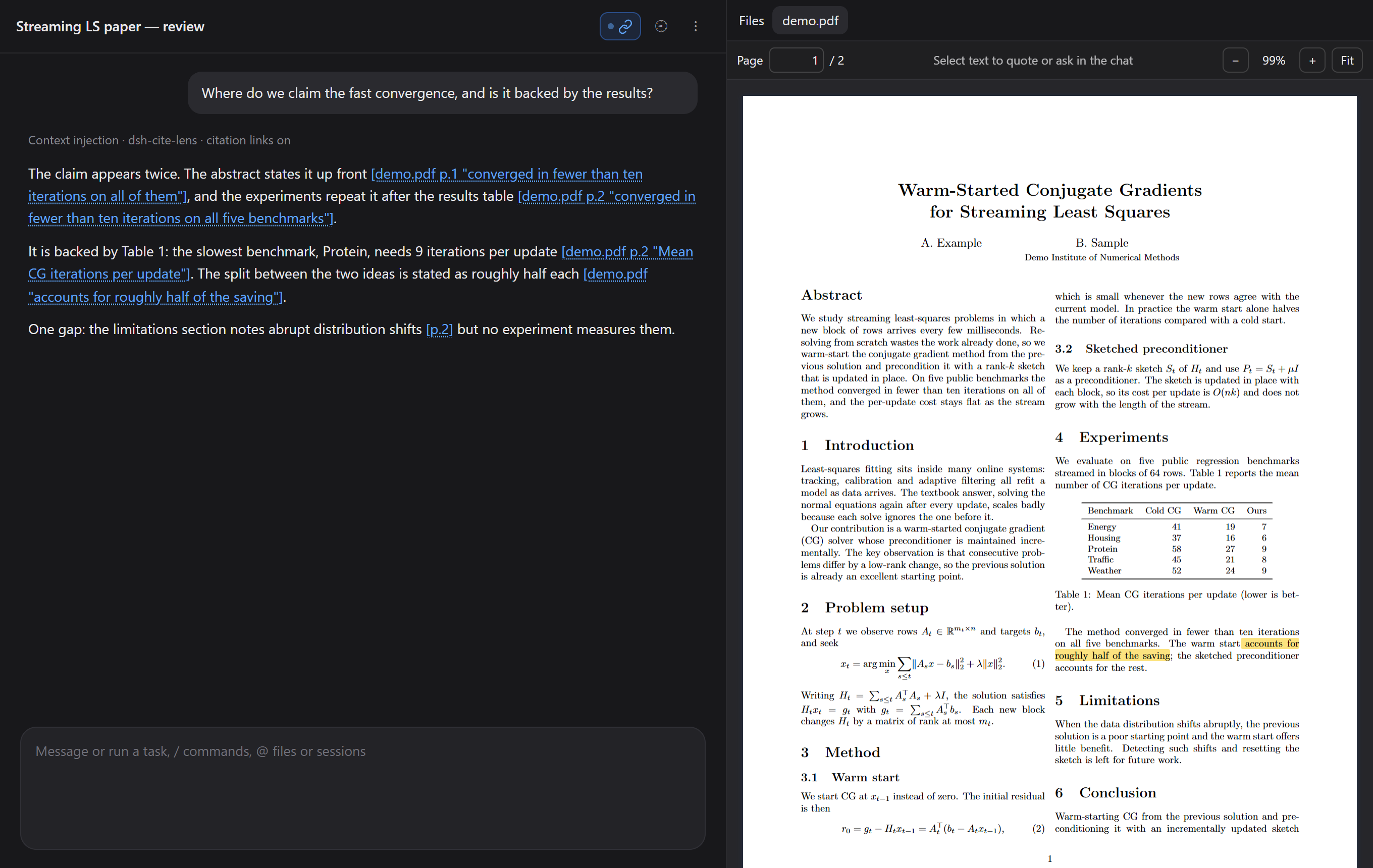
DiscoveredCite Lens for dsh: select text in a PDF in the Files tab to quote or ask about it in the current chat, and turn the model's [main.pdf p.7 "exact words"] citations into links that open the PDF and high

dsh-cite-lens
English | 中文






A DeepSeek Harness plugin for working on papers with the model, in the PDF you already have open.
- Select text in a PDF and ask about it. PDFs in the Files tab open with selectable text. Select a passage and send it to the chat you are in — quoted, tagged with the file and page.
- Click the model's citations. When the model cites
[main.pdf p.7 "exact words"], the citation is a link: clicking it opens the PDF, scrolls to those words, and highlights them with a fading marker. /cite-linksmakes a chat back every claim about the paper with such a link — handy for reviewing a draft, or checking what the model changed after editing your LaTeX.
Everything stays on your machine. The PDF is rendered in your browser with PDF.js; nothing is uploaded, and the plugin itself never sends a message — it only fills in your message box.
Install
dsh plugin --profile web add dsh-cite-lens
Restart dsh web. PDFs you open from the Files tab now use Cite Lens. To go back to dsh's built-in PDF view, remove the plugin.
What you get
Select a passage, ask about it
Select text and a toolbar appears over it:
| Button | Puts in your message box |
|---|---|
| Quote | the passage, tagged main.pdf · p.17, for you to write under |
| Ask | the passage, with the cursor waiting after Question: |
| Explain | the passage and a request to explain it |
| Check this | the passage and a request to check its claims against the paper |
Each is added under whatever you have already typed, in the chat you are in. Nothing is sent until you send it.
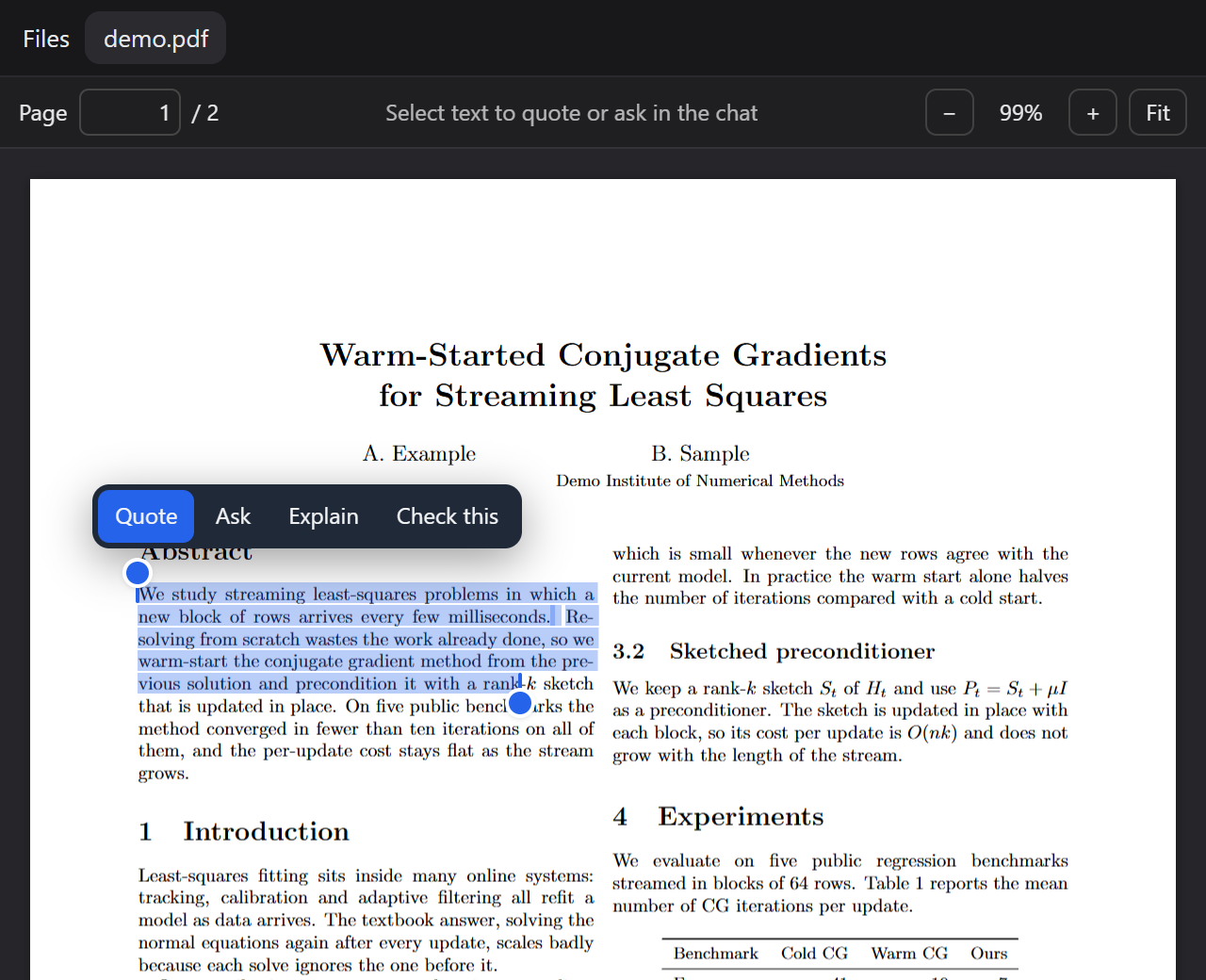
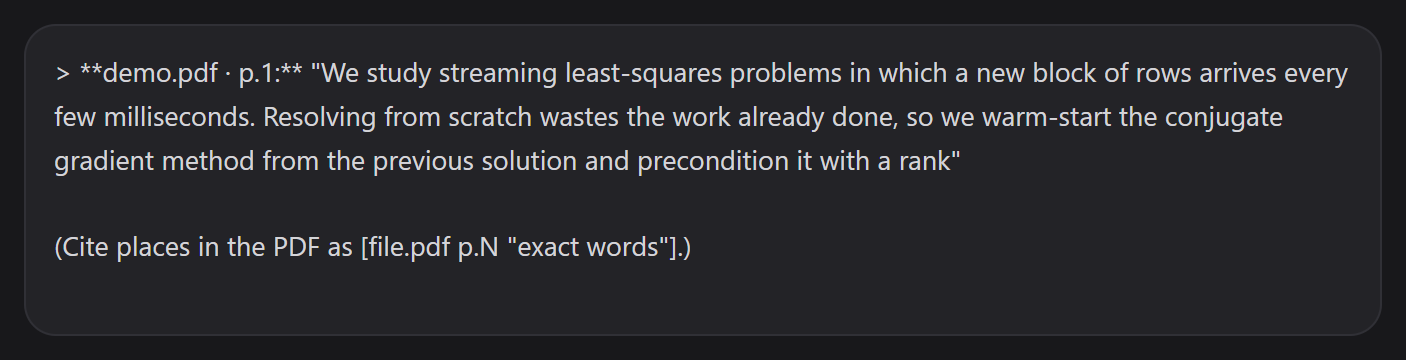
Selection behaves like an editor's, not like a raw PDF text layer:
- it does not jump to the whole page when the cursor crosses the gap between lines or the margin;
- handles at both ends grow or shrink the selection, and snap to the nearest text;
- Shift+click extends or shrinks it; Shift+←/→ moves the end by a character, Shift+Alt+←/→ by a word.
Citations that open the PDF
The plugin adds a short note to each chat's system prompt describing the citation format, so the model can point at places like this:
| The model writes | Clicking it |
|---|---|
[p.7] | the PDF you are reading, page 7 |
[main.pdf p.7] | opens main.pdf (or switches to it) at page 7 |
[main.pdf "exact words"] | opens it, finds the words anywhere in the PDF, highlights them |
[main.pdf p.7 "exact words"] | the same, searching page 7 first |
The page is optional on purpose: after the model edits your LaTeX it rarely knows which page a sentence lands on, so it quotes the words and Cite Lens finds them. Matching is forgiving — line breaks, words hyphenated across lines, ligatures, curly quotes and case are all ignored — and works on pages that have not been drawn yet. If the words are not in the PDF (it has not been rebuilt since the edit, say), the link tells you so instead of jumping somewhere wrong.
Paths are relative to the chat's workspace ([build/main.pdf "…"]). A PDF that is not open is opened through dsh's Files tab. A bare [p.7] with nothing open reopens the PDF you used last.
/cite-links
/cite-links          toggle for this chat
/cite-links on|off   set it
/cite-links status   ask
While it is on, every message you send goes in with a short reminder asking the model to back each statement about the paper with a link — in prose, lists and tables alike. A link icon in the chat's top bar shows the state (with a dot when on) and toggles it with a click. The setting is per chat and survives a restart.

Requirements
- dsh
0.1.5-rc.2or newer, web profile (dsh web). Developed against the 0.1.5 line and checked on0.2.1-rc.3: the PDF preview registers as an external-band renderer withbinaryExtensions: ['pdf'], which is the contract both lines share. - Node.js 22 or newer
- A current browser. Citation links are underlined with the CSS Custom Highlight API; in a browser without it they still work when clicked, they just are not underlined. Tested in Chrome.
How it works
| Piece | dsh seam |
|---|---|
| The PDF view | ctx.documentPreviews.register({ extensions: ['pdf'], priority: 'extension' }) and the keyed sidebar.right.tab.document slot — the external band ranks above the built-in view |
| Writing to your message box | the current chat (ctx.sessions.list) → its scope (ctx.sessions.scope) → ctx.conversation.input.for(scope): the draft is read and appended to, never replaced, and never touched while a message is sending |
| Opening a cited PDF | ctx.sidebarRight.openResource(address) |
| Citation links | text ranges painted with ::highlight() and hit-tested on click — the chat's DOM is never edited, so streaming replies are unaffected |
| The citation guide | a section in each chat's system prompt (agent/session-start) |
/cite-links | a dsh command; while on, a reminder joins the step that carries your new prompt (agent/pre-step), once per prompt |
Rendering stays smooth on long papers: pages are drawn one at a time nearest to where you are reading, first at 1× and then sharp once scrolling stops; far pages are freed; the text layer is built in idle time.
Development
npm install      # PDF.js and esbuild (dev only — there are no runtime dependencies)
npm run build    # src/client → lib/client.js
npm test         # quoting, chat insertion, citation parsing, /cite-links, PDF.js text
lib/client.js is generated: edit src/client/ and rebuild. It bundles PDF.js (Apache-2.0) and its worker, so the plugin needs no static file routes.
Licence
MIT — see LICENSE, which also carries the notice for the bundled PDF.js.
Comments
Loading…
Similar plugins
by feifiefei
DSH right-sidebar file helper: annotate a selection in the document preview (text lines / Excel ranges / Word-PDF pages) or right-click a file, then send the quote plus your note into the current chat
★ 0
MIT
JavaScript
Oct 19, 2026
dsh plugin --profile web add dsh-file-to-chatby panando
DSH plugin: turn any selected reply snippet into an atomic reference chip — delete as one unit, click to jump back to the source, structured serialization on send.
★ 1
MIT
JavaScript
Oct 4, 2026
dsh plugin --profile web add @panando/dsh-quote-sidechatby GGboya
DeepSeek Harness (dsh) 插件:论文伴读工作台 —— PDF 转录 / 检索 / 流式问答 + 内置阅读器页面。
★ 29
↓ 1.6k/wk
NOASSERTION
TypeScript
Oct 22, 2026
dsh plugin --profile web add @ggboy123/dsh-paper-readerby ylw-ux
Pins passages selected in a conversation into a per-conversation right-sidebar panel, marks them in the transcript, jumps back to the source passage on click, and quotes a pinned passage into the comp
★ 4
↓ 59/wk
MIT
JavaScript
Oct 24, 2026
dsh plugin --profile web add dsh-pinsby liuhaolong16
Quote reply layer for DeepSeek Harness: quote a passage into an editable tray above the composer; it rides into the next turn as model context (never into the message body) and shows as an expandable row under that turn. 引用回复层:选中一段进引用行,随下一回合作为上下文注入模型(不进消息正文),回合尾部显示可展开的引用(N)。
★ 1
MIT
JavaScript
Oct 16, 2026
dsh plugin --profile web add dsh-quote-replyby tr1v3r
Quote selected conversation text into the Web composer as native reference chips for focused follow-up turns.
★ 7
↓ 234/wk
MIT
JavaScript
Sep 28, 2026
dsh plugin --profile web add dsh-quote-followup