
dsh-workspace-visibility
IdentifiedHide selected workspaces — and the sessions they own — from the DSH sidebar, with a Show hidden workspaces switch in the view options. Display-only: no data is modified.
@adamcjm/dsh-workspace-visibility


English | 中文
A DeepSeek Harness plugin that lets you hide chosen workspaces from the sidebar — and bring them back whenever you want — without touching any workspace, session or archive data.
Two entries, exactly where you already look:
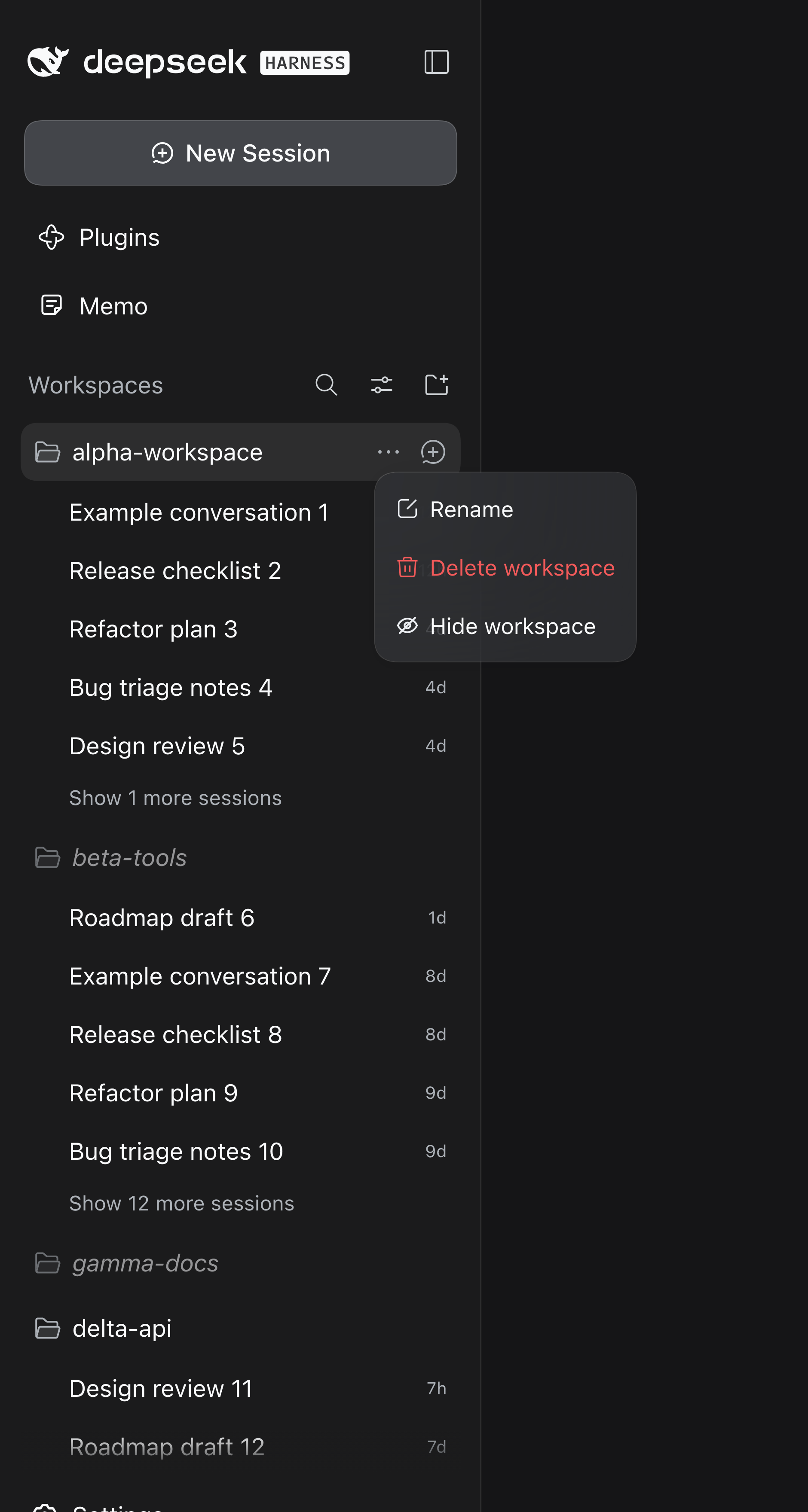
- Workspace row →“…” menu → Hide workspace (it reads Unhide workspace once the hidden rows are on screen again).
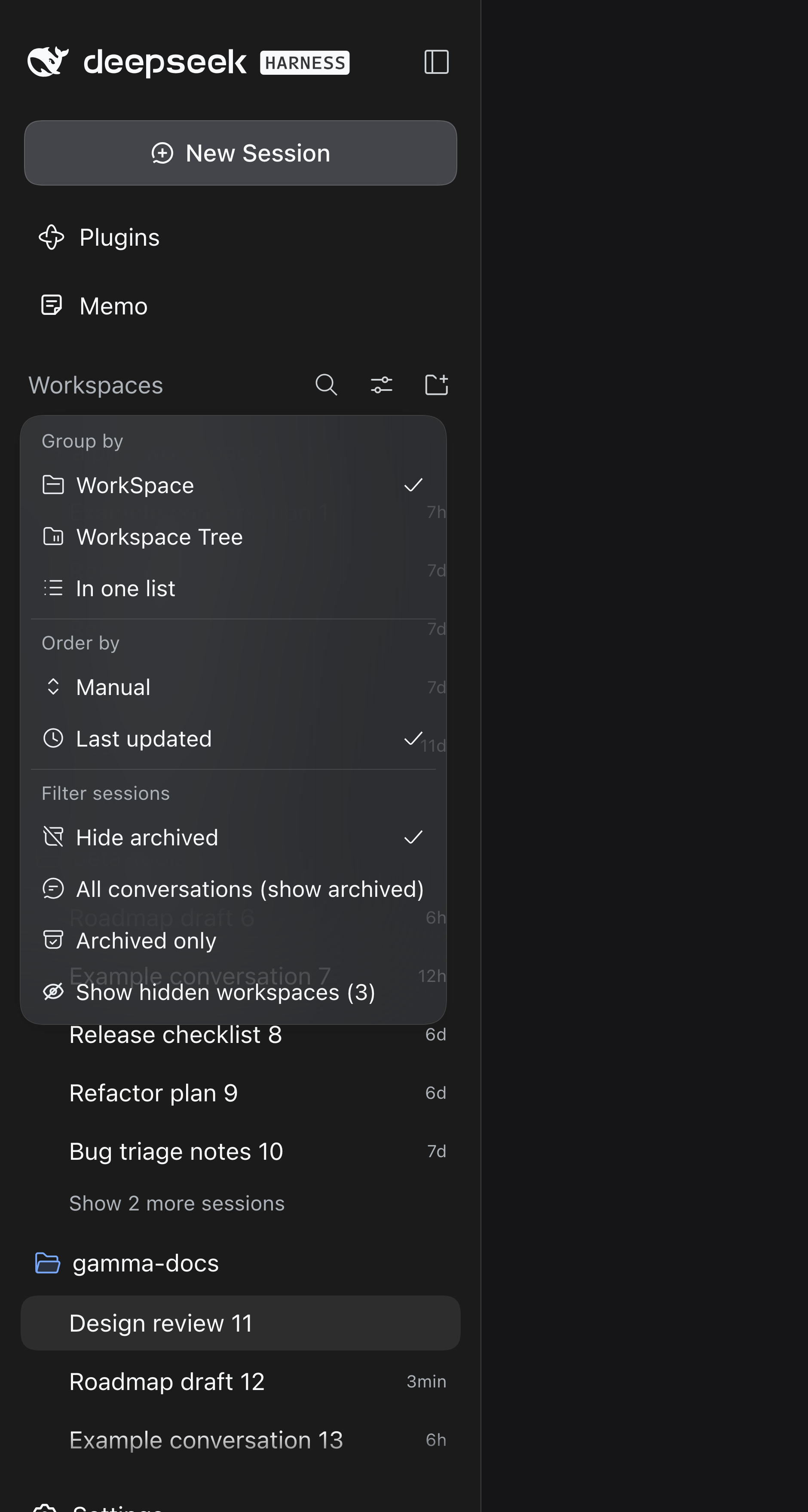
- Sidebar → View options → Show hidden workspaces (N) — a persisted switch that reveals every hidden workspace so you can restore it; the label carries the current hidden count.
Display-only by design:
- no archive, unarchive, rename, move, pin or delete calls;
- no changes to workspace records, session logs or the archive set;
- the only state written is one small Host file
(
$DSH_HOME/storages/workspace-visibility.json).
Screenshots
| Workspace “…” menu | View options |
|---|---|
 |  |
After hiding, the workspace row and all of its sessions disappear:
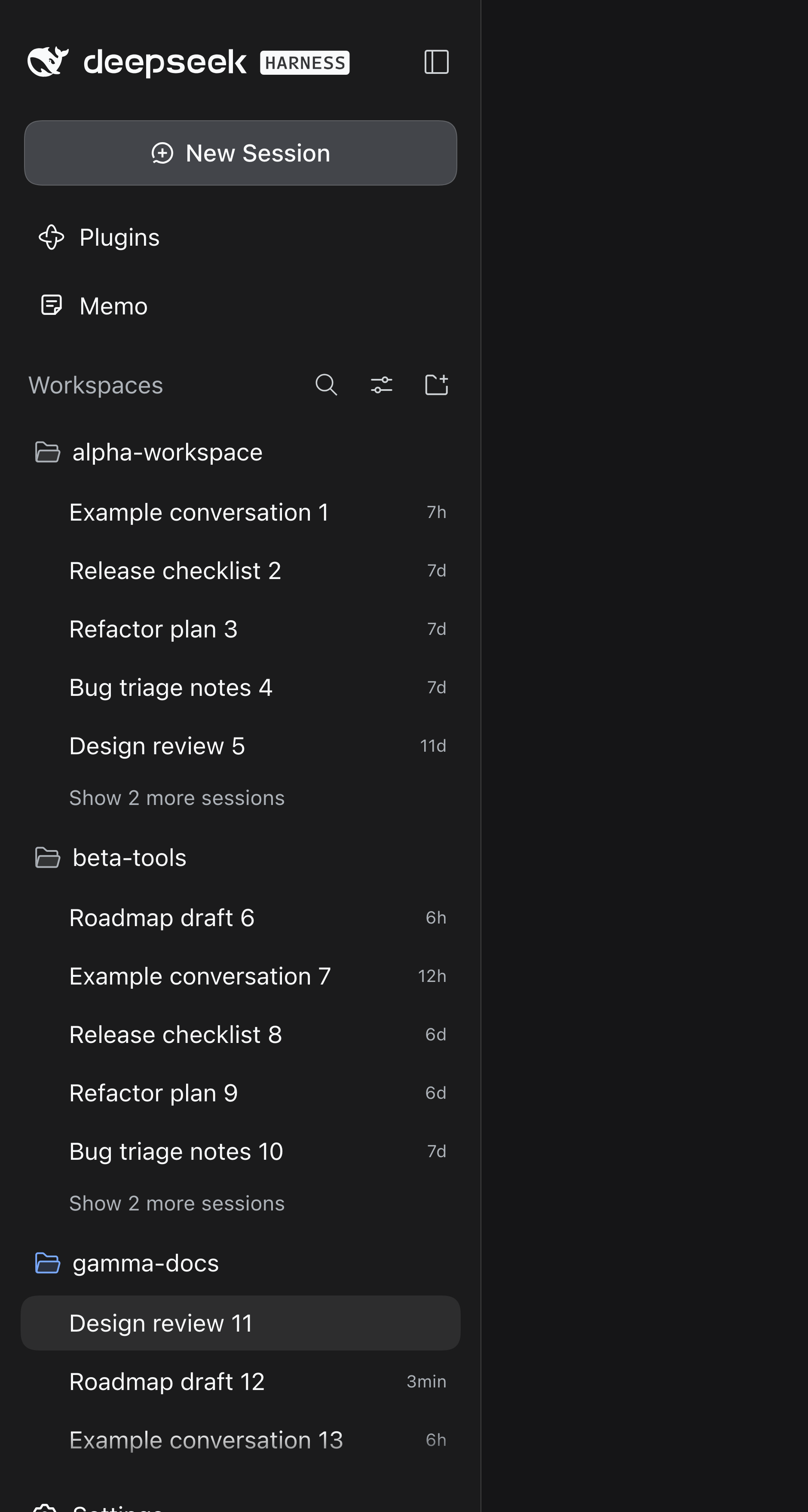
Screenshots use demo workspace names; this English edition shows the English UI — the 中文 section below shows the same flow in Chinese.
Persistence and multi-client sync
Hidden ids and the Show hidden workspaces switch are Host state, not browser state:
- They live in
$DSH_HOME/storages/workspace-visibility.json, written atomically (temp file + rename) by the Host half of this plugin. - The browser keeps no copy — this plugin reads and writes no
localStorage(0.1.x users get their old key removed exactly once; the old ids are discarded, not migrated). - At boot the browser fetches the state once, then follows an SSE stream
(
/workspace-visibility/stream). A change made in one client is pushed to every other connected client — Desktop, other tabs, other browsers — without a refresh. This is the same push model as the shipped workspace-order stream (workspace/follow). - Local mutations travel as increments (
POST /workspace-visibility/mutate), so two clients hiding different workspaces cannot overwrite each other. - Consequences: the state survives Desktop restarts and random ports, every client sharing
the same Host sees the same hidden set, and a client connected to a different Host (or a
different
DSH_HOME) has its own state. - Across DSH surfaces (Desktop ↔ web). DSH Desktop and a
dsh webinstance are two separate Host processes sharing one$DSH_HOME. Each process watches the shared state file and broadcasts changes written by the other one to its own clients (< 1 s), and mutations take a cross-process lock and read-modify-write the file — so hiding a workspace in Desktop shows up in the open web UI and vice versa, without either side losing the other's change.
Profiles and Hosts
The state path is derived from $DSH_HOME, not from the profile, so the desktop
profile and the web profile share one state file when they run with the same
DSH_HOME. Concretely:
- Same
DSH_HOME(the default~/.dshon one machine) — any mix of DSH Desktop,dsh web, desktop profile and web profile shares one hidden set. Updates land in under a second: a push over SSE inside one Host, and the cross-process file watch between the Desktop Host and thedsh webHost. - Different
DSH_HOME(another machine, a customDSH_HOME, a remote Host) — each gets its own state file and its own hidden set. There is no cross-machine sync: the plugin stores the state locally, it does not call any network service. - A profile without this plugin (for example a TUI-only profile) is unaffected: it shows every workspace. The state file is profile-independent, so installing the plugin there later picks up the same hidden set without migration.
- Remote browser access to a running Host shares that Host's state, because the
browser half talks to the Host it is connected to; it is the Host (and its
DSH_HOME) that decides the state.
Robustness
The state is treated as untrusted input; the plugin never takes the Host down:
- a missing, unreadable, corrupt or absurdly large (> 1 MiB) state file is treated as an empty state and logged — never thrown;
- non-string entries are dropped; the id list is de-duplicated and capped;
- hidden ids whose workspace was deleted are pruned automatically (on load, on every read and once a minute), and a hide request for an unknown workspace is ignored — a deleted workspace never leaves a stale record behind;
- if the workspace registry is unavailable, the state is kept as-is instead of pruned;
- a failed write (read-only directory, disk full) keeps the in-memory state, logs a warning and still answers the request;
- on the browser side a failed sync is queued and retried, the SSE stream reconnects by itself, and malformed frames are ignored.
Upgrade from 0.1.x
The old localStorage key (dsh-workspace-visibility.state.v1) is removed exactly once,
driven by the Host flag legacyCleanupDone. There is no migration: workspaces hidden with
0.1.x are visible again after upgrading.
Install
Requires DeepSeek Harness 0.2.0-rc.2 or newer (tested on 0.2.0-rc.2 and 0.2.1-rc.2).
From npm (recommended)
dsh plugin --profile <profile> add @adamcjm/dsh-workspace-visibility
dsh plugin add records the dependency and the bundle entry, installs it into the profile,
and finishes in two steps:
- Restart the DSH app — the Host plugin tree is assembled at process start.
- Hard-refresh the page (Cmd/Ctrl+Shift+R) so the renderer loads the new client bundle.
Equivalent manual setup — ~/.dsh/profiles/<profile>/package.json:
{
  "dependencies": {
    "@adamcjm/dsh-workspace-visibility": "^0.1.0"
  },
  "dsh": {
    "profile": {
      "bundles": ["…", "@adamcjm/dsh-workspace-visibility"]
    }
  }
}
then cd ~/.dsh/profiles/<profile> && pnpm install, restart DSH, refresh.
If the profile enforces pnpm's minimumReleaseAge, a just-published version can be
refused; add the package name to minimumReleaseAgeExclude in that profile's
pnpm-workspace.yaml (recent pnpm versions do this automatically).
From a GitHub release (pinned tag)
dsh plugin --profile <profile> add https://codeload.github.com/adamcjm/dsh-workspace-visibility/tar.gz/refs/tags/v0.1.0
Pin a tag or commit you tested; do not follow main for daily use.
From a local checkout (development, link:)
Point the profile at the checkout so edits apply on the next restart without an install step:
// ~/.dsh/profiles/<profile>/package.json
{
  "dependencies": {
    "@adamcjm/dsh-workspace-visibility": "link:/absolute/path/to/dsh-workspace-visibility"
  },
  "dsh": {
    "profile": {
      "bundles": ["…", "@adamcjm/dsh-workspace-visibility"]
    }
  }
}
cd ~/.dsh/profiles/<profile> && pnpm install
The link: protocol installs a symlink, so later edits to lib/client.js only need a
page refresh after the Host restart — no reinstall.
Use
- Hover a Workspace row and open its “…” menu → Hide workspace. The workspace row disappears together with the sessions it owns.
- Open View options (the sliders icon in the “WorkSpaces” header) → Show hidden workspaces. Hidden rows come back, dimmed and italicised.
- Open a revealed row's “…” menu → Unhide workspace to restore it permanently.
While Show hidden workspaces is on, hiding another workspace still hides it immediately (the switch turns back off), so the action always shows its effect.
The switch state and hidden ids live in localStorage under
dsh-workspace-visibility.state.v1, next to the shipped view options. Clearing that key
restores everything.
Why it is built this way
The shipped sidebar (@deepseek-ai/dsh-client-ui-workspace) exposes slots for Session
row menus and buttons, but the Workspace row's “…” menu and the View options menu are
hardcoded arrays with no slot. Both entries are therefore appended to those menus as DOM,
cloning the shipped item's own classes, so they follow the shipped styling.
Hiding does not touch the DOM rows: the plugin wraps the workspaces.list client model
(getSnapshot / subscribe, the same lazy seam the shipped sidebar reads) and projects a
filtered snapshot. The sidebar, its search results and the Hero workspace picker all lose
the workspace in one place, and hiding keeps working even if the menu DOM changes.
The one pitfall solved by the projection: the shipped grouping trails every session not
owned by a visible workspace into an “Ungrouped” bucket. Removing a workspace from
items alone would spill all of its sessions there. The projection instead marks those
sessions as view-only archived ids, so the shipped archive filter keeps them out — with no
Host archive write and no data loss.
Scope and known limits
- Host state, shared by every client on that Host. Hidden ids and the switch live in
$DSH_HOME/storages/workspace-visibility.json; every browser, tab and DSH surface connected to the same Host shows the same set, and it survives Desktop restarts and random ports. Clearing browser site data does not forget it. A client connected to a different Host (or a differentDSH_HOME) has its own state. - The menu entries are DOM-appended. A future sidebar restyle can move the menus; the hiding itself is unaffected (it is projection-based). If the entries go missing after a DSH upgrade, the hidden set is still in the Host state file — upgrading or re-adding the plugin brings the entries back.
- Collapsed groups lose their expansion state for a hidden workspace (the shipped view store prunes records of workspaces it no longer sees). Restoring the workspace shows its group collapsed again.
- A hidden workspace may be the one holding the open Session. The sidebar row and its sessions disappear; the conversation in the main panel keeps working. Use the switch to bring the row back.
- Archived-view interaction. With the shipped All conversations (show archived) filter selected, sessions of a hidden workspace are shown by the product as archived rows under “Ungrouped” (the projection marks them view-only archived). The default Hide archived view is unaffected.
- Not part of the workspace registry. The state file is owned by this plugin; a TUI session or another DSH installation without this plugin simply sees every workspace.
Verify
Offline contract self-check (no DSH process needed):
npm test
npm test runs two zero-dependency suites. The browser suite evaluates lib/client.js in
a vm sandbox: loader contract, projection (including the no-Ungrouped-spill rule), the
in-memory store, bootstrap/SSE/increments, the model wrapper and a full apply() run. The
Host suite drives lib/index.js against a fake web server: atomic writes, increments, SSE
broadcast, restart reload and corrupt-file tolerance.
In a live page, after restarting DSH:
// the plugin is loaded
document.getElementById('dsh-workspace-visibility/style') !== null
// inside the page console: the state is served by the Host, not localStorage
await (await fetch('/workspace-visibility/state')).json()
On the Host shell:
cat "${DSH_HOME:-$HOME/.dsh}/storages/workspace-visibility.json"
Uninstall
- Before uninstalling, turn Show hidden workspaces on and unhide what you hid (or the rows stay hidden only until the plugin is removed — the ids are inert afterwards).
- Remove the package from the profile's
dependenciesanddsh.profile.bundles, runpnpm install, then restart DSH. - Optionally delete the Host state file
$DSH_HOME/storages/workspace-visibility.json— turn Show hidden workspaces on and unhide first if you want to keep the state.
Layout
lib/client.js      browser half: projection, menus, fallback entry (no build step)
lib/index.js       host half: mount-only placeholder
cordis.patch.yml   bundle layer inserting the one plugin row
locale/*.json      plugin-manager title/description
icon.svg           plugin icon
test/verify.mjs    zero-dependency self-check (`npm test`)
License
MIT © adamcjm
中文
一个 DeepSeek Harness 插件:把选中的工作区从侧边栏隐藏, 需要时再放出来。不归档、不删除、不重命名、不改写任何工作区或会话数据。
两个入口都在你原本就要找的位置:
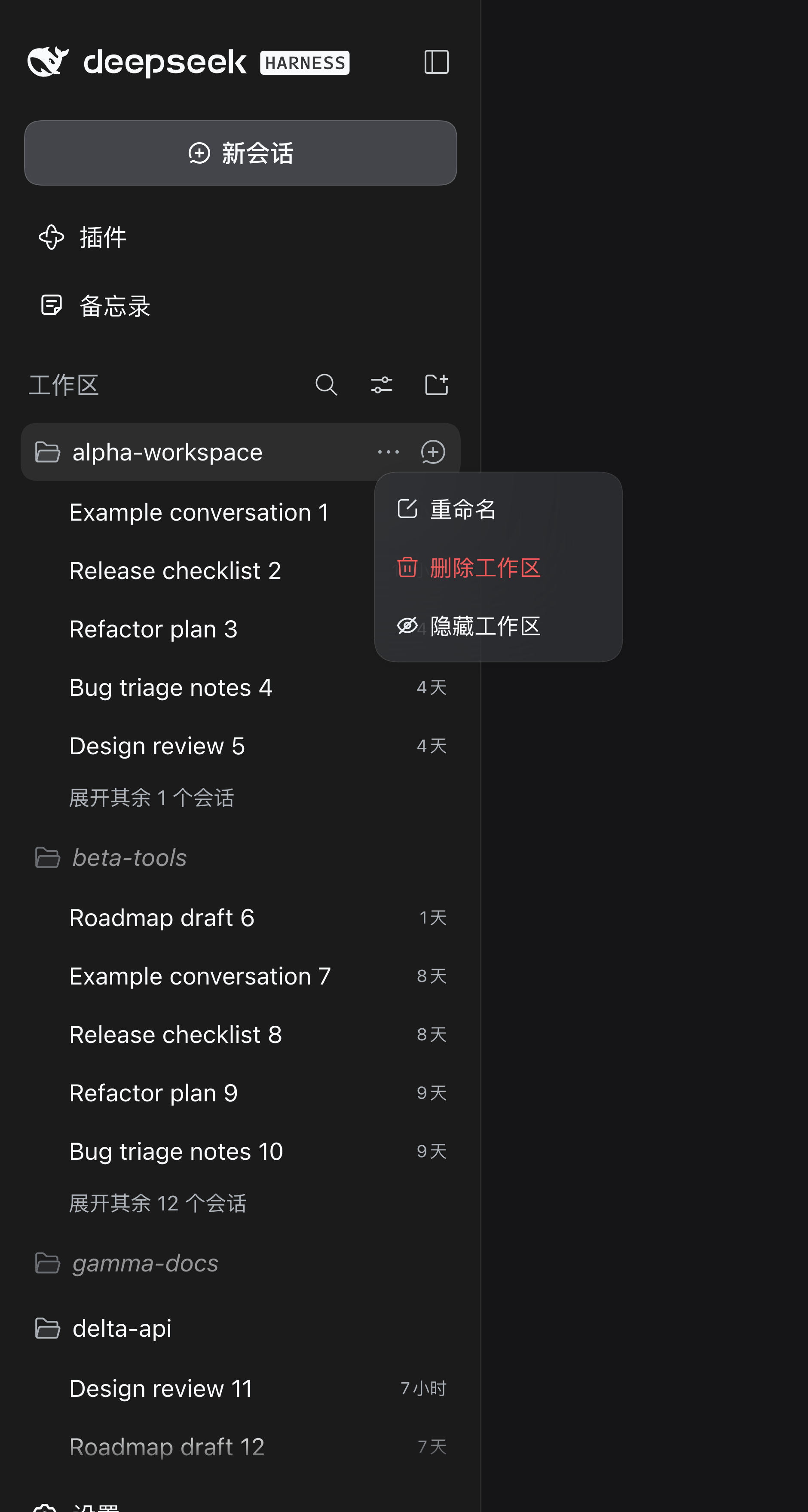
- 工作区行 →「…」菜单 → 隐藏工作区(在「显示隐藏工作区」打开时,这一项变为 取消隐藏工作区)。
- 侧栏「WorkSpaces」区头 → 视图选项 → 显示隐藏工作区 (N) —— 一个持久化开关,打开后隐藏行 重新出现,可逐行恢复;括号里是当前隐藏的工作区数量。
设计上只做显示过滤:
- 不调用归档 / 取消归档 / 重命名 / 移动 / pin / 删除;
- 不改工作区记录、会话日志与归档集合;
- 唯一写入是 Host 上的一个小文件(
$DSH_HOME/storages/workspace-visibility.json)。
截图
| 工作区行「…」菜单 | 视图选项菜单 |
|---|---|
 | 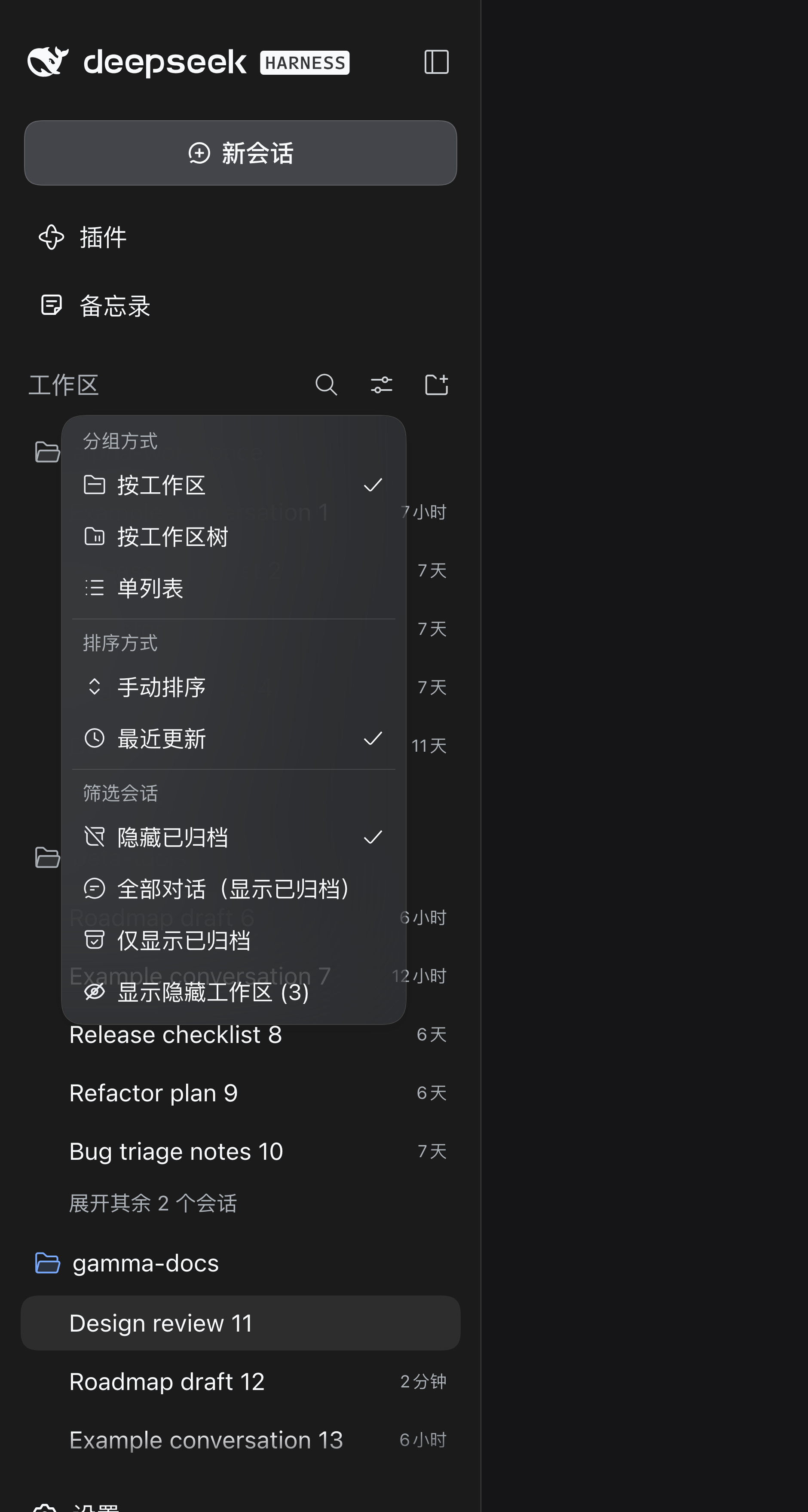 |
隐藏后,该工作区行连同它名下的会话一起消失:
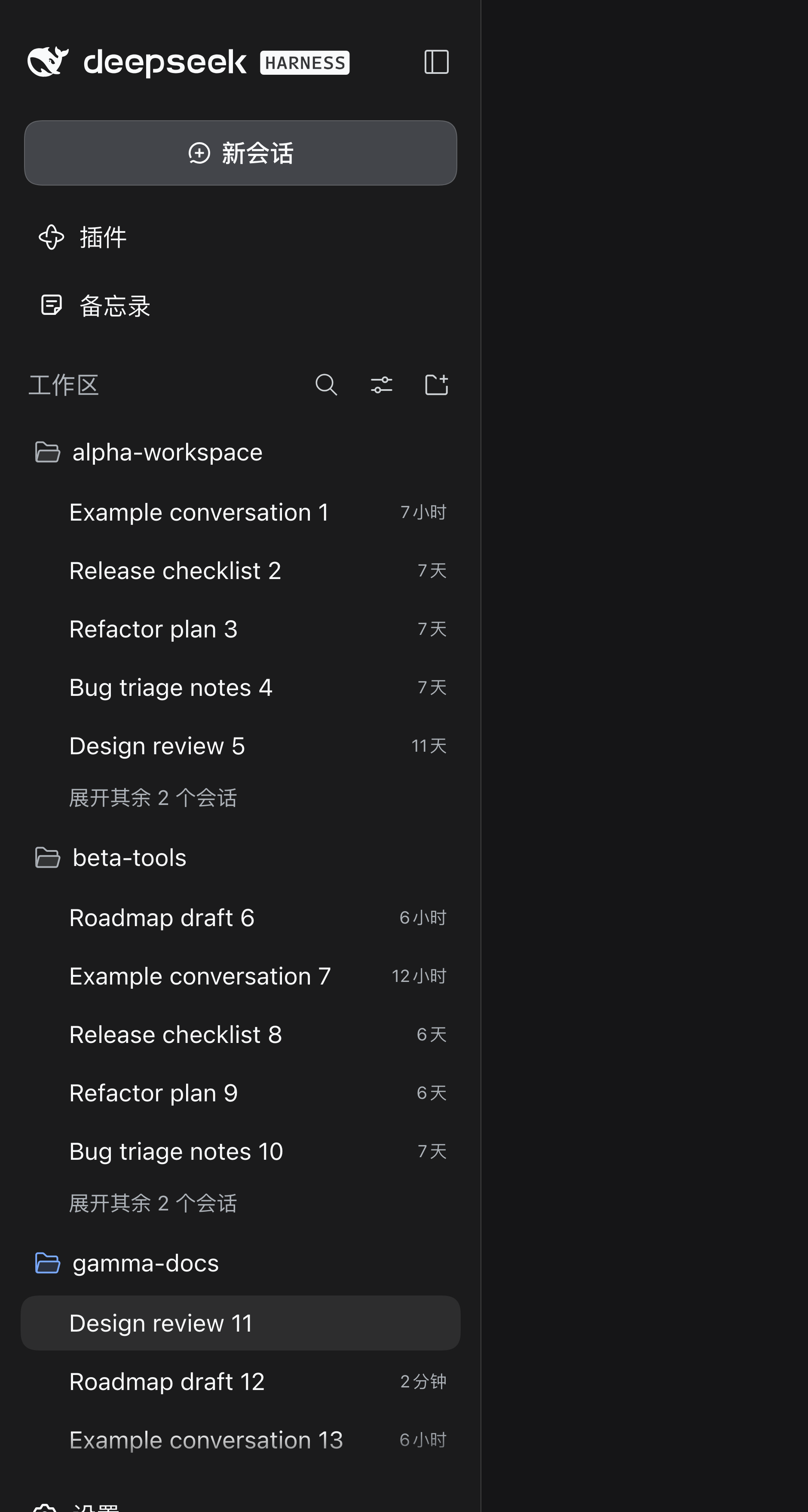
截图使用演示用的工作区名称;本节使用中文界面(英文节为同一流程的英文界面截图)。
持久化与多客户端同步
隐藏集合与「显示隐藏工作区」开关是 Host 状态,不是浏览器状态:
- 它们存在
$DSH_HOME/storages/workspace-visibility.json,由本插件的 Host 半侧原子写入 (临时文件 + rename)。 - 浏览器不保留副本——本插件不读写
localStorage(0.1.x 用户的旧键会被删除一次, 旧数据直接丢弃、不做迁移)。 - 浏览器启动时拉取一次状态,随后跟随 SSE 流(
/workspace-visibility/stream): 任一客户端里的变更会被推送给所有已连接客户端——Desktop、其它标签页、其它浏览器—— 无需刷新。这与官方工作区排序的workspace/follow推送模型一致。 - 本地变更以增量方式发送(
POST /workspace-visibility/mutate),两个客户端隐藏不同 工作区时不会互相覆盖。 - 结果:状态能跨 Desktop 重启与随机端口保留;连接同一个 Host 的所有客户端看到同一份
隐藏集合;连接不同 Host(或不同
DSH_HOME)的客户端各有自己的状态。 - 跨 DSH 界面(Desktop ↔ web)。 DSH Desktop 与
dsh web是两个独立的 Host 进程, 但共享同一个$DSH_HOME。两个进程都会监听共享状态文件:一方写入后,另一方会在 1 秒内 读到并广播给自己已连接的客户端;同时写入走跨进程锁 + read-modify-write,所以 Desktop 里隐藏一个工作区,打开的 web 界面会跟着变,反之亦然,双方都不会覆盖对方的改动。
Profile 与 Host
状态路径由 $DSH_HOME 决定,与 profile 无关——所以当 desktop profile 与 web
profile 使用同一个 DSH_HOME 时,它们共享同一份状态文件。具体来说:
- 同一个
DSH_HOME(同一台机器上的默认~/.dsh)——DSH Desktop、dsh web、 desktop profile、web profile 任意组合都共享一份隐藏集合;更新在 1 秒内到达: 同一个 Host 内走 SSE 推送,Desktop Host 与dsh webHost 之间走跨进程文件监听。 - 不同的
DSH_HOME(另一台机器、自定义DSH_HOME、远程 Host)——各自拥有独立的 状态文件与隐藏集合。没有跨机器同步:插件只把状态存在本地,不调用任何网络服务。 - 没装本插件的 profile(例如只有 TUI 的 profile)不受影响,照旧显示所有工作区。 状态文件与 profile 无关,之后在那边装上插件会直接读到同一份隐藏集合,无需迁移。
- 远程浏览器访问正在运行的 Host 时,共享的是那个 Host 的状态——浏览器半侧只跟
它连接的 Host 通信,状态由 Host(及其
DSH_HOME)决定。
容错
状态按不可信输入处理,插件不会把 Host 弄崩:
- 状态文件缺失、不可读、损坏或异常过大(> 1 MiB)时按空状态处理并记录日志,不抛错;
- 非字符串条目直接丢弃;id 列表去重并有上限;
- 工作区被删除后,它对应的隐藏记录会被自动清理(加载时、每次读取时、以及每分钟一次), 针对未知工作区的隐藏请求会被忽略——已删除的工作区不会留下失效记录;
- 工作区 registry 不可用时保留原状态、不做清理,也不报错;
- 写入失败(目录只读、磁盘满)时保留内存状态、记录警告,请求仍然正常返回;
- 浏览器侧同步失败会排队重试,SSE 流自动重连,解析失败的帧直接忽略。
从 0.1.x 升级
旧 localStorage 键(dsh-workspace-visibility.state.v1)由 Host 的 legacyCleanupDone
标记驱动、只删除一次。不做迁移:0.1.x 里隐藏的工作区在升级后会重新显示。
安装
要求 DeepSeek Harness 0.2.0-rc.2 或更新版本(已在 0.2.0-rc.2 与 0.2.1-rc.2 验证)。
从 npm(推荐)
dsh plugin --profile <profile> add @adamcjm/dsh-workspace-visibility
dsh plugin add 会把依赖与 bundle 条目一起写进 profile 并完成安装,然后:
- 重启 DSH 应用 —— Host 插件树在进程启动时组装。
- 强制刷新页面(Cmd/Ctrl+Shift+R),让渲染端加载新的 client bundle。
等价的纯手动配置 —— ~/.dsh/profiles/<profile>/package.json:
{
  "dependencies": {
    "@adamcjm/dsh-workspace-visibility": "^0.1.0"
  },
  "dsh": {
    "profile": {
      "bundles": ["…", "@adamcjm/dsh-workspace-visibility"]
    }
  }
}
然后 cd ~/.dsh/profiles/<profile> && pnpm install,重启 DSH,刷新页面。
如果该 profile 启用了 pnpm 的 minimumReleaseAge,刚发布的版本可能被拒绝;把包名加入该
profile 的 pnpm-workspace.yaml 的 minimumReleaseAgeExclude(较新的 pnpm 会自动处理)。
从 GitHub Release 安装(钉住 tag)
dsh plugin --profile <profile> add https://codeload.github.com/adamcjm/dsh-workspace-visibility/tar.gz/refs/tags/v0.1.0
日常使用请钉住验证过的 tag 或 commit,不要跟随 main。
本地开发(link:)
把 profile 指向本地 checkout,改完代码重启即可生效,不需要重新安装:
// ~/.dsh/profiles/<profile>/package.json
{
  "dependencies": {
    "@adamcjm/dsh-workspace-visibility": "link:/absolute/path/to/dsh-workspace-visibility"
  },
  "dsh": {
    "profile": {
      "bundles": ["…", "@adamcjm/dsh-workspace-visibility"]
    }
  }
}
cd ~/.dsh/profiles/<profile> && pnpm install
link: 安装出来的是符号链接,之后改 lib/client.js 只需重启 Host + 刷新页面,不用重装。
使用
- 悬停任意工作区行,打开「…」菜单 → 隐藏工作区。 该工作区行连同它名下的会话一起从侧边栏消失。
- 打开「WorkSpaces」区头的 视图选项(滑块图标)→ 显示隐藏工作区。 隐藏行重新出现,带淡化 + 斜体标记。
- 打开被显示行的「…」菜单 → 取消隐藏工作区,永久恢复。
「显示隐藏工作区」打开期间再隐藏另一个工作区,会立刻隐藏它并自动关掉这个开关, 保证“隐藏”动作总是立即生效。
开关状态与隐藏集合存放在 localStorage 的 dsh-workspace-visibility.state.v1
(与官方视图选项同级别)。清掉这个键即全部恢复。
为什么这样做
官方侧边栏(@deepseek-ai/dsh-client-ui-workspace)只给会话行菜单和会话行按钮暴露了
slot;工作区行的「…」菜单和视图选项菜单都是硬编码数组,没有扩展点。因此两个入口以 DOM
方式追加进对应菜单,并克隆官方菜单项自己的 class,样式跟随官方。
隐藏本身不碰行 DOM:插件包装 workspaces.list 客户端模型(getSnapshot /
subscribe,官方侧边栏本来就是懒读这个缝),投影一份过滤后的快照。侧边栏、搜索、Hero
工作区选择器在同一处失去该工作区,菜单 DOM 变化也不影响隐藏效果。
投影里解决的一个坑:官方分组会把“不属于任何可见工作区”的会话收进 「未分组」。
如果只把工作区从 items 里删掉,它名下的会话会全部漏进未分组。投影改为把这些会话作为
仅视图层的已归档 id 合并进归档集合,官方归档过滤器自然把它们藏起来 —— 不写 Host
归档、不丢数据。
范围与已知限制
- Host 状态,同一 Host 上的所有客户端共享。 隐藏集合与开关存在
$DSH_HOME/storages/workspace-visibility.json;连接同一个 Host 的浏览器、标签页、 Desktop 与 web 界面看到同一份集合,跨 Desktop 重启与随机端口保留,清站点数据也不会丢。 连接不同 Host(或不同DSH_HOME)的客户端各有自己的状态。 - 两个菜单项是 DOM 追加的。 未来侧边栏改版可能移动菜单;隐藏本身不受影响(走数据投影)。 如升级后菜单项消失,隐藏集合仍在 Host 状态文件里,重装或升级插件后菜单即恢复。
- 隐藏工作区的展开状态会丢。 官方视图 store 会清理“看不见的工作区”的展开记录, 恢复后该组默认折叠。
- 正在使用的工作区也可以隐藏。 侧栏行与该组会话消失,主视图里正在进行的对话不受影响; 用开关把行找回来即可。
- 与归档视图的交互。 切到官方的「全部对话(显示已归档)」时,被隐藏工作区的会话会以 已归档行出现在「未分组」(投影把它们标成了视图层已归档)。默认的「隐藏已归档」视图不受影响。
- 不属于工作区注册表。 状态文件归本插件所有;未安装本插件的 TUI 会话或另一套 DSH 安装照旧看到全部工作区。
验证
离线契约自检(不需要 DSH 进程):
npm test
npm test 跑两个零依赖测试套件。浏览器套件在 vm 沙箱里加载 lib/client.js:加载器契约、
快照投影(含“不漏进未分组”)、内存 store、bootstrap/SSE/增量同步、包装与卸载、完整
apply()。Host 套件对着 fake web server 驱动 lib/index.js:原子写入、增量、SSE 广播、
重启后重新加载、损坏文件容错。
在真实页面中(重启 DSH 后):
// 插件已加载
document.getElementById('dsh-workspace-visibility/style') !== null
// 页面 console:状态由 Host 提供,不在 localStorage
await (await fetch('/workspace-visibility/state')).json()
Host 命令行:
cat "${DSH_HOME:-$HOME/.dsh}/storages/workspace-visibility.json"
卸载
- 卸载前先打开「显示隐藏工作区」把隐藏项恢复(或直接卸载——隐藏 id 会变成惰性数据)。
- 从 profile 的
dependencies与dsh.profile.bundles中移除,pnpm install,重启 DSH。 - 可选:删除 Host 状态文件
$DSH_HOME/storages/workspace-visibility.json(若想保留恢复 能力,先打开「显示隐藏工作区」逐项取消隐藏)。
目录结构
lib/client.js      浏览器半侧:投影、菜单、兜底入口(零构建)
lib/index.js       host 半侧:仅占位挂载
cordis.patch.yml   bundle 层,插入单个插件行
locale/*.json      插件管理器的标题/描述
icon.svg           插件图标
test/verify.mjs    零依赖自检(`npm test`)
许可
MIT © adamcjm
Comments
Loading…