

dsh-restart
Manifest valid新增重启按钮、自定义dsh启动、右侧边栏页面大小
dsh-restart
DeepSeek Harness 桌面端维护工具。一个插件,三项功能,零 asar 补丁——不改官方安装包,nightly 更新不会把它冲掉。
- Cookie 清理 —— 根治
dsh-auth-*累积导致的 431 / "认证失败" - 页面重启按钮 —— 装/停插件后不用再手动退出重开
- 窗口与右侧栏尺寸 —— 默认窗口太小、右侧栏太宽的个性化(可手填,也可读当前值保存)
背景:为什么需要它
dsh-client-connection 生成 cookie 名时把 Host 的随机端口也算进了哈希:
// node_modules/@deepseek-ai/dsh-client-connection/lib/index.js
const COOKIE_PREFIX = "dsh-auth-";
function cookieName(authority) {
  return COOKIE_PREFIX + encodeBase64Url(createHash("sha256").update(authority).digest());
}
而 cookie 的作用域只认 host、不认端口。于是每次启动拿到新端口 → 新 cookie 名 → 新增一条、永不覆盖。累积到 71 条时请求头约 16.1 KB,超过 Node 默认的 16384 字节上限,服务端回 431,桌面端只显示"认证失败"。
上游已有 #10802、#10828、#11095 三份报告。
界面预览
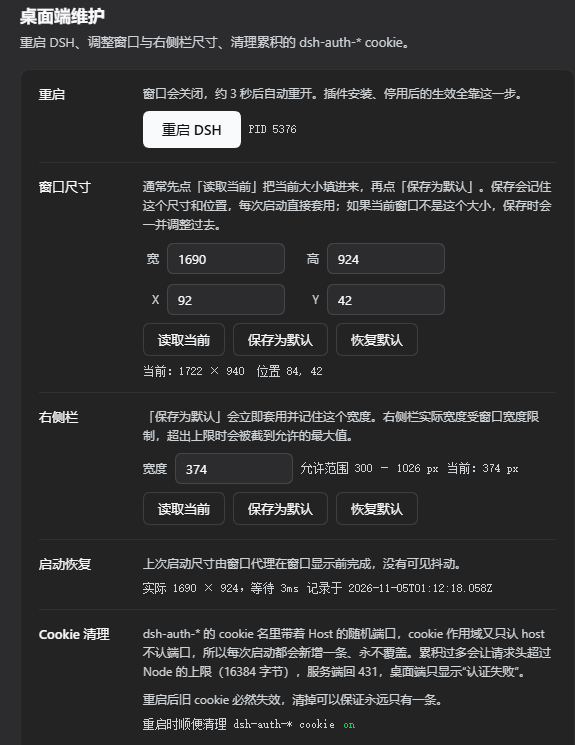
设置页里多出「桌面维护」,三项功能都在这一页:
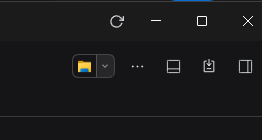
标题栏右上角、最小化按钮左边是循环箭头,点一下就是重启(顺带清 cookie):
安装
方式一:插件页安装(推荐)
-
打开 设置 → 插件,点 添加插件
-
在「包名或地址」里填入:
https://github.com/Abin1020/dsh-restart -
点 安装,装完后完全退出 DSH 再打开
装的时候 DSH 会自动把本插件登记进 profile 的 dependencies 与 dsh.profile.bundles,不需要手改任何文件。装完重启生效——第一次重启只能手动退出重开,因为重启按钮这时才被加载进来。
方式二:手动安装(离线包 / 想改代码时)
# 1. 放进插件目录
git clone https://github.com/Abin1020/dsh-restart.git ~/.dsh/plugins/dsh-restart

# 2. 在 profile 的 package.json 里登记
#    ~/.dsh/profiles/desktop/package.json
#    - dependencies 加 "dsh-restart": "file:../../plugins/dsh-restart"
#    - dsh.profile.bundles 末尾加 "dsh-restart"

# 3. 建链接(profile 用 pnpm 的 nodeLinker: hoisted,它不会替你建这个链接)
#    Windows PowerShell:
#    New-Item -ItemType Junction `
#      -Path "$env:USERPROFILE\.dsh\profiles\desktop\node_modules\dsh-restart" `
#      -Target "$env:USERPROFILE\.dsh\plugins\dsh-restart"
同样要重启一次 DSH。
确认装上了
浏览器或 PowerShell 打开 http://127.0.0.1:<当前端口>/dsh-restart/status,返回 200 就是加载成功。端口在启动日志里,或看地址栏。
卸载
插件页点 卸载 即可,DSH 会自己清掉 dependencies 和 dsh.profile.bundles 里的登记。之后要再重启一次才真正卸载干净——这正是本插件存在的理由。
手动装的版本需要自己收拾:
# 1. 从 profile 移除(把 ~ 换成你的用户目录)
#    ~/.dsh/profiles/desktop/package.json
#      删 dependencies 里的 "dsh-restart"
#      删 dsh.profile.bundles 里的 "dsh-restart"

# 2. 删链接
rm ~/.dsh/profiles/desktop/node_modules/dsh-restart

# 3. 删插件与数据(可选)
rm -rf ~/.dsh/plugins/dsh-restart ~/.dsh/dsh-restart
备份的 cookie 库在 %APPDATA%\@deepseek-ai\dsh-desktop\Network\dsh-tools-backup\,需要时手动删。
三项功能各自怎么实现
功能一:Cookie 清理
运行期清不了。 Electron 活着的时候 Network/Cookies 被 Chromium 独占锁定,实测四条路全失败:
| 方式 | 结果 |
|---|---|
fs.openSync(p, 'r') | EBUSY |
fs.openSync(p, 'r+') | EPERM |
new DatabaseSync(p, { readOnly: true }) | unable to open database file(errcode 14) |
file:...?immutable=1 | 同样失败 |
所以清理挂在 应用退出之后,由 detached helper 执行:
Host 插件 → spawn(detached) helper → 等 Electron 退出 → 打开 SQLite → 清理
清理动作:
DELETE FROM cookies WHERE name LIKE 'dsh-auth-%'
- 删之前先备份到
Network/dsh-tools-backup/Cookies.<时间戳>.bak,滚动保留最近 3 份 - 备份失败就不删,宁可不清也不裸删
- 删完
VACUUM并重读校验,实际删除条数写进last-run.json - 只匹配
dsh-auth-前缀,其它站点的 cookie(harness.deepseek.com、127.0.0.1上无关的)一条不动
实测数据
一次真实清理的 last-run.json:
{
  "mode": "restart",
  "terminated": { "ok": true },
  "cleans": [
    {
      "label": "default",
      "before": 7, "after": 0, "removed": 7,
      "backup": "Network\\dsh-tools-backup\\Cookies.20261102-162013.bak"
    },
    { "label": "partition:dsh-platform", "before": 0, "after": 0, "removed": 0,
      "skipped": "nothing to clean" }
  ],
  "launched": { "ok": true, "pid": 2804 }
}
功能二:页面重启按钮
页面按钮 → POST /dsh-restart/restart → Host 返回 202
                                            → detached helper 启动
                                            → 等 800ms(让响应先回页面)
                                            → taskkill /PID <Electron> /F
                                            → 清 cookie
                                            → 等 1200ms
                                            → 重新拉起 DeepSeek Harness.exe
关键取舍:
- 为什么不在 Host 里直接重启? Host 自己
process.exit()会被主进程判成崩溃,弹原生崩溃对话框(DesktopHostProcess.fail→reportFatal)。 - 为什么只杀 Electron 主进程、不加
/T? helper 自己是 Host 的子进程,Host 又是 Electron 的子进程,/T会把 helper 一起杀掉。只杀主进程是安全的——它退出后 Host 的 IPC 断开,desktop-host里的process.once("disconnect", stop)会自行优雅收尾。 - 动手前先验身份。
tasklist /FI "PID eq <pid>"查到镜像名不等于deepseek harness.exe就中止——防止 PID 被复用时误杀无关进程。 - 零 asar 补丁。 不改官方安装包,nightly 更新不会冲掉。
功能三:窗口尺寸与右侧栏宽度
两个都不需要改 app.asar。
右侧栏:ctx.slots.entries("root") 找到 layout 注册的那条 entry,
        用 entry.store.create().actions.setRightbar(px) 直接改真实布局
        (layout 注册时把 create() 固定成同一个实例,所以拿到的就是 AppFrame 在用的那个)
        上限 min(视口 × 0.7, 视口 − 280 − 400),下限 300,超了被 clampWidth 截断

窗口: 渲染层的 window.resizeTo / moveTo 只当兜底;
        真正干活的是 lib/winagent.exe —— 一个 Host 在自己 apply() 里拉起的
        detached Win32 小进程,在窗口 show() 之前就用 SetWindowPos 摆好位置尺寸
窗口为什么需要外部进程
原来只靠渲染层,实测消不掉抖动。boot.log 三次记录都显示 "visibility":"visible", "at":10394 —— client bundle 在导航开始后约 10.4 秒才执行,那时窗口早就 show() 了。而且 Electron 里 document.visibilityState 对隐藏窗口同样报 visible,拿它判断"还没显示"是无效的。
反过来,Host 的 apply() 一定早于 main.js 的 navigateMain() 完成(页面就是 Host 提供的),所以从 Host 侧拉起一个独立进程去操作窗口,有整整十秒余量。这也解释了为什么 winagent 能在窗口第一次出现在屏幕上之前就把它摆好。
main.js:12889  createWindow(appPreload, false, true)      ← show = false
main.js:12937  enterWorkspace(): await navigateMain(url) 之后才 window.show()
main.js:13128  mainWindow = createMainWindow()
                  └── 里面 new DesktopHostProcess(...)   ← Host 先起来,页面后加载
lib/winagent.exe 的要点(源码在同目录 winagent-src.cs):
- 按
--pid找窗口:EnumWindows+GetWindowThreadProcessId,只认类名前缀Chrome_WidgetWin_1,多个候选取面积最大的(同进程还有个隐藏的Chrome_WidgetWin_0)。 - 每 40 ms 轮询一次,最多 30 秒;父进程先消失就写
parent-gone直接退出,不留孤儿。 - 尺寸换算不写死边框:先
DwmGetWindowAttribute(DWMWA_EXTENDED_FRAME_BOUNDS)取可见边界,用GetWindowRect.Width - visible.Width算出该窗口此刻的不可见边框(100% DPI 下是 32),再加上它 —— 所以--width 1690得到的可见宽度就是 1690,不是 1722。 - 最多两轮
SetWindowPos纠偏,|实际 − 目标| ≤ 2算到位。 - 结果追加一行 JSON 到
boot.log。
代理的开销实测
一次性进程,摆好就退出,不会常驻。真实重启记录里 waitedMs 是 3–5 ms:
{"phase":"agent","ok":true,"waitedMs":4,"visibleAtApply":false,
 "dpi":96,"wantCss":[1690,924],"gotPx":[1690,924],"gotPos":[92,42],"hwnd":199552}
Host 侧付出的同步开销(20 次采样,spawn 本身):
min 12.2 ms p50 17.4 ms max 27.9 ms avg 17.8 ms
而它是 detached + unref,Host 拉起后立刻继续,不等结果。对比主窗口从创建到 show() 要等页面加载完(实测 10.4 s),17 ms 是 0.17%。
即使构造"窗口一直不出现"的最坏场景让它轮询满 3 秒,占用也只是 15 MB 工作集 / 6 线程 / 单核 2.93% CPU(40 ms 一次的 Sleep 大部分时间挂起),且超时强制退出。
界面上的「启动恢复」那一行优先显示这条代理记录:visibleAtApply === false 就是"在窗口显示前完成,没有可见抖动",true 则是"赶到时窗口已经显示了"。没有代理记录时回落到渲染层的 boot.log 诊断,两者都没有就提示"还没有启动记录"。
关键取舍:
- 为什么不改
createWindow? 改 asar 要重算main.js的 integrity 节点,而且 nightly 更新会整个冲掉。外挂代理是零补丁的等价做法。 - 右侧栏为什么不走
ctx.layout?LayoutController只暴露openRightbar/closeRightbar/toggleSidebar,没有setRightbar。宽度被写进内联gridTemplateColumns,CSS 也盖不掉,唯一入口是 root slot 的 store。 - 为什么不用
slots.inject("root")拿 store?root是 single slot,catalog 明确写了二次注册会 shadow 整个 AppFrame。只能entries("root")读取已有条目。 - 左侧栏不动,保持默认 280。
布局存在 $DSH_HOME/dsh-restart/layout.json:
{ "window": { "width": 1600, "height": 1000, "x": 40, "y": 30 }, "rightbar": { "width": 520 } }
任一项为 null(或缺失)表示"不覆盖,沿用应用默认"。
三项功能怎么协同
重启是触发点,清理是副作用。
- 每次点重启 → 必然清一次(默认开)。旧 cookie 重启后本来就失效,清掉保证永远只有 1 条
- 不做定时器:运行期 cookie 库被 Chromium 独占,清不了;而"每次重启必清"已经保证库里不会累积第二条
- 顺序上清理一定在"进程已退出"和"新进程启动"之间,这是唯一能安全打开 SQLite 的窗口
- 布局偏好(窗口尺寸 / 右侧栏宽度)也走这条链:调好 → 保存为默认 → 点重启 → 新进程起来时由 client 读
layout.json,代理在show()前套用
配置
配置文件是 cordis.patch.yml:
- insert:
    - id: dsh-restart
      name: 'dsh-restart'
      config:
        cleanOnEveryRestart: true   # 每次重启都清
        keepBackups: 3              # 备份保留份数
        restartLaunchDelayMs: 1200  # 关旧进程到拉新进程的间隔
        killDelayMs: 800            # 收到请求到动手的延迟
        dryRun: false               # true 时只统计不删除
接口
| 方法 | 路径 | 说明 |
|---|---|---|
GET | /dsh-restart/status | 当前状态、cookie 库列表、上次执行结果、当前布局偏好 |
POST | /dsh-restart/restart | 安排重启;body {"clean": false} 可单次跳过清理 |
GET | /dsh-restart/last-run | 上次 helper 执行结果 |
GET | /dsh-restart/layout | 读布局偏好 |
PUT | /dsh-restart/layout | 合并写布局偏好;显式 null 清除该项,坏值保留原值 |
POST | /dsh-restart/diag | 追加一行启动时序到 boot.log(诊断用,可删) |
全部走同源闸:跨站请求 403;无 origin(桌面端转发会剥掉)放行;有 origin 时必须与 host 一致。
UI 落点
| Slot | 内容 |
|---|---|
settings.section(order: 50) | 「桌面维护」设置页:单卡 + 行分隔(SettingRow,左 88 px 标签列),七行依次为重启、窗口尺寸、右侧栏、启动恢复、Cookie 清理、上次执行、运行环境 |
shell.overlay(order: 10) | 标题栏循环箭头图标按钮,紧贴窗口控制键左侧。只在 html[data-windows-titlebar] 下显示,全屏自动隐藏;靠 -webkit-app-region: no-drag 才能点 |
项目结构
dsh-restart/
├── client.js                渲染层:设置页 + 标题栏按钮 + 布局卡片(1273 行)
├── cordis.patch.yml         bundle patch,声明插件与默认配置
├── lib/
│   ├── index.js             Host 侧入口:5 条路由、读状态、拉起窗口代理
│   ├── paths.js             路径推导:cookie 库、数据目录、可执行文件
│   ├── cookies.js           SQLite 读写:inspect / backup / purge
│   ├── restart.js           拉起 detached helper
│   ├── helper.mjs           一次性进程:验身份 → 杀进程 → 清 cookie → 重启
│   ├── layout.js            layout.json 的读写与校验
│   ├── winagent.mjs         拉起窗口代理
│   ├── winagent-src.cs      窗口代理源码(C# 5)
│   └── winagent.exe         预编译产物(9216 B)
├── LICENSE
├── CHANGELOG.md
└── README.md
重编窗口代理
winagent.exe 是预编译的,正常使用不需要碰它。要改逻辑:
cd lib
& "$env:WINDIR\Microsoft.NET\Framework64\v4.0.30319\csc.exe" `
  -nologo -target:winexe -optimize+ -out:winagent.exe winagent-src.cs
必须是 -target:winexe(不是 exe),否则启动时会闪一下黑色控制台窗口。
数据目录
$DSH_HOME/dsh-restart/:
| 文件 | 内容 |
|---|---|
last-run.json | 上次 helper 的执行摘要 |
boot.log | 启动时序诊断 + 窗口代理的执行记录(追加式,可随时删) |
helper.log | 追加式日志 |
layout.json | 窗口尺寸 / 位置与右侧栏宽度偏好 |
已知边界
- 只在 Windows 桌面端有效;纯 web 模式下按钮置灰
- 重启是强制结束进程(
taskkill /F),正在进行中的写入会中断。DSH 的会话记录是实时落盘的,正常使用不会丢 - 只清
dsh-auth-前缀,不做任何通配清理 - 窗口尺寸启动由
lib/winagent.exe在窗口显示前设好;界面上的「应用」按钮仍走渲染层resizeTo,最大化或全屏时是空操作,界面上会提示先恢复窗口 - 窗口代理只作用于启动那一次。之后用户自己拖动/最大化窗口不会被覆盖,也不会被记下来(要记住就点「读取当前」再「保存为默认」)
- 右侧栏宽度受窗口宽度限制,上限 =
min(视口 × 0.7, 视口 − 680),下限 300;超出的请求值会被截断并提示 - 左侧栏不在本插件范围内,保持默认 280(layout 的
clampWidth(px, 264, 420)是它的硬边界) - 启动恢复做不到"窗口诞生即目标尺寸"——那需要改
createWindow(动 asar),已明确不做。现有做法是把调整压在窗口show()之前,视觉上等价;只有当 bundle 加载恰好晚于show()时才会看到一帧抖动,visibilitychange兜底把它的时长压到最短 boot.log是启动时序诊断:每次恢复会追加一行{phase, visibility, at, startSize}。visibility:"hidden"表示调整发生在显示前(理想),"visible"表示 bundle 晚于show()。确认无误后可删掉这条路由与 client 里的上报,或直接删文件不影响功能
许可
Comments
Loading…
Similar plugins
by myxiyues
DSH 客户端插件:在「设置」里保存主窗口尺寸/位置,重启自动恢复。koffi/user32 进程内改窗口,无计划任务、无外部进程。
★ 0
MIT
JavaScript
Oct 21, 2026
dsh plugin --profile web add dsh-window-sizeby zhouchengke2046
Independent one-click restart for DeepSeek Harness web (Settings page). · 独立的 DSH Web 一键重启插件。
★ 0
MIT
JavaScript
Aug 19, 2026
dsh plugin --profile web add dsh-restartby hadesybil-hub
Adds a restart button next to the shutdown button in the bottom-right of the DSH Web GUI; the server comes back up and the browser reopens.
★ 0
MIT
JavaScript
Sep 28, 2026
dsh plugin --profile web add dsh-restart-buttonby StabCut
DSH Desktop sidebar restart button: orderly relaunch of DSH Desktop from the sidebar settings row (based on desktopActions.requestRestart).
★ 0
MIT
JavaScript
Aug 21, 2026
dsh plugin --profile web add dsh-plugin-restart-desktopby dingdong2333333-lab
DSH 官方客户端没有的两个按钮:重启和刷新。一个很小的独立插件。
★ 0
Unlicense
JavaScript
Oct 21, 2026
dsh plugin --profile web add dsh-app-controlsby FuriousKinght
A button at the foot of the sidebar that restarts the DSH desktop app and reloads the page when it comes back.
★ 0
MIT
JavaScript
Oct 29, 2026
dsh plugin --profile web add dsh-restart-button