

dsh-cuadrive-mac
Manifest validmacOS-only DeepSeek Harness plugin: private cua-driver computer-use for DSH
dsh-cua-drive
dsh plugin --profile web add github:aa2246740/dsh-cuadrive-mac
PATH 上需要有 pnpm。然后重启这个 Host,再刷新页面。
dsh 不在 PATH 上时:
npx @deepseek-ai/dsh plugin --profile web add github:aa2246740/dsh-cuadrive-mac
官方 dsh plugin add 会在 $DSH_HOME/profiles/web 里跑 pnpm。这个包装了 dsh.bundle.patch,所以会写进 dsh.profile.bundles。仓库已提交编好的 lib/,GitHub 安装不会跑 prepare。dsh plugin add 只写 profile,不会热挂正在跑的 Host。
只做 macOS。装上之后,DSH 里的 agent 用一份私有、钉死的 cua-driver 0.20.0(写在 runtime-lock.json)点窗口、读屏幕、操作 App。跑在插件自己的 socket 上,不会停、改或劫持机器上已有的 Cua。
第一次启动会向拉起 dsh 的那个进程要辅助功能和屏幕录制。DSH.app 勾 DSH。命令行 dsh web 勾 Terminal / iTerm / Cursor / VS Code。Windows / Linux 只加载 cua_status,说明这是 macOS-only,不会下载驱动,也不会启动 computer-use。
包名是 dsh-cua-drive。仓库还叫 dsh-cuadrive-mac,已经下过的包、权限、socket、会话不用搬家。
本地 clone 也走同一条官方 CLI:
git clone https://github.com/aa2246740/dsh-cuadrive-mac.git
dsh plugin --profile web add ./dsh-cuadrive-mac
然后同样重启 Host,刷新页面。
dsh plugin --profile web remove dsh-cua-drive
DSH.app 的 Plugin Manager 只接受 npm 包名,吃不了 github:。桌面用户用 dsh web 装进 web profile。
如果旧 profile 的 cordis.patch.yml 里已经有一行 dsh-cuadrive-mac,先删掉。现在由 Bundle 自己占 Loader,留两份会在启动时报重复 id。
第一次在 Mac 上
| 你怎么跑 dsh | 系统设置里要勾谁 |
|---|---|
| DSH.app | DSH |
CLI dsh web,没有 app 包 | Terminal / iTerm / Cursor / VS Code,父进程那个 App |
不要跑 cua-driver permissions grant,那会去拉 /Applications/CuaDriver.app。看 cua_status.hostPermissions.hostLabel,勾那个名字。
第一次在 Mac 上启动需要联网一次,把钉死的 darwin-universal 包拉到 $DSH_HOME/dsh-cuadrive-mac/vendor/。下不动就设 HTTPS_PROXY / ALL_PROXY / 插件配置 proxy,或者把一模一样的 tarball 放到 runtime.manualCachePath。不要跑 cua-driver update。
进度看 cua_status 的卡片标题,或 $DSH_HOME/dsh-cuadrive-mac/status.json 和 download.log。
Windows / Linux 只加载状态工具:
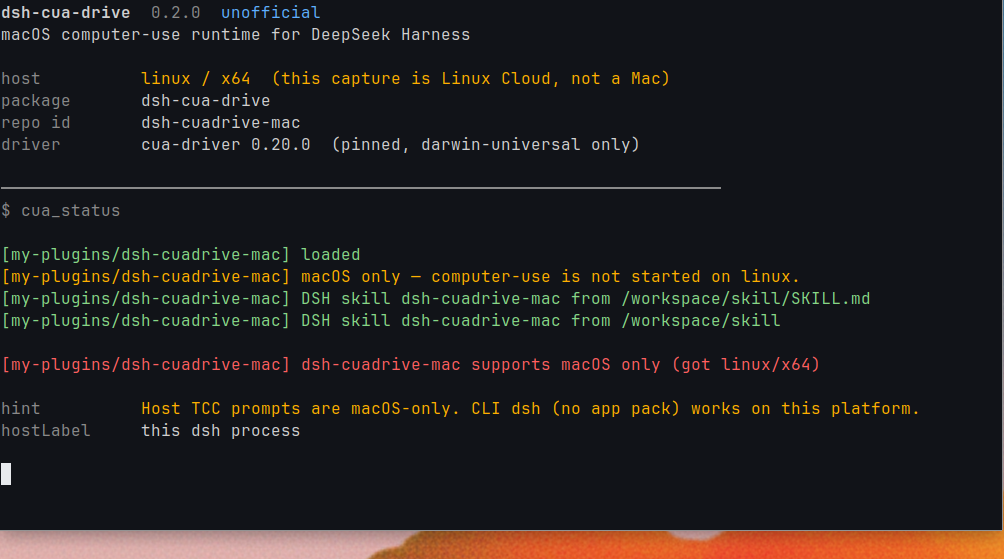
私有运行时在 $DSH_HOME/dsh-cuadrive-mac/。关掉 DSH,停的只是 run/driver.sock。给模型的工具名仍是 cua_*。
配置
| key | 默认 | 干什么 |
|---|---|---|
binary | 空 | 绝对路径覆盖;空就用插件 vendor 目录 |
ownDaemon | true | 私有 DSH socket |
socketPath | $DSH_HOME/dsh-cuadrive-mac/run/driver.sock | 只给 DSH 的 serve |
autoStart | true | socket 没起来就下载并 serve --embedded |
proxy | 空 | 拉 GitHub 时用的 HTTP(S) 代理 |
promptPermissions | true | 第一次用拉起 dsh 的那个 host 去要权限 |
timeoutMs | 90000 | 单次调用时限 |
sessionId | dsh | 私有 daemon 上的 hosted session |
本地开发
克隆到独立目录,用官方 dsh plugin add 挂进 profile:
npm ci
npm test
npm run typecheck
npm run build
dsh plugin --profile web add .
改完同样重启 Host,刷新页面。
MIT。
Comments
Loading…
Similar plugins
by wangyong1972
Native macOS computer-use plugin for DeepSeek Harness with trusted mouse/keyboard control, screenshots, and multi-display selection.
★ 0
MIT
TypeScript
Aug 23, 2026
dsh plugin --profile web add @wangyong1972/dsh-computer-use-macosby Qingzhou-Joshua
DeepSeek Harness plugin—a simple toolkit for developers.
★ 0
MIT
TypeScript
Aug 14, 2026
dsh plugin --profile web add dsh-dev-toolboxby AITabby
A macOS-only native account-pool and provider plugin for DeepSeek Harness.
★ 79
MIT
JavaScript
Sep 3, 2026
dsh plugin --profile web add @dockyard-dsh/pluginWindows-only Computer Use plugin for DeepSeek Harness with UIA, cua-driver, and optional GLM vision.
★ 0
↓ 1.1k/wk
dsh plugin --profile web add dsh-computer-useby wryyyds7
Community plugins for DeepSeek Harness (dsh)
★ 0
MIT
TypeScript
Aug 18, 2026
dsh plugin --profile web add @wryyyds7/dsh-plugins-rootby Skylarking
DeepSeek Harness plugin: multi workspace
★ 0
TypeScript
Aug 20, 2026
dsh plugin --profile web add @skylarking/dsh-multi-workspace