
dsh-perm-guard
Manifest valid★ 1Auto-approval permission guard: a middle tier between workspace-write and danger-full-access — auto-allows safe operations inside trust directories, always asks a human for destructive ones, with 11 p
dsh-perm-guard 🛡️


Auto-approval permission guard for DeepSeek Harness (dsh) web — the "middle tier" between workspace-write (asks too often) and danger-full-access (too open). Common operations like cross-directory edits, git commit/merge and builds run without approval prompts; destructive operations (deletes, disk ops, privilege escalation, curl|sh) always ask for human confirmation.
Unofficial project: independently developed and maintained by a community member, not an official DeepSeek product.
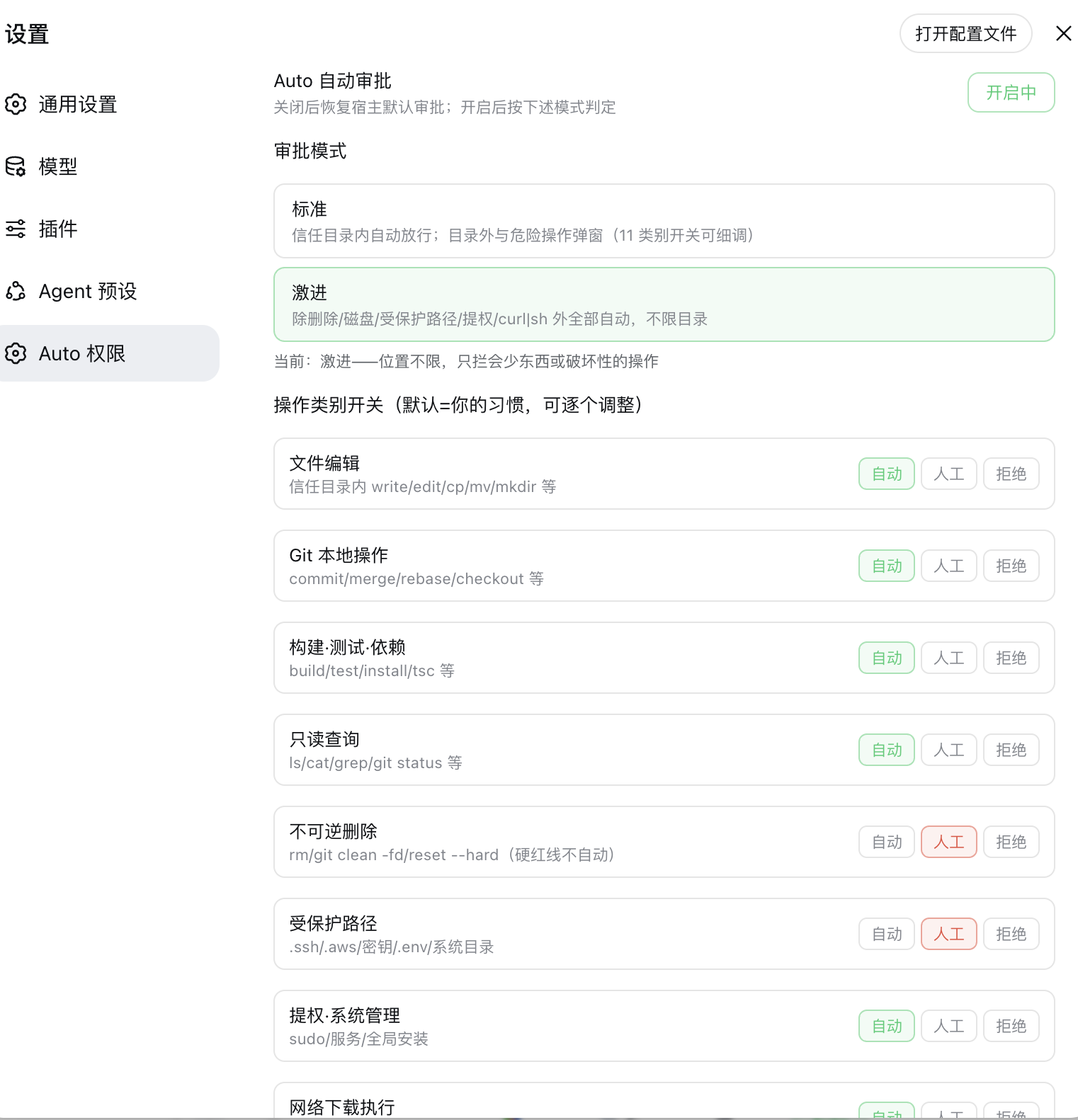
Screenshot

Features
- Two modes (switchable in the settings page, persisted):
- Standard — auto-approve inside the trust directories (workspace, sibling directories, custom list); outside + risky operations prompt.
- Aggressive — location-unrestricted: only destructive operations still prompt.
- 11 per-category tri-state switches (auto / ask / deny) with your personal defaults.
- Audit trail — every decision is recorded (approved / forwarded to human / rejected) with timestamp and command summary.
- Persistent config —
~/.dsh/perm-guard.json, survives restarts. Zero host dependencies.
Install
# DSH 0.1.7 and later:
dsh plugin --profile web add "github:a903067276-rgb/dsh-perm-guard#main"
# DSH 0.1.5 and older (this release needs 0.1.7+):
# dsh plugin --profile web add "github:a903067276-rgb/dsh-perm-guard#v0.2.10"
Then restart dsh web. Update: dsh plugin --profile web update dsh-perm-guard, restart.
Manual install fallback: see docs/install.md.
Usage
- Auto button — in the composer tool row (left of the input box). Click to toggle auto-approval on/off (green = on). Off restores the host's default approval behavior completely.
- Settings → "Auto 权限" (Auto Permissions) — total switch, mode selection (Standard / Aggressive), 11 category switches, trust directory editor, and the recent-decision audit list.
- Rules apply to all sessions (including subagents) while enabled.
Mode defaults
| Category | Standard | Aggressive |
|---|---|---|
| File edit (write/edit/cp/mv/mkdir) | auto (in trust dirs) | auto |
| Git local (commit/merge/rebase/checkout) | auto | auto |
| Build / test / install | auto | auto |
| Read-only queries (ls/cat/grep/git status) | auto | auto |
| Delete (rm, reset --hard, clean -fd) | ask | ask |
| Protected paths (.ssh/.aws/secrets/.env/system dirs) | ask | ask |
| Privilege (sudo, services, global installs) | ask | ask |
| Network download-execute (curl|sh) | ask | ask |
| Git push | ask | auto |
| Publish / deploy | ask | auto |
| Disk / partition / device | ask | ask |
Switching modes resets the category switches to that mode's defaults (adjustable afterwards).
Never auto-approved (all modes)
- Deletion:
rm,rm -rf /or~(circuit breaker, even with$(...)variants),git reset --hard,git clean -fd,Remove-Item - Disk:
ddwriting devices,mkfs/fdisk/wipefs/diskutilerase, writes to/dev/ - Privilege:
sudo/su, service management (launchctl/systemctl), recursivechmod/chownon/or~ - Network download-execute:
curl|sh,wget|sh - Force push:
git push --force/-f(rewrites history) - Writes to protected paths
Platform support
| Platform | Status |
|---|---|
| macOS | ✅ development environment |
| Linux | ⚠️ expected to work |
| Windows | ✅ adapted & field-tested (win32 path handling + PowerShell vocabulary, 2026-08-24) |
Windows notes
- Trusted dirs accept three absolute-path styles —
C:\…,C:/…,/c/…(MSYS/Git-Bash) — normalized toC:/…on save; invalid entries are reported back by the UI instead of being silently dropped. - Classifier covers common PowerShell cmdlets: pipeline/formatting (
Select-Objectetc.) count as read-only;Invoke-RestMethod/iwrmap to network;Stop-Process,reg add,schtasks /createetc. map to privilege (always human-confirmed);vssadmin delete shadows,bcdedit,diskpartare hard red lines. ghCLI read-only subcommands (view/list/status…) auto-approve; write operations fall back to human confirmation.- Escalated retries (
sandbox_permissions) raise exactly one confirmation card instead of two.
Requirements
- DSH web >= 0.1.0-rc.6 (the approval system this plugin guards)
- Version compatibility (best effort — the settings card uses dual-field
key+idregistration to satisfy both rc.6 (id) and rc.7+ (key); verified locally on rc.6/rc.8/0.1.1-rc.2/0.1.5-rc.1, not guaranteed on every DSH version):- DSH 0.1.0-rc.6 and newer (incl. the 0.1.1 / 0.1.2 / 0.1.5 lines): try
main(default) orv0.2.9and newer. - Conservative fallbacks (the last pre-0.1.1 build): DSH 0.1.0-rc.7/rc.8 →
v0.2.7(dsh plugin add github:a903067276-rgb/dsh-perm-guard#v0.2.7); DSH 0.1.0-rc.6 → frozenrc6-compattag (no maintenance). - ⚠️ On DSH 0.1.5+ do not install
v0.2.8: it imports the removedsettingsNamespaceexport and makes the whole plugin tree fail to load (the web app will not boot). Usemain/v0.2.9+ instead.
- DSH 0.1.0-rc.6 and newer (incl. the 0.1.1 / 0.1.2 / 0.1.5 lines): try
pnpmin PATH —dsh pluginis a pnpm forwarder (needed for install/update)- ✅ DSH 0.1.7 and later — use this release (
v0.4.2): it declarespeerDependencies: {"@deepseek-ai/dsh": "^0.1.7-rc.1 || ^0.2.0-rc.1"}, so a mismatched host refuses to load it with an explicit reason instead of failing quietly. Settings move to the 0.1.7 model (pluginConfig, live-editable.volatile()fields), so changes apply without a restart. - ✅ DSH 0.2.0-rc.1 — verified compatible: the peer range now covers both lines (
^0.1.7-rc.1 || ^0.2.0-rc.1) anddsh.compatibility.dshReleasesadds"0.2.0-rc.1": "compatible"— verified on a real 0.2.0-rc.1 host and a shadow instance. Since 0.2 the host gates profile bundles on peer compatibility and skips the whole bundle when the declared range misses the running host, so this range is what keeps the plugin loading. - ⚠️ DSH 0.1.5 and older — install the previous tag
v0.2.10: that line keeps the old behavior and uses no 0.1.7-only API. - ⛔ Old plugin releases (up to
v0.2.10) are not supported on 0.1.7 — disabling and re-enabling it from the plugin manager throwsduplicate route, and configuration edits no longer apply. Upgrade the plugin together with the host.
- ✅ DSH 0.1.7 and later — use this release (
- Maintenance policy: this plugin keeps evolving with the latest DSH releases; compatibility with older DSH versions is best-effort only and not guaranteed going forward.
How it works
- Interception before the host prompt — every approval request is intercepted before the host prompt; the actual command/target is classified, and safe operations are auto-answered
allowed-once(~13ms, no popup), risky ones are forwarded to the human prompt. - Call lookup — an approval request carries no tool arguments, so the plugin resolves the real arguments from the session log by
callId; DSH 0.1.5 removedSession.events, so it now reads the publicsnapshotEvents()(older hosts keep theeventspath). When neither is available it always falls back to the human prompt (safe default, never auto-allow). - Command-level firewall (
tools/pre-execute) — dangerous categories are intercepted before the sandbox even rejects them. - Classification pipeline — the two modes set per-category defaults (Standard: trust directories; Aggressive: location-unrestricted), and the 11 tri-state switches (auto / ask / deny) fine-tune each category.
- Audit + persistence — every decision is recorded with timestamp and command summary; approval decisions are always persisted via the host's
approval/asked+approval/decidedevent pair.
Notes
- DSH's sandbox has no OS-level network fence (unlike Codex): the plugin can only detect download-execute patterns (
curl|sh) in command text, not block other network traffic. - Terminal sessions, subagent creation, model calls and MCP tools are outside the approval system entirely.
- Commands whose text contains danger words (e.g. echoing
"Remove-Item", or scripts embedding rule sources) are conservatively intercepted — expected, rare in practice. - The audit list is in-memory (60 entries) and resets on restart; approval decisions themselves are always persisted via the host's
approval/asked+approval/decidedevent pair.
Coverage
- All approval entry points in DSH are covered:
bash,pwsh(PowerShell), and thewrite/editfile tools. MCP tools and other read-only tools have no approval mechanism and are unaffected. - Compound commands (
a && rm -rf x): pure-word chains are split and evaluated per subcommand, taking the strictest result; chains containing variables/redirection/wildcards are treated conservatively as one unit. - Unknown commands always fall back to "ask" regardless of mode (safe default) — the classifier never auto-allows what it cannot parse.
How it compares to Claude Code / Codex
| Claude Code | Codex | dsh-perm-guard | |
|---|---|---|---|
| Read-only command set | built-in, not configurable | sandbox | built-in + configurable |
rm -rf / ~ breaker | always prompts | sandbox blocks | always prompts (all modes) |
| Protected paths | yes | .git/.agents/.codex | .ssh/.aws/secrets/system dirs/.git |
| Network isolation | tool-level | OS-level (default off) | not available (DSH has no OS network fence; only curl|sh pattern detection) |
| Approval categories | 3 tool classes | 5 granular switches | 11 explicit switches + 2 modes |
| Auditing | prompts only | logs | in-plugin audit + host approval/asked/decided events |
Configuration file
~/.dsh/perm-guard.json (created on first change):
{
  "enabled": true,
  "mode": "standard",
  "categories": { "fileEdit": "auto", "...": "..." },
  "trustedDirs": []
}
trustedDirs: extra absolute paths auto-approved in Standard mode (default: workspace + its sibling directories).- Trust directories are ignored in Aggressive mode (location-unrestricted).
Development
# hot-plug testing (no restart)
# 1. define a dynamic Cordis plugin with the same decision logic
# 2. cordis_run → verify → cordis_stop

# static bundle (this repo layout)
# symlink to ~/.dsh/profiles/web/node_modules/dsh-perm-guard
# add "dsh-perm-guard" to ~/.dsh/profiles/web/package.json dsh.profile.bundles
# restart dsh web
Verification matrix: docs/verify-checklist.md
License
Comments
Loading…
Similar plugins
by StyxNether
Auto-Approval: a middle permission tier for DeepSeek Harness between workspace-write and danger-full-access, auto-approving harmless commands and trusted-area targets
★ 4
↓ 35/wk
MIT
JavaScript
Sep 6, 2026
dsh plugin --profile web add dsh-auto-approval-pluginPermission mode between workspace-write and full access: shell commands are checked by deterministic rules and a subagent review; irreversible or system-level actions require explicit approval.
★ 0
dsh plugin --profile web add dsh-almost-full-accessby Jiao-XXX
为 DeepSeek Harness 增加介于 Workspace Write 与 Full access 之间的自动批准权限档,危险或不确定操作仍转人工审批。An auto-approval permission preset between workspace-write and full access for DeepSeek Harness.
★ 17
↓ 209/wk
MIT
JavaScript
Oct 2, 2026
dsh plugin --profile web add dsh-auto-approveby MrWeiCodes
Fine-grained permission gateway: per-category tool-call review (outside-workspace directories, commands, file read/write, subagents, repeated actions) with global & per-project allow/deny exceptions,
★ 17
↓ 443/wk
MIT
JavaScript
Oct 18, 2026
dsh plugin --profile web add @mrweicodes/dsh-permgateby LAwLi3tCoding
Adds an "approve for me" access mode whose approval requests are answered by an independent reviewer model instead of a person: the reviewer can read the workspace read-only, a reviewer that cannot ru
★ 0
NOASSERTION
TypeScript
Oct 14, 2026
dsh plugin --profile web add dsh-approval-reviewby yyfdfsyyf-source
An independent permission gate above the built-in sandbox. It blocks writes outside the workspace and to protected paths even under danger-full-access, refuses whole-file overwrites without a complete
★ 1
MIT
JavaScript
Oct 22, 2026
dsh plugin --profile web add dsh-hard-gate