

dsh-backup
Manifest validAutomated backups of DSH sessions, config and custom directories — scheduled or manual, packed as tgz with rotation
dsh-backup 📦

Unofficial project: independently developed and maintained by a community member, not an official DeepSeek product.
Automated backups of your DSH data — sessions, profile config and any custom directories — packed into .zip archives with scheduled or manual runs and automatic rotation.
Screenshot
| Action | Effect |
|---|---|
| Scheduled backup | Packs DSH data on a timer (default every 6 h) |
| Manual backup | One-click "Back up now" from the Settings page |
| Custom directories | Add extra paths (e.g. your memory library) per line |
| Rotation | Keeps only the latest N archives (default 10), old ones are deleted |
| Restore | Manual only — extract an archive back to its original location (steps in docs/install.md) |
What is backed up by default: ~/.dsh/sessions (conversation history), ~/.dsh/profiles (config, excluding node_modules), ~/.dsh/AGENTS.md (global conventions). Everything else — like your memory library — goes into the custom directory list.
Install
# DSH 0.1.7 and later:
dsh plugin --profile web add "github:a903067276-rgb/dsh-backup#main"
# DSH 0.1.5 and older (this release needs 0.1.7+):
# dsh plugin --profile web add "github:a903067276-rgb/dsh-backup#v0.1.4"
Then restart dsh web. Manual fallback: docs/install.md.
Usage
Open Settings → Backup:
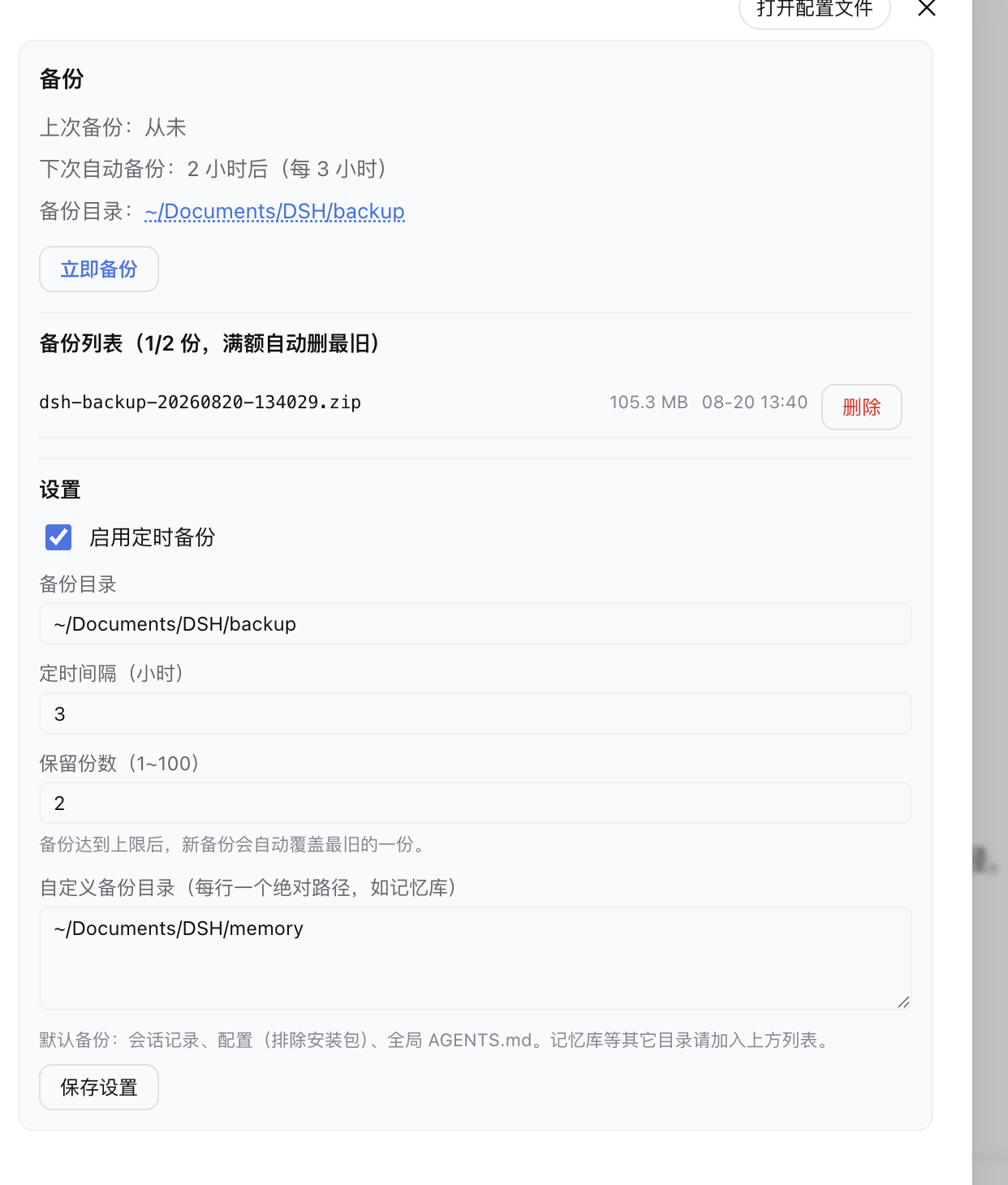
- Status row: last backup / next scheduled run / backup folder
- Back up now button
- Backup list: name, size, time, delete
- Settings: backup folder, schedule toggle + interval (hours), retention count, custom directories (one absolute path per line)
Platform support
| Platform | Status |
|---|---|
| macOS | ✅ tested |
| Linux | ✅ expected (pure Node, no system zip required) |
| Windows | ✅ expected (pure Node, no system zip required) |
Requirements
- DSH web >= 0.1.0-rc.6
- Version compatibility (best effort — the settings card uses dual-field
key+idregistration to satisfy both rc.6 (id) and rc.7+ (key); verified locally on rc.6/rc.8/0.1.1-rc.2/0.1.5-rc.1, not guaranteed on every DSH version):- DSH 0.1.0-rc.6 and newer (incl. 0.1.1-rc.1/rc.2): try
main(default). - DSH 0.1.7: live config — the plugin now declares its fields with an exported
Configschema (all.volatile()), so Settings saves go through the official settings service and apply immediately, no restart. Host config the plugin writes lands in its own profile entry (settings.update(entryId, patch)); needs@deepseek-ai/schemastery≥ 3.18.3 (ships with 0.1.7). - DSH 0.1.5-rc.1: load-verified (host half loads cleanly); it only uses stable services such as
settings/shelland touches none of the contracts changed in 0.1.5. The end-to-end backup/restore flow was not re-tested on 0.1.5. - Conservative fallbacks (the last pre-0.1.1 build): DSH 0.1.0-rc.7/rc.8 →
v0.1.2(dsh plugin add github:a903067276-rgb/dsh-backup#v0.1.2); DSH 0.1.0-rc.6 → frozenrc6-compattag (no maintenance).
- DSH 0.1.0-rc.6 and newer (incl. 0.1.1-rc.1/rc.2): try
- Node.js ≥ 16.7 (bundled with DSH)
- ✅ DSH 0.1.7 and later — use this release (
v0.2.0): it declarespeerDependencies: {"@deepseek-ai/dsh": ">=0.1.7-rc.1 <0.2.0"}, so a mismatched host refuses to load it with an explicit reason instead of failing quietly. Settings move to the 0.1.7 model (pluginConfig, live-editable.volatile()fields), so changes apply without a restart. - ⚠️ DSH 0.1.5 and older — install the previous tag
v0.1.4: that line keeps the old behavior and uses no 0.1.7-only API. - ⛔ Old plugin releases (up to
v0.1.4) are not supported on 0.1.7 — settings silently become defaults (settings.register/getare gone). Upgrade the plugin together with the host.
- ✅ DSH 0.1.7 and later — use this release (
- Maintenance policy: this plugin keeps evolving with the latest DSH releases; compatibility with older DSH versions is best-effort only and not guaranteed going forward.
How it works
- Host: a zero-dependency zip packer (
lib/zip.js, pure Node streams — no systemzip, no shell, immune to the session sandbox), atimer-driven schedule, and a/api/dsh-backup/*route for the Settings page. - Client: one Settings section (
settings.section, "备份") that lists backups and edits configuration; saving goes through the official settings service into the plugin's profile-entry config (volatile fields — takes effect immediately, no restart; a restart is only needed on pre-0.1.7 hosts, which fall back to writing the patch file).
Notes
- Restore is intentionally manual: stop DSH, extract the archive over the original paths, and keep the current data around until you are sure the restore is correct. The plugin never overwrites anything by itself.
- The backup folder defaults to
~/Documents/DSH/backupand can be changed in Settings. - Only backups the plugin owns (
dsh-backup-*.zip) are listed/deleted — other files in the folder are left alone.
License
MIT
Compatibility
Versions
| Latest version | Published | Size |
|---|---|---|
| 0.1.1 | — | — |
Comments
Loading…
From the same category
by awesome-dsh-plugin
A curated list of plugins for DeepSeek Harness (dsh) · DeepSeek Harness 插件精选列表
★ 25.1k
CC0-1.0
Python
Nov 18, 2026
by woniuniuniu
DeepSeek Harness 自媒体工作台插件:一句话记灵感,一键生成脚本、封面、配图和分镜
★ 1.5k
↓ 8.2k/wk
MIT
JavaScript
Nov 18, 2026
dsh plugin --profile web add dsh-media-deskby 0xsline
DeepSeek Harness (DSH) ecosystem: curated plugins, tools, and infrastructure from dsh-external/hub and the public dsh-plugin topic.
★ 1.4k
CC0-1.0
Python
Nov 6, 2026
by keli-wen
Hire Google's Antigravity CLI (agy) as a fast Gemini staffer for Claude Code, OpenAI Codex, and DeepSeek Harness.
★ 893
MIT
JavaScript
Nov 16, 2026
dsh plugin --profile agent add agy-staffby Roland0511
MarkText (muya) WYSIWYG Markdown editor for the DeepSeek Harness right sidebar
★ 840
↓ 2.8k/wk
MIT
JavaScript
Nov 7, 2026
dsh plugin --profile web add dsh-marktextby SAOS-3624
Scene-aware storyboard for DeepSeek Harness: 9-16 numbered cells with timestamps + transcript + an audio envelope, packed into ONE image (384 tokens). Two tools: video_storyboard and video_zoom.
★ 575
↓ 17k/wk
MIT
JavaScript
Nov 16, 2026
dsh plugin --profile web add dsh-video-storyboard