

dsh-openviking-enhance
Manifest valid★ 3OpenViking in the DSH web GUI: a Studio panel, a per-session memory-commit status pill with its commit timeline, and a right-sidebar tab showing what the current session retrieves.
dsh-openviking-enhance
English | 中文
v0.2.0 · Changelog
Brings your local OpenViking memory server into the DeepSeek Harness (DSH) Web GUI: a Studio panel in the left sidebar, and a commit status pill under the message box that shows what each session commit did to your memories.
Nothing needs to be patched in DSH or in the OpenViking plugin — it mounts as an ordinary DSH bundle.
What you get
OpenViking Studio, inside DSH. A new row at the bottom of the left sidebar opens the OpenViking server's own Studio UI in the main area, so you can browse memories, sessions and retrieval without leaving the app or switching to a browser.
Per-session commit status. OpenViking writes memory in commits: a session's turns accumulate until a token threshold is reached (or the session ends), then they are archived and the memories are extracted. The pill under the message box tells you where the session you are looking at stands.
The pill follows the app's language (see Notes); in English it reads:
| Pill | Meaning |
|---|---|
OV · not committed | Nothing from this session has been committed yet |
OV · 12.3k/20k | Turns are accumulating towards the commit threshold |
OV · extracting… | A commit is being archived and its memories extracted |
OV · 3 commits | Three commits so far |
OV · extraction failed | A commit was archived but its memories could not be extracted |
OV · unavailable | The local OpenViking server cannot be reached |
Click the pill for details:
- a timeline of the most recent 3 commits — when each happened and how many memories it added, updated or deleted (the rest are one click away);
- clicking a commit lists the exact memories it changed, with their
viking://paths; - any failed extraction, with the time, how long it ran, and the reason the server reported.
The panel and the pill read only. This plugin never commits, writes or deletes anything in OpenViking.
What this session retrieves. The right sidebar gains a Memory recall tab: it shows what OpenViking pulls in for the session you are looking at
— the query it searched with (that session's most recent message, or one you type
yourself), every hit in each of its three sources (memories, resources, skills)
with its score — graded from red through orange to green — its file name, its kind
(entity, event, …) and its abstract. The full viking:// path is on hover, and
opening a row loads that entry's whole text. The plan the server retrieved with is there
too. Open it from the right sidebar's +
guide; it is per session, like the column itself.
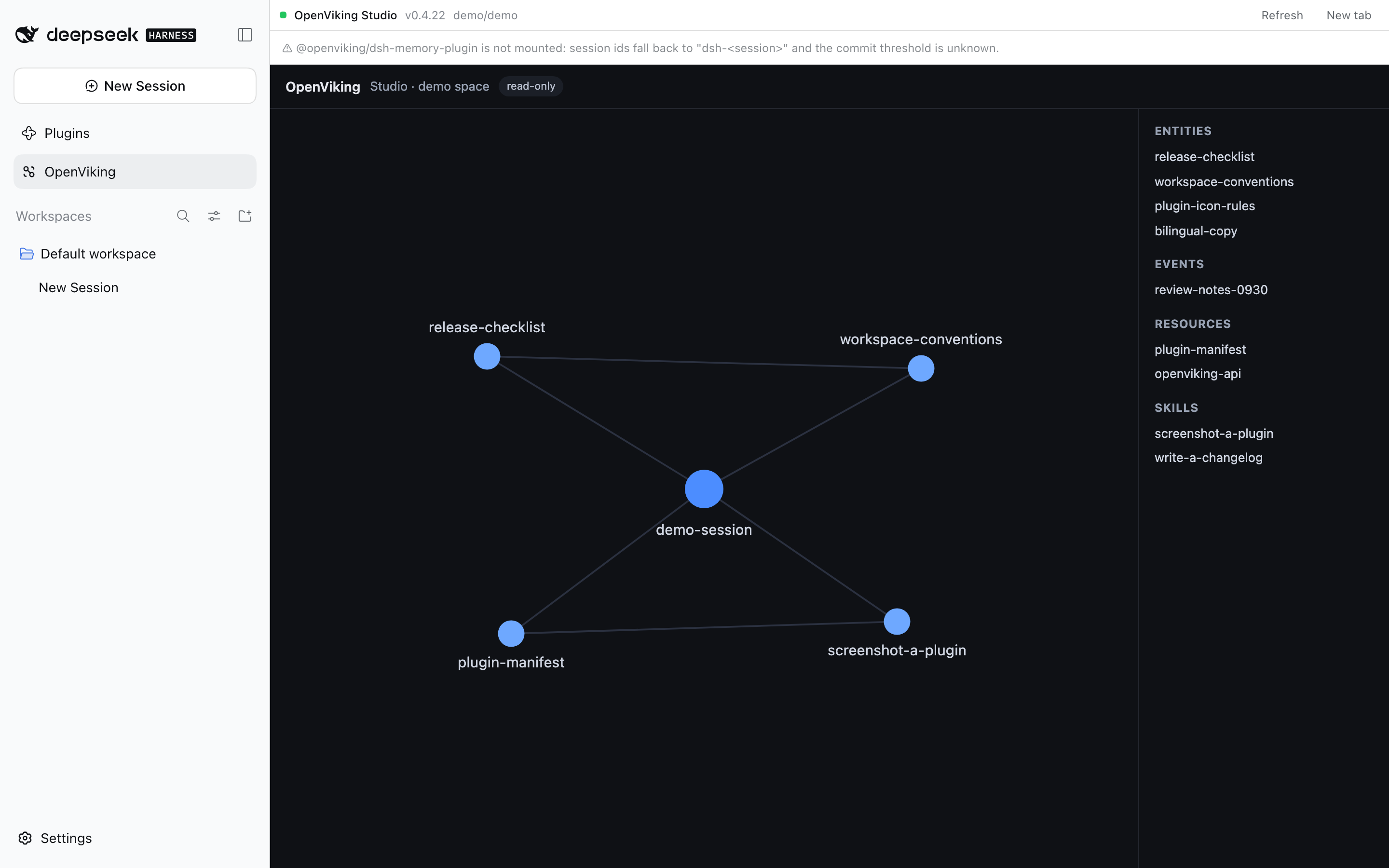
The Studio panel, the sidebar row that opens it, and the commit pill below the composer.
Requirements
| DSH | 0.2.0-rc.2 or newer (desktop or web profile) |
| OpenViking | A local server; 0.4.22 tested. Studio is served at /studio/ on the same port |
| Memory plugin | @openviking/dsh-memory-plugin recommended — it is what commits sessions. Without it the panel still works, but pending-token thresholds are unknown |
Install
Install it from the Plugins page (Add plugin → package name or tarball), or:
# from npm
dsh plugin --profile desktop add dsh-openviking-enhance

# or the prebuilt tarball from the latest release
dsh plugin --profile desktop add https://github.com/A2chitect/dsh-openviking-enhance/releases/latest/download/dsh-openviking-enhance.tgz
Installing straight from a Git URL is refused by pnpm — the package asks to run a build script and pnpm blocks those until they are allowed — so a source checkout is installed as a tarball instead. The client half is a prebuilt bundle: a source install would have nothing to load.
pnpm pack && dsh plugin --profile desktop add ./dsh-openviking-enhance-<version>.tgz
Then restart the DSH app once: the host half is loaded at startup. To remove it:
dsh plugin --profile desktop remove dsh-openviking-enhance
Configuration
Everything has a sensible default — a standard local setup needs no configuration at all. To change something, open Plugins in the sidebar, pick this plugin, and use Configure on its row: the form carries the fields below, a check button that probes the address before you save, and a default button per field that clears the override instead of writing an empty value.
The same settings can still be written by hand in your profile's patch file
(~/.dsh/profiles/desktop/cordis.patch.yml), under the row openviking-enhance:
- id: openviking-enhance
  name: 'dsh-openviking-enhance'
  config:
    endpoint: http://127.0.0.1:1933
| Field | Default | Meaning |
|---|---|---|
endpoint | from ~/.openviking/ovcli.conf, else http://127.0.0.1:1933 | OpenViking base URL |
apiKey | from ovcli.conf | Only needed if the server requires authentication |
account / user | default / default | Identity the panel reads under |
studioPath | /studio/ | Where Studio is served on that origin |
cacheTtlMs | 2500 | How long a status answer is reused |
Troubleshooting
No OpenViking row in the sidebar, or no pill under the message box. The client half is served as a file and picked up on page load. Reload the window (⌘R). If it is still missing, restart the app.
The panel says it cannot reach OpenViking.
Start the server and check it directly: curl http://127.0.0.1:1933/health. The
panel shows the address it tried, which helps when endpoint is not the default.
The pill says extraction failed.
The commit was archived but OpenViking could not turn it into memories — those
memories are not in your library. Click the pill for the server's own error; it is
usually a problem with the extraction model configured in ~/.openviking/ov.conf.
The pill shows a token count instead of a commit count.
@openviking/dsh-memory-plugin is not installed, so the commit threshold is
unknown. Commits themselves still work; only the progress denominator is missing.
The timeline shows only 3 commits. That is the default. Click show all.
There is no recall tab in the right sidebar.
The tab is reached through that column's own + guide, and it only exists after a
window reload (the client half is a file the page loads). If DSH is older than
0.2.0-rc.2 it has no right sidebar to contribute to: the row is skipped and the
Studio panel and the pill keep working.
I changed the code and nothing happened. The two halves reload differently: the client half after a window reload, the host half only after an app restart.
Notes
- The plugin's own text follows the app's language. It ships Chinese and English and reads the locale DSH sets, so switching the app's language switches this plugin's copy too; anything else falls back to English.
- OpenViking cleans up its commit task records over time, so the failure list covers recent commits only. The archives themselves are permanent.
- The plugin's internal routes answer loopback requests only, and only from the DSH window's own origin.
Development
pnpm install
pnpm run build      # lib/index.js (host) + lib/client.js (browser)
pnpm test           # typecheck, packaging contract, unit tests, smoke harnesses
pnpm run watch      # rebuild on change
The smoke harness prints the commit timeline without needing the GUI, and skips the
live-data part when OpenViking is not running (SMOKE_REQUIRE_SERVER=1 makes that a
failure instead). The code comments explain how the pieces fit together.
The version lives in package.json and is tagged vX.Y.Z in git; while it is 0.x
the internals may still change. See CHANGELOG.md for what each
release contains, and RELEASING.md for the release steps and the
GUI acceptance checklist — that one is a maintainer document, Chinese only.
Versions
| Latest version | Published | Size |
|---|---|---|
| 0.2.0 | — | — |
Comments
Loading…
Similar plugins
A developer toolkit for the DeepSeek Harness (DSH) web console: a real multi-tab PTY terminal docked under the composer plus an AI-output file browser sidebar with syntax highlighting, Markdown render
★ 0
↓ 138/wk
dsh plugin --profile web add dsh-devpanelby seekerwxy
Browser-style session tab bar for DeepSeek Harness (DSH): one tab per opened session at the very top of the web app — click to switch, close, and start new sessions. 浏览器式会话标签页导航栏.
★ 0
MIT
JavaScript
Aug 15, 2026
dsh plugin --profile web add dsh-session-tabsby kiligzzz
Sidebar panel for archived sessions in DeepSeek Harness: group by workspace, search by title, preview user questions, one-click restore, or delete with confirmation.
★ 3
MIT
TypeScript
Sep 15, 2026
dsh plugin --profile web add @kiligzzz/dsh-session-archiveby XiLuovo
Session timeline down the left of the conversation: every user message at a glance, current-message tracking, hover preview of the message and its reply, click to jump, collapsible.
★ 4
↓ 205/wk
MIT
JavaScript
Aug 24, 2026
dsh plugin --profile web add dsh-session-timelineby SocFeng
DSH WebUI session query navigation with a faint conversation-edge rail, a hover list of real user queries, and click-to-jump back to the matching bubble.
★ 1
MIT
JavaScript
Aug 26, 2026
dsh plugin --profile web add dsh-query-jumpby kakajun
Records real clicks, inputs, navigation and network traffic in a user-guided browser session for DSH, then generates a Markdown timeline report (report.md + events.jsonl) to build API-level skills.
★ 1
↓ 168/wk
MIT
TypeScript
Sep 30, 2026
dsh plugin --profile web add dsh-web-recorder