

vscode-pet
Manifest validUnofficial DeepSeek Harness port of VS Code's Blobby chat pet: official sprites, hats, colors, chat reactions, drag/throw, achievements and jump game.
Blobby — VS Code Pet for DSH
English | 简体中文
Blobby is the official VS Code chat pet, ported to the DeepSeek Harness Web composer. It uses the
official sprite sheets, accessories, frame timings, physics and interaction rules from
microsoft/vscode, not a look-alike. On Windows it can also step out of the DSH window and live on
the desktop while DSH is minimized.
Attribution
This is an independent DSH port, not a Microsoft product. All Blobby sprite art, accessory atlases, animation timing, physics constants, achievement catalog, color palette and jump-game rules are derived from the official VS Code implementation and are used under the MIT license.
- Upstream documentation: https://code.visualstudio.com/docs/agents/reference/chat-pet
- Upstream sprite assets and runtime: https://github.com/microsoft/vscode/tree/main/src/vs/workbench/contrib/chat/browser/widget/media/chatPet
- Pinned upstream commit:
ce233327f26ef7791b7fff0143c24e81a8126bd2 - The plugin icon is a composite of the official idle body and wizard-hat atlas with the official
thinking bubble, recolored to a white body. The master is 144×144 (4× the 36px plugin-card
artwork);
icons/icon-{144,72,48,36,30}.pngkeeps native variants, andicon.svgembeds the 144px master. - See NOTICE.md for the complete source-file list and Microsoft's MIT license text.
Thanks to the VS Code team and the original Blobby authors for the character and artwork.
What it does
- Sits on top of the composer and reacts to chat: pointer gaze, typing, thinking, clapping when the agent needs input, sleeping after 20 seconds, and the red-button celebration when a turn finishes. While a turn runs, the thinking bubble's top is anchored to the thin divider above the "深度求索" status row, so the dots start exactly on that line instead of floating above it; the anchor is recomputed from the real divider whenever the chat, window or scale changes.
- Drag it, flick it, throw it with
Shift+←/→, hop with←/→, catch it while it falls, and watch the despawn/respawn portal sequence. While the DSH window is visible the composer card is its only perch: it spawns and respawns above that card, follows it when the window or input grows/shrinks, bounces off the side walls, and its respawn drop is capped above the composer instead of falling from the top of the chat. On the desktop the taskbar (or the screen bottom while the taskbar is auto-hidden) is the floor. - Desktop display (Windows desktop app only): the pet's context menu gains a checkable
Show on Desktop item, with Smart Hide directly below it once enabled. While DSH is active
the native helper waits prepared. When DSH is minimized/hidden, or another window covers it,
Blobby moves to the desktop through the official respawn portal and lands above the taskbar at the
bottom-right. A mere focus loss is not enough: while DSH is still visible and unobstructed (the
user clicked the desktop or a window beside it) the pet stays in the window, and the client
re-probes the window every 600ms so it still steps out once another window covers DSH. Focusing
DSH again plays the portal/fall return inside the window. Double-click
the desktop pet to bring the DSH window back. The desktop right-click menu mirrors the DSH menu:
Hats, Change Color and Play Jump Game restore DSH and open the existing panels/game, while Go on the
Run, size controls, Show on Desktop and Smart Hide work on the desktop itself. Throws always land
on the taskbar/screen floor and never trigger a fall respawn. The helper window ends exactly at the
taskbar and only the pet/menu accept clicks, so the taskbar and windows underneath stay usable; the
menu is positioned before it is shown and keeps its size rows open for repeated clicks, its size
labels align to the outer edges of their halves like the in-window menu, and it follows the DSH
light/dark palette and current UI language. The menu lives in its own layered window, so opening it
never resizes or moves the pet window (resizing that layered window used to blank the pet for a
frame), and it stays anchored where it opened while the size rows grow or shrink the pet. The
helper renders on the
composition loop with subpixel
position compensation and no per-frame topmost churn, so its motion matches the in-window pet
instead of sliding on the window's pixel grid. It also adopts the exact grab cursor used by DSH by
capturing the rendered pet's cursor at runtime (no separate cursor asset), together with the same
drag-resistance wobble and the crossed-out (X) eyes while the pet is held (the same eye-overlay
geometry as the in-window CSS, baked into the frames at the matching size). Chat reactions stay in
sync on the desktop (the thinking bubble appears
while a turn is running). Typing is deliberately not mirrored: the input facts are only forwarded
while the DSH document has focus, so text left in the composer never makes the desktop pet type
along. The desktop state machine also mirrors the window: waking when facts wake it, buttonPress
when a request completes (silent
when cancelled), dizzy after quick cursor wiggles beside the pet (recorded from the idle facing
changes within a 240px radius, first direction not counted, 8 changes/600ms like the window),
reduced-motion variants, and eyes during the
typing/buttonPress/love poses. The periodic blink is implemented as a tiny transparent eye
overlay (body-colored pupil covers + the 2px clipped pupil lines) shown for 260ms at 1.4–3.4s
intervals, matching the window's ChatPetBlinkController and disabled under reduced motion. The pupil
gaze is mirrored with nine pre-baked eye overlays (the eye box covered with the body color and the
pupil shifted by up to 2 display px), selected from the cursor direction for the tracking poses
and skipped while blinking/dragging. The overlays use each animation frame's source index for the
bobbed-eye offset (the payload carries
frameIndices, e.g. idle [0,20]), and when the pet faces left the horizontal gaze component is flipped in the overlay source to cancel the pet image's mirror, so the pupil still moves toward the screen-space cursor like the window's unmirrored eye overlay. The mouse-bounce counter is an accent pill at the pet's top-right (5s or until the next throw) and 20+ bounces spawn the same 24-particle confetti burst (window temporarily grows to fit it; reduced motion skips the confetti). Remaining known differences: the desktop never falls to a respawn death (taskbar floor), the jump game opens in DSH, the DSH port does not track achievements, and the VS Code-only painting/searching states and keyboard hop do not apply. The facing follows the cursor only in the idle pose; sleeping, waking, typing, rendering, clapping and reaction poses keep the direction they had when they started, matching the window's ChatPetFacingController. Smart Hide keeps the pet on the desktop only instead of above other applications. The native helper exits with DSH; on non-Windows the menu items are absent and the host refuses to start the helper, and the plain Web GUI hides the items as well. - Right-click for Hats, Play Jump Game, Go on the Run / Come Back, inline − Shrink / Grow + and Reset Size controls, and Change Color.
- 13 hats from the official catalog plus the Color Customization custom-color entry, laid out with the
DSH-only No Hat option as a 3-column, 15-card grid. The counter keeps VS Code's "14 of 14
unlocked" wording; only the 13 hats and Color Customization are counted. The DSH port does not track
achievements, so every hat is unlocked by default and the initial look is Insiders + Cowboy
Hat; unlock hints, rewards and "new" badges are not shown.
/blobbystill unlocks Color Customization for the solid and custom colors. - Click reactions include a rare (~1%) yapping fall: Blobby tips over and opens its mouth; the
light gap is the official sprite's open mouth, not missing artwork. Clicking a sleeping Blobby
first plays the official shake-then-wake animation (the 8-frame
buddy-wakingsprite, 880ms) and the status line reports that it woke up; only the next click plays a random reaction. - Stable/Insiders colors plus the eight official solid presets and a custom hex color (unlocked by
/blobby). Hats and colors are applied immediately and persist. - Blobby's jump game: Space to charge, release to jump, Left/Right to aim or hop, Escape to exit, with moving/crumbling platforms, wall bank shots, hop score and a persisted high score.
- Reduced-motion support, keyboard access, and a live status region for screen readers.
Performance and memory
- The desktop helper loads animation frames lazily: the prepared helper decodes only the idle, blink and gaze overlays (7 of 140 frames, ~0.26 MB instead of 6.26 MB in the reference bundle), and every other state/effect decodes its PNGs on first use. The same run dropped the prepared helper from ~117.7 MB to ~103.2 MB working set (~119.5 MB to ~99.7 MB private).
- Prepared helpers are reused for the instant desktop start while DSH is focused; a helper whose
client stops sending the 250ms facts heartbeat is reclaimed after five minutes, so a crashed or
reloaded page cannot leave a hidden PowerShell/WPF process and its temp frames behind. The host
serializes
prepare/start/stop, the client bounds/startat 15 seconds, and the in-window pet is suspended only after the helper reports the show, so a stalled warmup or prepare can no longer leave Blobby invisible in both places; a start invalidated by DSH regaining focus is stopped instead of shown. - Client images load on demand: only the worn hat is prefetched, the hats-panel previews load their own accessory images and release the non-worn ones when the panel closes, and the colored-sprite cache is capped at 1 MP with LRU eviction.
- The desktop theme is cached (re-checked at most every two seconds) and the menu labels are cached
per locale revision; the 250ms facts message only carries
theme/labelswhen they changed, and the helper keeps the last values otherwise. - Desktop frame baking reuses one canvas per batch (the PNG payload is byte-identical), the jump game prunes platforms/walls below the camera, and widget/slot/bridge teardown releases timers, observers, the idle preload, the debug API and the frame caches.
- Diagnostics: with
?blobbyDebug=1(orlocalStorage["dsh.vscode-pet.debug"]="1"),window.__dshBlobby.memory()reports the JS heap, image/colored cache sizes, desktop frame bytes and timer/listener/DOM counts; the helper'sstatus.jsonreportsframes: {loaded,total,bytes}. - 1.2.17 handoff fixes: blur/visibility start the helper in the event itself (a 250ms timer in a
minimized renderer can be throttled/frozen); the facts heartbeat's response carries the helper's
preparedflag so the client clearsactiveeven when the hidden renderer's long-poll stalls (the/pendingwait is also bounded and retried); and the helper reportsstopReason,dshWindow,dshIconic,dshForeground,dshWasIconicinstatus.jsonwhile the client's snapshot exposesstarting,stopping,lastHiddenReason, so a hide can be attributed to the focus return, the window-restored check or a client stop. - 1.2.19 desktop-vanish fix: the helper rewrites
status.jsonat most every 250ms, but since 1.2.17 the host treated the file'sphaseas authoritative. The first facts heartbeat right after a successful/startstill read the oldpreparedsnapshot, so the client believed the helper had hidden itself and stopped it in the same tick — after every minimize/blur Blobby simply disappeared. Each show now carries an increasingshowSeq, the helper stamps it intostatus.json, and the host only trusts a snapshot that belongs to the current show. The helper also flushes the status file immediately on show/hide transitions (no 250ms wait) and only then acknowledges withshown, and/startwaits for that acknowledgement: a helper that never confirms fails the start with504(the client then restores the in-window pet) instead of suspending both halves. - 1.2.20 stdin-encoding fix: the helper decoded its stdin with the console's ANSI code page (CP936
on Chinese Windows), so the UTF-8 menu labels inside a show command were mangled — the label
"跳跳乐" ended in a lead byte that swallowed the closing quote and the whole line failed to
parse. The helper silently dropped it, so a reused (prepared) helper never showed: the host only
saw the missing acknowledgement, killed the helper after the timeout, and the next cold start
worked again — which is why the handoff looked intermittent. The host now writes every stdin
message as pure ASCII (
\uXXXXescapes, decoded back to the original text by any reader) and the helper reads stdin as UTF-8 explicitly; an unparsable command is reported on stderr instead of being dropped silently. - 1.2.21 light-theme menu fix: the desktop theme reader normalized CSS colors through a canvas and
only parsed the
rgb()/rgba()form, but Chromium serializes opaque colors as#rrggbb. Every opaque theme color (menu text, muted/disabled text, accent) was silently dropped, the host filled the missing fields with its dark-palette defaults, and the light menu drew near-white labels (#f2f3f5) on the white background while only the disabled row stayed readable. The reader now parses hex as well as rgb forms, and a partial theme falls back inside the palette selected bydark, so a light menu can never inherit dark labels again. - 1.2.22 desktop polish: the context menu moved into its own layered window, so opening it never
resizes or moves the pet window (a layered-window resize recreated its surface and showed the old
content at the new origin for one frame, which flashed the pet), and the menu stays anchored where
it opened while the size rows grow or shrink the pet. Typing is no longer mirrored to the desktop:
the input facts are only forwarded while the DSH document has focus, because typing in the
composer requires that focus. Focus loss alone also no longer sends the pet to the desktop: the
new
/api/blobby/desktop/proberoute asks the prepared helper (Win32WindowFromPointat the in-window pet) whether DSH is still visible and unobstructed, so clicking the desktop keeps Blobby in the window while a window that covers DSH still hands it over; the client re-probes every 600ms while DSH stays visible, and falls back to the old focus-based handoff when no helper can answer. - 1.2.23 thinking-bubble alignment: the speech bubble used to sit at a fixed CSS offset above the
pet, so while a turn ran its visible top floated a few pixels above the thin divider above the
"深度求索" status row (the offset changes with the window, font size and pet scale, so a fixed value
cannot land on the line everywhere). The widget now reads the real divider from the chat DOM
(
[data-chat-running]+ its divider span), converts the distance into the bubble's CSS coordinate (accounting for the 30/96 transparent source rows and the pet scale) and keeps the visible top on that line, with a clamp so a very large pet never drags the bubble into its face. It re-runs on state changes, layout, scroll and resize; without a running row it falls back to the original CSS position. At the default 48px size the bubble now starts exactly on the divider (measured 0.00px offset); with the clamp, pets much larger than the composer gap keep a small overhang instead of covering the eyes. - 1.2.24 sleeping-click wake fix: the pointer-down handler set the
wakingtransient but never re-rendered, so clicking a sleeping Blobby left it asleep on screen; the shake-then-wake animation only appeared if an unrelated facts update happened to recompute the state (the keyboard path worked becauseactivate()calledrecompute()itself)._wake()now renders immediately when it starts the waking animation (guarded against the nested call fromrecompute()'s busy-start path), so the official 8-framebuddy-wakingsprite plays for 880ms and then returns to idle, matching the VS Code original. The desktop helper already handled this in its state machine. - 1.2.25 desktop click/wake flash fix: the helper sized its layered pet window from the current animation's frame width, so every state change that switched to a wider sprite (waking/sleep 120, buttonPress 160, typing 168, painting 192) resized the window. A layered-window resize recreates its surface and the DWM presents the previous content for one frame, which is the flash seen when clicking the desktop pet or during the wake shake. The pads are now computed once from the widest/tallest frame in the whole manifest, so the window keeps one size (208×112 at scale 1) for every state and only moves with the pet; click-through and the taskbar-hugging bottom edge are unchanged. This also removes the frame that was exposed when the pet returned to idle after waking.
- The remaining helper footprint is the PowerShell 5.1 + .NET/WPF runtime itself; removing it would need a different helper host and is out of scope for the current implementation.
Install in a DSH profile
From the public npm package (after release):
dsh plugin --profile web add vscode-pet
Source install from the public repository (always available):
dsh plugin --profile web add github:96274zxc/vscode-pet
For the Electron desktop app, use Plugins → Add plugin → vscode-pet, or the same CLI with
--profile desktop where the CLI is allowed to manage that profile.
For development from this checkout, link the package into a profile:
$node = "$env:USERPROFILE\.dsh\dsh-runtimes\dsh-primary-runtime\dependencies\node\bin\node.exe"
$pnpm = "$env:USERPROFILE\.dsh\dsh-runtimes\dsh-primary-runtime\dependencies\pnpm\bin\pnpm.mjs"
$profile = "$env:USERPROFILE\.dsh\profiles\desktop"
& $node $pnpm --dir $profile add "vscode-pet@link:C:/path/to/vscode-pet"
Then add vscode-pet to the profile's dsh.profile.bundles (or enable it in Plugins). Reload the
page; if the Electron app does not recompose the loader live, restart it. To uninstall, remove the
dependency and the bundle selection.
Build and test
node scripts/fetch-assets.mjs   # re-download the pinned VS Code assets
node scripts/build.mjs          # validate dimensions and build client.js
node --test test/*.test.mjs
client.js is generated. Edit files under src/ and rebuild; do not edit client.js directly.
Assets are embedded as PNG data URLs so the plugin works under both http:// and the desktop
dsh-app:// scheme without cross-origin canvas issues. The test suite also compiles and runs the
Windows desktop helper's deterministic self-test (desktop/blobby-desktop.ps1 -SelfTest); the
helper is a local PowerShell/.NET WPF process that the host half starts only in the Windows desktop
app.
Controls
| Input | Action |
|---|---|
| Click / Enter / Space | Random reaction; wakes Blobby; opens the hats panel while the star is visible |
← / → | Hop along the composer |
Shift+← / Shift+→ | Throw toward a wall |
Right-click / Shift+F10 / ContextMenu | Context menu |
| Drag | Move Blobby; release with speed to throw |
| Bounce while falling / Enter / Space | Bounce |
/blobby | Unlock Color Customization and open the color tab |
/vscode-pet | Show/hide Blobby (keeps the plugin installed) |
| Right-click → Show on Desktop | Windows desktop app only: move Blobby to the desktop while DSH is minimized or unfocused (✓ when enabled) |
| Right-click → Smart Hide | Windows desktop app only: show the desktop pet on the desktop only, never above other apps |
| Alt+Tab to a window that covers DSH / minimize | Windows desktop app only: move Blobby to the desktop above the other window |
| Click the desktop or a window beside DSH | Windows desktop app only: DSH stays visible and unobstructed, so Blobby stays in the window |
| Focus the DSH window | Windows desktop app only: return Blobby into the DSH window |
| Double-click the desktop pet | Bring the DSH window back |
Compatibility
- Target: DSH
>=0.2.1-rc.1Web and Desktop profiles. - The desktop display is Windows desktop only. It uses
connection-authenticated host routes on the loopback server plus a local PowerShell/.NET WPF helper; the plain Web GUI hides the menu items and non-Windows hosts return501for desktop-start requests. While the display is enabled the helper stays prepared in the background for an immediate handoff and exits when DSH exits. No DSH source is modified and no model tools or routes outside/api/blobby/desktop/*are added. - Preferences, hats, colors and the jump-game high score stay in
localStorage['dsh.vscode-pet.prefs.v1']on the local device. Desktop frames and settings are generated on the client; the helper only receives PNG frames, labels and local geometry.
Source and license
Sprite art, animation timing and interaction logic are derived from
Microsoft VS Code commit
ce233327f26ef7791b7fff0143c24e81a8126bd2, MIT licensed. See NOTICE.md for the exact
paths. The plugin code is MIT licensed (see LICENSE).
Verification
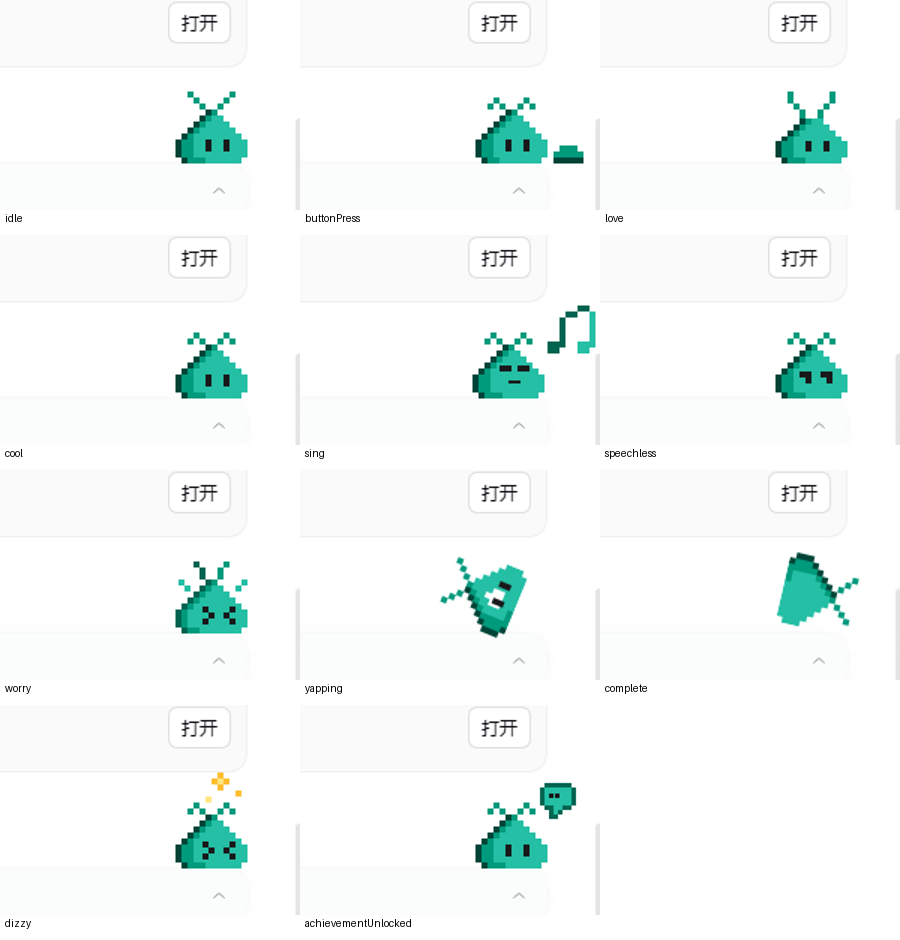
The plugin was exercised in a temporary DSH web profile with headless Chrome: idle/typing/thinking/
clapping/sleep/reactions, drag and throw, despawn/respawn, the context menu, both customization
tabs, hat and color selection, Color Customization unlock, and the jump game. docs/states.png is the
state matrix and docs/hats.png / docs/color.png are the customization panels from that
run.
It was then verified in the real Electron desktop profile (not headless): composer-card landings, default spawn, maximize/restore repositioning, rotated wall bounces, capped respawn, and resizing while the pet is airborne. The fall and respawn paths were also compared frame by frame against VS Code 1.144's Blobby on the same machine.
Desktop display was verified in the same Windows Electron profile: the trailing check mark and the
conditional Smart Hide item, the portal/respawn handoff when minimizing and restoring, landing on
the taskbar, throwing without a fall respawn, Smart Hide against a foreground app, double-click
restore, the desktop Hats command opening the existing panel, and the helper exiting when DSH's
host closes its stdin. After the handoff optimizations it was re-checked for the prepared helper
(desktop portal visible within about half a second of clicking away), focus-based switching
(Alt+Tab/click-away), the ~60 fps composition loop during throws, subpixel-exact pet placement
(appliedScreenX equal to the physics position instead of the window's rounded pixel), the exact
DSH grab cursor captured at runtime (byte-identical icon/hotspot), the drag resistance wobble, the
thinking bubble while a turn runs, a taskbar that stays clickable under the pet window, and a desktop
context menu that appears at its final position without a flash.
The 1.2.19 handoff fix was re-checked against the real helper: the shown acknowledgement with a
fresh status.json (showSeq matching, phase starting), /facts right after the start reporting
prepared: false while the helper rested above the taskbar with DSH minimized, and the stop returning
the helper to a prepared phase that /facts reports as prepared: true again.
The 1.2.20 encoding fix was verified with a bundle carrying the Chinese menu labels: the same reuse
show that had timed out after 8 s now acknowledges in 3–6 ms, and eight consecutive minimize/restore
cycles on the real helper reused one prepared session (showSeq 1…6) without a single cold respawn.
The 1.2.21 light menu was compared with the in-window menu on the same screen: enabled text is
#0F1115 in both, disabled text is #81858C in both, and the menu background differs by one unit
(#FBFCFC desktop vs #FAFBFB in-window) because the desktop menu is opaque while the in-window
menu is translucent over the page.
The 1.2.22 changes were verified on the real desktop: a ~15ms burst capture of the pet around the
menu click has no blank frame (1.2.21 lost the pet for one frame), the desktop helper stays on
idle/rendering instead of typing while the composer holds text and DSH is minimized (the
forwarded facts showed hasInput:false while hidden and hasInput:true while focused), and the
probe reported foreground/covered/iconic correctly against a real Notepad window (beside DSH:
uncovered; over the in-window pet: covered; DSH minimized: iconic).
The 1.2.23 bubble anchor was measured in the live chat at the default size: with the pet resting at
top 644 and the composer card at 692, the status divider sits at 637 and the bubble's visible top
lands on 637 as well (0.00px offset; the screenshot's divider row and bubble top edge are the same
row). The anchor is computed from the divider rect, so it follows a different window/font layout and
re-runs on scroll/resize instead of assuming a fixed offset.
The 1.2.24 wake fix was exercised on the live pet in both placements. In the DSH window the
data-state timeline after a real mouse click is sleep → waking (880ms) → idle, and a burst
capture of the pet confirmed the rendered sprite changed for the waking frames. With the desktop
helper shown (DSH minimized) the helper's status.json sampled around the click shows the same
sleep → waking → idle sequence, so both placements play the shake-then-wake animation.
The 1.2.25 constant-size fix was verified by sampling the helper's status.json window rect across
state changes: a sleeping pet clicked into waking and back to idle keeps 208×112 throughout
(previously 136×112 → 112×112), and clicking an idle pet into the wide cool state also keeps
208×112. The rendered buddy-waking frames were also compared pixel-by-pixel with the official
buddy-waking-*.spritesheet.png: the port's frames are a faithful recolor (the same pixels, with
the body/shadow palette from VS Code's own chatPetColors.ts). The thin dark line at the body's
side during the shake is the official 1px shadow outline (source color #004e7c), which the
palette maps to #808080 for the White preset because VS Code itself uses body.darken(0.5);
it is not an added border, and it stands out most with a white body. The port keeps that behavior
to stay faithful to the original; choosing a saturated color preset makes the shadow blend again.
The helper's geometry, physics and state-machine self-test runs in the test suite.
Comments
Loading…
Similar plugins
by youzhoujiMrLiu
Codex-compatible desktop pet for the DeepSeek Harness web GUI: animated pets that follow the agent state|兼容 Codex 格式的 DSH 桌面宠物:随智能体状态变化的动画宠物
★ 0
MIT
TypeScript
Aug 16, 2026
dsh plugin --profile web add dsh-codex-compatible-petby YangShen-SWE
A Windows desktop pet for official DeepSeek API balance, usage, and animated reactions in DSH.
★ 8
NOASSERTION
PowerShell
Oct 21, 2026
dsh plugin --profile web add dsh-plugin-simple-petby cakeni
Harness Pet — an unofficial community pet for DeepSeek Harness. Not affiliated with, endorsed by, or maintained by DeepSeek.
★ 6
MIT
TypeScript
Aug 14, 2026
dsh plugin --profile web add harness-petby theskywilldawn
Adds a stamina-bar desktop pet to every DeepSeek Harness session — two bars in the session header for context and alertness, plus a draggable whale-girl who can be poked, petted and dressed up.
★ 4
↓ 1.6k/wk
JavaScript
Oct 28, 2026
dsh plugin --profile web add dsh-stamina-petby hasan-aghayev
Floating desktop pet for DeepSeek Harness with a growing local pet library
★ 0
NOASSERTION
JavaScript
Sep 23, 2026
dsh plugin --profile web add dsh-pet-companionby c-ling
DeepSeek Harness 桌面电子宠物插件:跟随 agent 状态变换心情的内置/自定义/Codex 精灵图伙伴。
★ 4
↓ 80/wk
MIT
JavaScript
Oct 22, 2026
dsh plugin --profile web add dsh-plugin-pet