
dsh-bilibili-note
Manifest valid把 B站视频链接变成 Obsidian 结构化笔记的 DSH 技能插件:只拉字幕、不下载视频,机械环节写死、判断环节交给模型。
bilibili-note
DSH plugin packaging of
3588834014-del/bilibili-note.This repository is the plugin edition: the upstream project plus a DeepSeek Harness bundle wrapper (
package.json/cordis.patch.yml/lib/index.js). The original skill + CLI lives upstream — use that one if you don't need to install it as a dsh plugin. GitHub does not allow forking a repository into the same account, so this is a derivative copy rather than a fork-network fork.
Turn Bilibili videos into structured Obsidian notes — subtitles only, never the video.
中文说明见 README.zh-CN.md。


A small CLI — plus an optional agent skill — that turns a Bilibili video into a structured
Markdown note in your Obsidian vault. It downloads only the subtitle file (--skip-download),
cleans the timestamps, and writes a note with YAML front matter, a summary section, bullet
points carrying clickable ?t= jump links, and the full transcript collapsed at the bottom.
The repetitive half (fetch, parse, format, verify) is a script. The judgment half (summary, key points, tags) is left as a documented contract you or an agent fill in.
Bilibili URL ──▶ fetch ──▶ manifest.json ──▶ [you / agent] ──▶ content.json ──▶ write ──▶ note.md
                  │         subtitles +                      summary, bullets,       │
                  │         timestamped segments             tags                    │
                  └── yt-dlp, subtitles only ────────────────────────────────────────┘
Real output
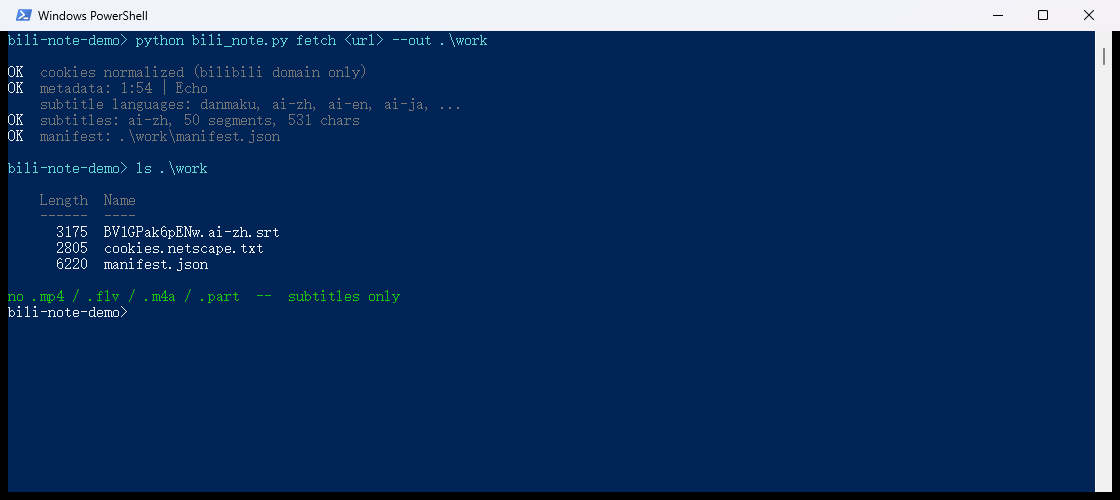
fetch on a real video — note what is not there: no .mp4, .flv, .m4a or .part,
only the subtitle file and its manifest.
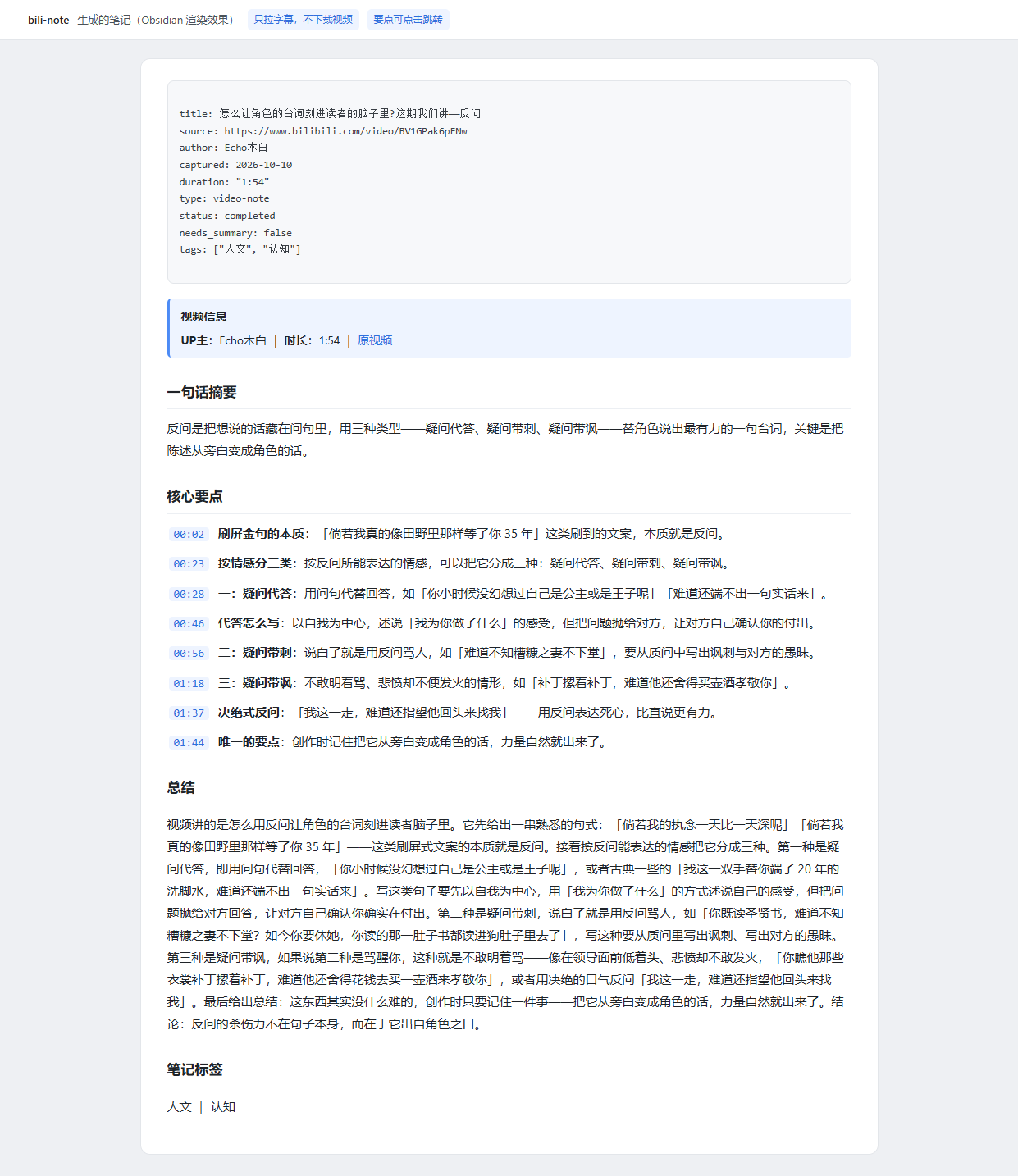
And the note it produces (Obsidian rendering — front matter, clickable ?t= jump links,
summary, bullets, tags). Screenshot taken from a real run, not a mock-up:
Why this one
- Subtitles only.
--skip-downloadis mandatory, and the tool verifies no media file (.mp4/.flv/.m4a/.part) landed in the working directory. No reverse-engineering, no private APIs — justyt-dlp. - Multi-part videos are merged. For an anthology (B站 分P 合集) it fetches every part's subtitles and rebases the timestamps onto one continuous timeline. Verified on a real 6-part anthology: 2:10:32 → 2807 segments / 33214 characters, matching an independent concatenation segment-for-segment. A part with no subtitles is skipped while keeping its time slot, so later timestamps stay correct.
- It refuses to produce garbage. If two parts yield byte-identical subtitles, it errors out instead of silently emitting a note whose content is one part repeated N times. (That exact bug shipped during development and was caught by this guard.)
- No subtitles? It skips and tells you. It never fabricates content or writes an empty note.
Install
No dependencies — standard library only. yt-dlp is an external command, not a Python package.
As a DSH plugin (recommended for DeepSeek Harness)
dsh plugin --profile web add github:3588834014-del/bilibili-note-plugin
This is a bundle plugin that registers the bilibili-note skill straight into the DSH skill
catalog — no manual copying into ~/.agents/skills. Restart your profile afterwards and the
skill is available; the model picks it up from phrases like 「B站笔记」 or a pasted BV link.
The plugin ships its own copy of scripts/bili_note.py, docs/ and SKILL.md, and rewrites
the <skill-dir> placeholders in the skill body to the absolute install path, so the model
never has to guess where the script lives. Uninstall with
dsh plugin --profile web remove dsh-bilibili-note.
There is no npm package yet, so this plugin is source-installed — it is listed on dsh-plugin.org but will not appear in the in-app plugin store. pnpm ≥10 may ask you to allow the git dependency's build script; this package has no
preparescript, so nothing runs at install time.
As a standalone CLI
pipx install git+https://github.com/3588834014-del/bilibili-note.git
# or
git clone https://github.com/3588834014-del/bilibili-note.git
cd bilibili-note && python -m pip install .
Then:
bili-note --version
bili-note note "https://www.bilibili.com/video/BVxxxxxxxxx" \
    --note-dir ~/MyVault/Sources/Videos
As a plain agent skill (no plugin)
python scripts/install.py            # installs to ~/.agents/skills/bilibili-note
python scripts/install.py --dry-run  # show what would be copied
The skill then appears in the dsh skill catalog and can be triggered with phrases like
「B站笔记」. The plugin, the skill-file install and the CLI all share the same implementation
(scripts/bili_note.py).
Requirements
| Requirement | Notes |
|---|---|
| Python 3.8+ | stdlib only |
yt-dlp | pip install -U yt-dlp — the only download channel |
| Bilibili login cookies | Required for AI subtitles; see below |
DSH >=0.2.0-rc.2 <0.3.0 | Only for the plugin/skill route |
Permissions and external services
Worth knowing before you install, since this tool touches the network and your vault:
- Network: talks to
bilibili.comthroughyt-dlponly. It downloads subtitles, never video or audio (--skip-downloadis mandatory and verified). - Credentials: reads a Bilibili cookie file from
$BILI_COOKIESor./cookies.txt. It writes a normalized temporary copy next to the work dir for yt-dlp; it never uploads, logs, or commits cookies. - Filesystem: writes notes into the
--note-diryou pass, plus a scratch work directory. Nothing outside those two paths is modified. - No telemetry, no extra dependencies, no reverse-engineered APIs.
Cookies (required)
Bilibili's AI-subtitle endpoint needs an authenticated session.
- Install the Get cookies.txt LOCALLY browser extension.
- Log into bilibili.com.
- Export
cookies.txt. - Put it in your working directory, or point at it:
export BILI_COOKIES=/path/to/cookies.txt      # Linux / macOS
$env:BILI_COOKIES = "C:\path\cookies.txt"     # PowerShell
Videos where the uploader supplied their own subtitles may work without this.
⚠️ Why you can't feed the export straight to yt-dlp
This is the single most surprising thing in this repository. That extension writes lines like:
.bilibili.com FALSE / FALSE 1819635894 SESSDATA xxxxx
The domain carries a leading dot, yet the host-only flag in column 2 is FALSE. Python's
http.cookiejar asserts:
assert domain_specified == initial_dot
The mismatch raises, and yt-dlp refuses to load the entire file:
ERROR: invalid Netscape format cookies file '...': '.bilibili.com\tFALSE\t/...'
The practical symptom is nasty: subtitles never arrive, and the error looks like
"this video has no subtitles." The fix is normalization — strip the leading dot and set the
flag to FALSE (a host-only cookie is still sent to api.bilibili.com and friends, so the
session is preserved). normalize_cookies() does this, plus filters to the bilibili domain
and de-duplicates by domain/path/name. You never have to do it by hand.
Output directory
Nothing is hard-coded. Pick either:
bili-note note "<URL>" --note-dir "<vault>/Sources/Videos"    # explicit

export BILI_VAULT="/path/to/MyVault"                           # or environment
export BILI_TARGET_DIR="Sources/Videos"                        # optional, this is the default
Deliberately no built-in default vault path: hard-coding one "looks right" path silently creates an empty directory on someone else's machine, and notes vanish into it.
Usage
# fetch metadata + subtitles (subtitles only, never the video)
bili-note fetch "<URL>" --out ./work

# write the note straight from an existing work dir
bili-note write --work ./work --note-dir "<vault>/Sources/Videos" --content-file content.json

# one shot: fetch + write
bili-note note "<URL>" --note-dir "<vault>/Sources/Videos" [--content-file content.json]

# structural self-check
bili-note verify --note "<note path>"

# environment self-check: cookies / yt-dlp / output dir (no network)
bili-note selftest
selftest answers the question you will actually ask — "why did I get no subtitles?" —
before you blame the code:
  ✓ cookie file: /home/me/cookies.txt
  ✓ has SESSDATA login: ...
  ✓ yt-dlp: /usr/local/bin/yt-dlp
  ✗ output dir: not configured (pass --note-dir, or set BILI_VAULT/BILI_TARGET_DIR)
fetch walks you through each step:
✓ cookie normalized: ... (33 bilibili cookies)
✓ metadata: <title> (<uploader>) | 12:34
  subtitle languages: danmaku, ai-zh, ai-en
✓ subtitles: ai-zh, 134 segments, 1625 chars
✓ manifest: /path/to/work/manifest.json
content.json — the judgment half
{
  "summary": "One sentence, 60-120 chars, conclusion first.",
  "body": "200-400 chars covering the argument and the conclusion.",
  "tags": ["认知", "人文"],
  "cards": ["CC_example"],
  "bullets": [
    {"time": 0,  "title": "Short heading", "text": "One sentence."},
    {"time": 23, "title": "Short heading", "text": "One sentence."}
  ]
}
time is seconds; the tool renders the MM:SS label and the jump link for you.
title and cards are optional. Omit --content-file entirely to get a draft note with
placeholders and status: draft.
What a note looks like
---
title: Video title
source: https://www.bilibili.com/video/BVxxxxxxxxx
author: Uploader
captured: 2026-01-01
duration: "12:34"
type: video-note
status: completed
needs_summary: false
tags: ["认知", "人文"]
---
> [!info] 视频信息
> **UP主**:Uploader | **时长**:12:34 | [原视频](https://www.bilibili.com/video/BVxxxxxxxxx)

## 一句话摘要
…
## 核心要点
|- [00:00](https://www.bilibili.com/video/BVxxxxxxxxx/?t=0s) **Heading**:One sentence.
|- [00:23](https://www.bilibili.com/video/BVxxxxxxxxx/?t=23s) **Heading**:One sentence.
## 总结
…
## 笔记标签
认知 | 人文
## 原始字幕
> [!quote]- 完整字幕(点击展开)
> …cleaned transcript, no timestamps or indices
The
|-prefix on bullet lines looks like a broken table row, and it is — deliberately. A downstream archive checker matches^\|- \[[0-9]{2}:[0-9]{2}\], so standard-list syntax would be rejected. All format constraints and their reasons live in docs/FORMAT.md.
Tests
No network, no cookies required:
python -m unittest discover -s tests -v
108 tests covering SRT parsing and timestamp cleanup (LF/CRLF/BOM, multi-line cues,
over-1-hour offsets, HTML and ASS tags, literal < > in text, zero-width characters,
duplicate rolling captions, empty cues), both timestamp formats, bullet-line contract,
draft-literal contract, cookie normalization, URL normalization (tracking params and ?p=),
anthology timestamp rebasing and subtitle-file selection, duplicate-part detection, on-disk
write and de-duplication, verify positive/negative cases, the CLI wiring, Python
minimum-version compatibility guards, and repository hygiene.
CI runs the same suite on Linux + Windows × Python 3.8/3.10/3.12 — see .github/workflows/ci.yml.
Known limitations
- Bilibili only. Other yt-dlp-supported sites are out of scope.
- Multi-part anthologies are merged and take a while. Two requests per part; a 2-hour
6-part anthology takes roughly 2 minutes. Pass
?p=6to grab a single part instead. Jump links point at{anthology URL}/?t={cumulative}s, so they are exact when playing the anthology as a whole but not when you open one part standalone. That is inherent to merging, not a fixable bug. - Depends on Bilibili's AI subtitles. Videos without subtitles (and without uploader-supplied ones) are skipped. No speech-to-text — this tool deliberately does not pull in ffmpeg/whisper.
- AI subtitles contain recognition errors.
ai-zhis machine-generated and regularly mis-hears or drops words. The rule this project follows: quotes are copied verbatim and not silently corrected; anything recoverable from context is paraphrased without quote marks; anything unintelligible is dropped rather than guessed. SeeSKILL.md§2.6. - Timestamps over 1 hour use total minutes (
[93:31]), notH:MM:SS— deliberate, to match the existing corpus. - ⚠️ Videos longer than 99 minutes trip a downstream checker. Because bullet labels are
total minutes, labels past 100 minutes are 3 digits (
[100:00],[123:49]). A validator using^\|- \[[0-9]{2}:[0-9]{2}\]only accepts 2 digits and will under-count, flagging long videos as "too few bullet points." Measured on the 2:10:32 anthology: 24% of the timeline has 3-digit minutes, first at 100:00. Fix is to widen{2}to{1,3}downstream; this repo's checker does that.verifypasses such notes but prints a warning.
Contributing
Issues and PRs welcome. Read docs/FORMAT.md before touching anything
format-related, and keep python -m unittest discover -s tests green — TestDownstreamContract
exists specifically to pin those contracts down.
License
Comments
Loading…
From the same category
DeepSeek Harness plugin for Reactive Resume: bridges your resumes and job applications into a Harness session over MCP.
★ 41.7k
↓ 164/wk
MIT
Aug 24, 2026
dsh plugin --profile web add dsh-plugin-reactive-resumeby Tencent
Let AI agents use your real, logged-in browser without interrupting your work. CLI + extension for browser automation across any shell-capable AI agent.
★ 9.2k
↓ 6.2k/wk
MIT
TypeScript
Oct 19, 2026
dsh plugin --profile terminal add @wxg-prc-cpg/browser-skill-dsh-pluginby dsh-market
The plugin market inside DeepSeek Harness — browse, search, one-click install · DSH 可视化插件市场
★ 7.5k
↓ 163.6k/wk
MIT
TypeScript
Oct 19, 2026
dsh plugin --profile web add dshmarketby yjh051108
dsh-routing-suite — injector + router-standard kit: install the runtime injector first, then the task-aware reasoning-mode router preset (measured P1-P23).
★ 7k
MIT
JavaScript
Sep 18, 2026
dsh plugin --profile web add @dsh-external/dsh-super-injectorby Q00
Agent OS: the agent gets smarter on its own. We just hold the line: Interview-gated, staged evaluation, budgeted evolution loop. MCP server, 14 runtimes: Claude Code, Codex CLI, Gemini CLI, OpenCode,
★ 6.3k
MIT
Python
Oct 19, 2026
by superdesigndev
OpenRouter for agent tools. Join community here: https://discord.gg/6mQYYfFMAn
★ 5.8k
NOASSERTION
Python
Oct 20, 2026
dsh plugin --profile web add treg-dsh