

dsh-dian-du
DiscoveredReading Pen: Click to select a sentence or code line in the answer, and have the AI explain it in a separate right-hand column. Reading-pen plugin for DeepSeek Harness (DSH).
dsh-dian-du · 点读笔 / Reading Pen
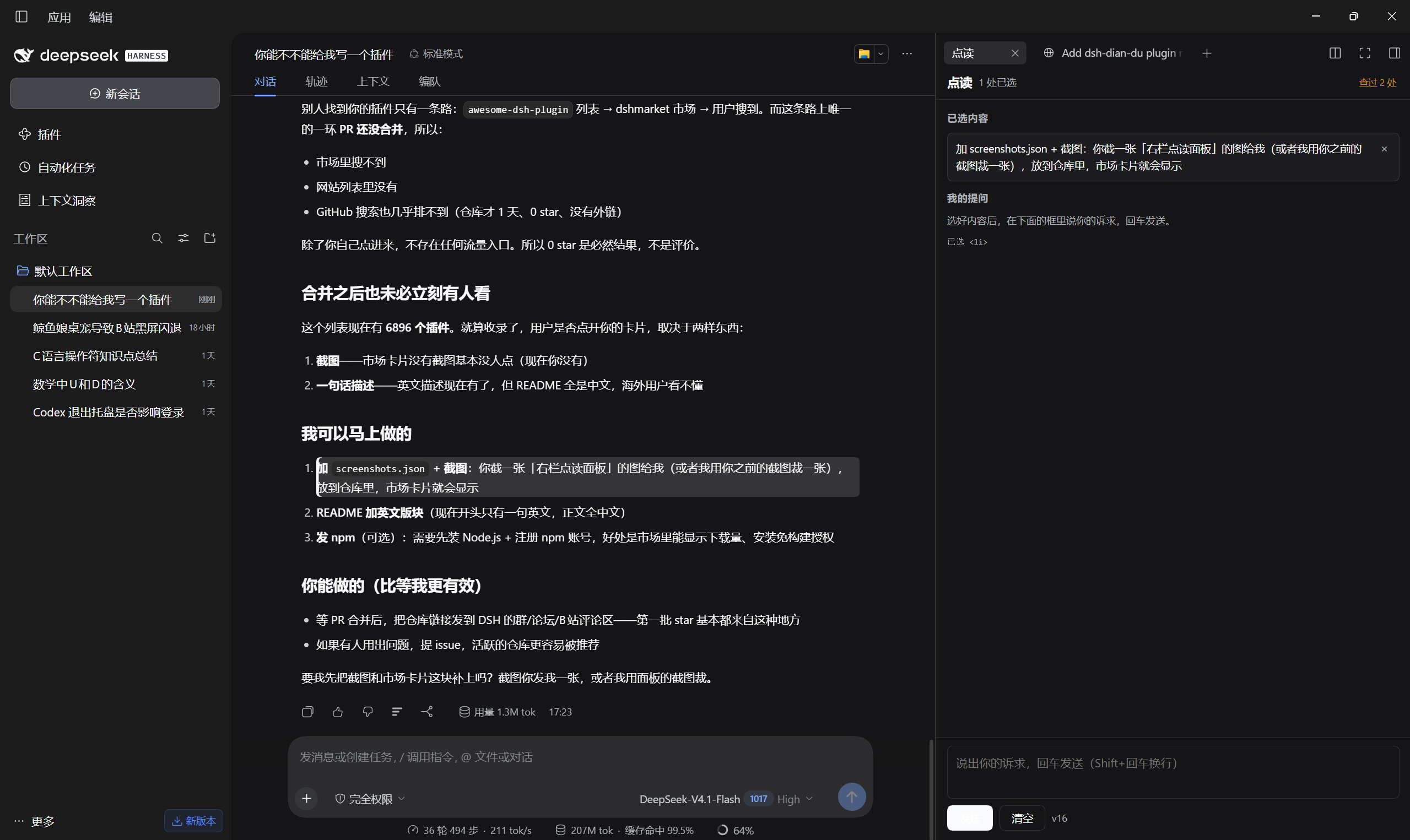
A reading-pen plugin for DeepSeek Harness (DSH). Click a sentence or a single code line in an answer, ask about it, and read the explanation in a docked right-hand column — the conversation itself is never rewritten.
中文说明见下方 中文.
Features
- Pick a passage — click a paragraph, heading, list item or quote to select it; inside a code block, click the exact line you mean.
- Two visual states — blue for the current selection, amber for passages you have already asked about (a trace of "I once got stuck here").
- Docked right column — selecting opens the「点读」tab in DSH's right Sidebar. The conversation narrows instead of being covered.
- Ask there — type in the column's input, press Enter; the explanation appears in that column and the main transcript keeps its original answer.
- Clear quickly — tap
Ctrlonce, orCtrl+click anywhere; 「查过 N 处」 clears all traces. - Same model as the chat — the call follows the conversation's provider/model/reasoning effort, falling back to
high.
Requirements
- DSH
>= 0.2.0-rc.1with the Web/Desktop client (the plugin registers a right-Sidebar tab and a Host command). - A configured model provider — the explanation runs through the same LLM service as the chat.
Install
# Desktop app profile
dsh plugin --profile desktop add github:2404376192/dsh-dian-du

# CLI / web profile
dsh plugin --profile web add github:2404376192/dsh-dian-du
Then quit DSH completely and reopen it — client bundles are scanned at startup only.
Verify: open the right Sidebar; the「点读」tab is there, and its footer shows the plugin version.
Usage
- Click the sentence (or the code line) you do not understand.
- The right column opens with that passage under「已选内容」.
- Type your question under「我的提问」and press Enter.
- Read the explanation in the same column; the left conversation is untouched.
How it works
| Part | Role |
|---|---|
client.js | Selection, highlighting and the right-column panel; registers into sidebar.right.pane.tab, with a shell.overlay fallback |
index.js | Host half: registers the /dian-du command and calls ctx.llm.stream |
| Flow | panel → ctx.remote.session.create (a dedicated side session) → ctx.remote.commands.execute('/dian-du …') → text rendered in the column |
cordis.patch.yml | Bundle patch; provider, model, reasoningEffort can be overridden here |
Model calls happen on the Host: the browser never sees an API key, and explanations are not appended to the main conversation's log.
Known limitations
- The main composer belongs to the main conversation. Messages sent there are answered on the left; to keep the explanation on the right, use the right column's input.
- DSH scans client bundles only at startup, so updating the plugin requires a full restart.
- Traces and selections are keyed by message node plus position; if an answer is regenerated, old traces no longer attach to it.
Development
npm test        # node test/host.test.mjs && node test/client.test.mjs
node --check client.js && node --check index.js
client.js            browser half: selection, highlight, right-column panel
index.js             host half: /dian-du command, model call
cordis.patch.yml     bundle patch and provider/model configuration
locale/{zh,en}.json  plugin list title and description
icon.svg             plugin icon
assets/              screenshots
License
MIT
中文
DeepSeek Harness(DSH)插件:在对话里点一下 AI 回答中的某个句子或代码行,然后在右侧独立栏里提问,让模型专门解释这一处。左侧原始回答不改动、不新增消息。
功能
- 点选:点段落 / 标题 / 列表 / 引用切换选中;代码块里点哪一行就选哪一行
- 两种颜色:蓝色是当前选中,琥珀色是问过的痕迹(这里曾经不会)
- 右侧栏:选中后自动展开「点读」标签,左侧对话被挤窄,不遮挡
- 提问:右栏底部输入诉求,回车发送,解释出现在右栏,左侧保持原样
- 清空:轻按一下
Ctrl,或Ctrl+ 点击任意位置;「查过 N 处」可清空全部痕迹 - 跟随当前模型:provider / model / reasoning effort 跟随对话,兜底
high
安装
# 桌面端
dsh plugin --profile desktop add github:2404376192/dsh-dian-du

# 命令行 / web
dsh plugin --profile web add github:2404376192/dsh-dian-du
装完完全退出 DSH 再打开(客户端 bundle 只在启动时扫描)。
使用
- 点一下想弄懂的句子(或代码块里的一行)
- 右栏「点读」自动展开,选中的内容显示在「已选内容」
- 在「我的提问」输入框里说诉求,回车
- 解释出现在右栏,左侧对话不动
原理
| 部分 | 说明 |
|---|---|
client.js | 点选、高亮、右栏面板;注册到 sidebar.right.pane.tab,另有 shell.overlay 兜底 |
index.js | Host 半边:注册 /dian-du 命令,用 ctx.llm.stream 调模型 |
| 调用链 | 面板 → ctx.remote.session.create(独立「点读」会话)→ ctx.remote.commands.execute('/dian-du …') → 文本回显在右栏 |
cordis.patch.yml | bundle 补丁;provider / model / reasoningEffort 可在这里改 |
模型调用只走 Host,浏览器端不接触 API key,解释也不会写进主对话的会话日志。
已知限制
- 主输入框属于主对话,发出去的内容由左侧回答;要解释只在右边,请用右栏底部的输入框
- DSH 只在启动时扫描客户端 bundle,更新插件必须完全退出再打开
- 痕迹和选中按「消息节点 + 位置」记录,回答被重新生成后旧痕迹挂不上
开发
npm test
node --check client.js && node --check index.js
许可
MIT
Comments
Loading…
Similar plugins
by yxue301603
DeepSeek Harness 原生插件 · 选文操作 · 选中回答后引用追问、解释或翻译,预览后填入草稿。
★ 0
MIT
JavaScript
Oct 25, 2026
dsh plugin --profile web add dsh-selection-actionsby 904915452
DeepSeek Harness plugin: configurable keyboard shortcuts (settings UI + input history + approval/plan hotkeys)
★ 0
MIT
JavaScript
Aug 17, 2026
dsh plugin --profile web add @zhangqingyu/dsh-keyboard-shortcutsby drscrewdriver
给 DeepSeek Harness 侧边栏加一个会话内容检索——标题/内容一键切换,还能按用户/回复/工具筛选
★ 4
↓ 290/wk
MIT
TypeScript
Oct 18, 2026
dsh plugin --profile web add dsh-session-search-toggleby hg1048596-pixel
DeepSeek Harness (DSH) 插件:在模型读取前撤回已发送的文字消息,支持单条与全部撤回。A DeepSeek Harness plugin that recalls sent-but-unread text messages before the model reads them — one-by-one or all at once.
★ 126
↓ 266/wk
MIT
JavaScript
Oct 3, 2026
dsh plugin --profile web add dsh-recall-unreadby saibei404
DeepSeek Harness 提示词优化插件:输入框旁一键把草稿改写成清晰可执行的提示词(DeepSeek V4.1 Flash)
★ 0
JavaScript
Oct 24, 2026
dsh plugin --profile web add dsh-prompt-polishby joeseesun
在 DeepSeek Harness 中阅读 RSS,与原生 AI 对话伴读文章 | RSS reading with native AI companion for DeepSeek Harness
★ 46
GPL-3.0
JavaScript
Oct 19, 2026
dsh plugin --profile web add qiaomu-rss-dsh