
dsh-chat-search
Manifest validFind text inside the open conversation with Ctrl+F: matches are highlighted in the message text, previous/next step through them, clicking the count lists the matches and jumps to any of them, and the
对话内查找 · dsh-chat-search
DeepSeek Harness 的对话内搜索插件。 按 Ctrl+F 就能在当前对话里查找关键词:正文高亮、上一个/下一个、命中位置列表,计数边搜边涨——而且不展开任何折叠块,不改变你正在看的位置。
English | 简体中文
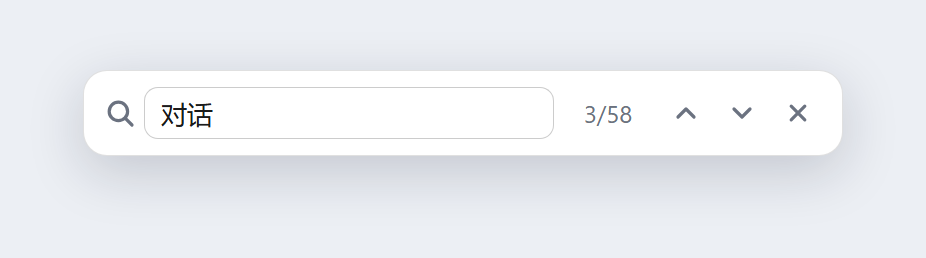
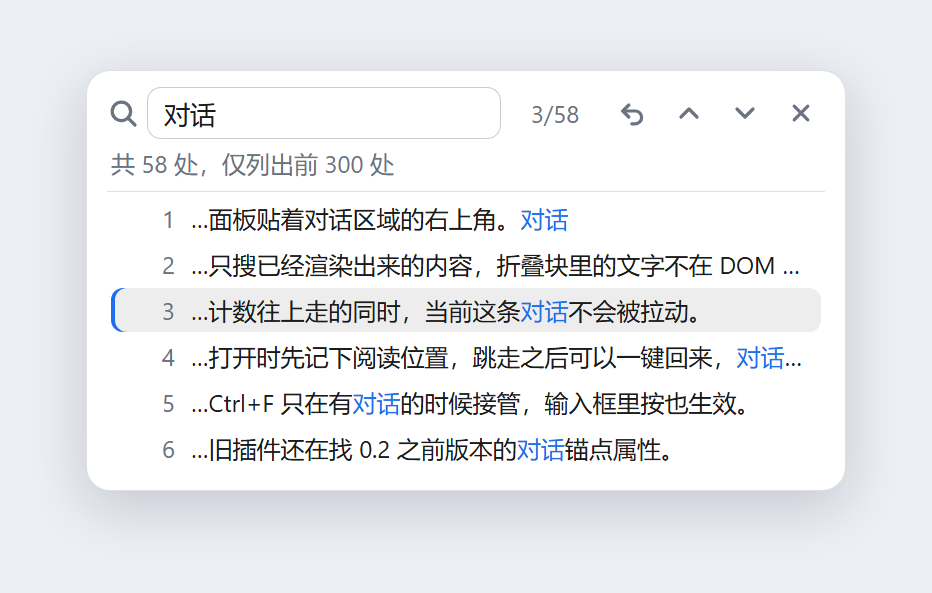
图为插件面板的界面预览(用插件自己的样式表渲染),不含任何真实对话内容。
为什么还要一个
Harness 本身没有对话内查找,Ctrl+F 交给浏览器后什么也不会发生;插件市场里的同类插件装上却用不了,因为它定位聊天内容靠的是 data-chat-anchor-key、data-chat-node-key、data-chat-turn 这类属性——这些属性在 0.2.x 的会话视图里已经不存在了(现在只有 data-conversation-region、data-conversation-scroll、data-conversation-session)。锚点找不到,跳转就永远是空的。
这个插件按现在的 DOM 契约重写,顺手把「搜索时的打扰感」也一起去掉了:
| 浏览器原生查找 | 老插件 | 本插件 | |
|---|---|---|---|
| 只在对话里搜(不含输入框/侧栏) | ❌ | ✅ | ✅ |
| 正文高亮 | ❌ | 只闪整条消息 | ✅ 按字符高亮 |
| 上一个 / 下一个 | ❌ | ✅ | ✅ |
| 不展开折叠块、不移动阅读位置 | — | ❌ 会展开全部 | ✅ |
| 计数随扫描实时增长 | — | ❌ 一次性阻塞 | ✅ |
| 首个命中就在你附近 | — | ❌ 从对话最顶上开始 | ✅ |
| 中文输入法合成时不误搜 | — | ❌ | ✅ |
| 点击面板外不关闭 | — | ❌ 点就关 | ✅ |
功能
Ctrl+F随时唤起——包括光标停在输入框里的时候(不再弹浏览器原生查找栏);已经打开时再按一次 = 聚焦并全选。- 边搜边涨的计数:扫描分片进行(每帧约 900 个节点 / 8ms),长对话也不会把界面卡住,数字一路往上走。
- 正文高亮:用 CSS Custom Highlight API 画 Range,不往 React 的 DOM 里插
<mark>,所以不会触发重排、不会和宿主抢节点。 - 上一个 / 下一个:
Enter/Shift+Enter,到尽头自动回绕。 - 首个命中 = 离你最近的那处:以当前视口顶部为锚,从近到远找第一个匹配,只有不可见时才滚动,且只滚到"刚好看得见"。
- 命中位置列表:点击计数展开全部命中(最多 300 条),每条带片段,命中词标蓝,点哪条跳哪条。
- 回到搜索前的位置:跳走之后点
⟲,一键回到开始搜索时的阅读位置(锚的是元素而不是滚动像素,所以中途加载历史也不会偏)。 - 不打扰:不展开折叠块、不改动对话内容;点面板空白处、点聊天区都不会关;
Esc才关,并且把焦点还给打开前的元素。 - 顺手补历史:开头会按需加载更早的消息(最多 80 页 / 12 秒),加载不完会在面板里说明"只搜索了已加载的部分"。
- 跟随主题:只用
--dsw-alias-*主题 token,明暗主题自动适配。
快捷键
| 按键 | 作用 |
|---|---|
Ctrl+F / Cmd+F | 打开搜索;已打开则聚焦并全选 |
Enter / ↓ 按钮 | 下一个命中 |
Shift+Enter / ↑ 按钮 | 上一个命中 |
Esc | 退出搜索,焦点还回原处 |
点击 3/58 | 展开 / 收起命中位置列表 |
安装
需要 DeepSeek Harness 桌面版(0.2.x)。装完刷新页面即可生效,不用重启应用。
方式 A:插件安装器(最省事)
在 Harness 的 插件 → 添加插件 输入框里粘地址。国内网络优先用下面这条——它走 jsDelivr CDN,不需要代理,实测 2 秒装完:
https://cdn.jsdelivr.net/gh/1834395550/dsh-chat-search@main/dist/dsh-chat-search-1.0.1.tgz
能直连 GitHub 的话,仓库地址或 Release 包也行:
git+https://github.com/1834395550/dsh-chat-search.git
https://github.com/1834395550/dsh-chat-search/releases/download/v1.0.1/dsh-chat-search-1.0.1.tgz
⚠️ 国内网络直接用 GitHub 地址会报错:GitHub 的 Release 下载会重定向到
objects.githubusercontent.com,这个域名在境内被重置,而安装器对 GitHub 地址和.tgz直链不走镜像源(必须本机直连),于是报「无法连接 github.com……需要本机能直接访问它或配置代理」。这不是包本身的问题——开代理,或者改用上面的 jsDelivr 地址即可。
填包名
dsh-chat-search现在还不行:包还没发到 npm。发布之后这条会成为最快的安装方式。
方式 B:放进 profile(本地开发也走这条)
git clone https://github.com/1834395550/dsh-chat-search.git
然后在 profile 的 package.json(%USERPROFILE%\.dsh\profiles\<profile>\package.json)里加一条依赖和一条 bundle:
{
  "dependencies": {
    "dsh-chat-search": "file:D:/path/to/dsh-chat-search"
  },
  "dsh": {
    "profile": {
      "bundles": ["...", "dsh-chat-search"]
    }
  }
}
再让 Harness 装一次依赖(下次启动会自动装;也可以在该目录执行 pnpm install),刷新页面。
方式 C:Release 预构建包(插件市场装的就是这个)
https://github.com/1834395550/dsh-chat-search/releases/download/v1.0.1/dsh-chat-search-1.0.1.tgz
把它交给插件安装器即可,不经过源码构建、不需要 allowBuilds 授权。
插件市场(
dshmarket)只列出社区精选目录awesome-dsh-plugin里的条目,自己仓库的包搜不到——所以本仓库已经按目录的收录要求整理好了(package.json里的dsh.bundle清单、根目录的screenshots.json、assets/下的位图图标、Release 上的预构建 tarball)。收录后就能在 插件 → 市场 里搜search找到并一键安装。
⚠️ 与同名旧插件冲突:社区里另一个也叫
dsh-chat-search的包(helo060228/dsh-chat-search)用的是同一个包名。装本插件前请先把旧的那条依赖和 bundle 删掉,否则 npm 会直接覆盖,且两个 bundle 会在同一个 overlay 槽里抢Ctrl+F。
它怎么工作
- 找到对话:
[data-conversation-region="chat"]就是聊天区,滚动容器是[data-conversation-scroll];[data-conversation-region="composer"](输入框那一块在 chat region 里面)整个剪掉,所以搜不到自己正在写的字。 - 把文本拼成块:手写一个走树的 walker,把文本节点按"最近的非行内祖先"分组拼成字符串——所以短语即使跨了
<code>、<span>、加粗,也能整句命中;script/style/svg/hidden一律跳过。 - 分片扫描:walker 每帧只走约 900 个节点或 8ms,匹配结果攒够一批再交给界面,计数因此是"涨"出来的而不是等出来的。
- 高亮:每个命中造一个
Range,丢进CSS.highlights(全部命中一个集合、当前命中另一个集合,优先级更高),配色写在组件内的<style>里。 - 定位:用
elementFromPoint取视口顶部那块节点当锚,compareDocumentPosition找到第一个"在锚之后"的命中;滚动时由外到内逐个滚动容器校正,只做最小位移。 - 输入法:
compositionstart/end+isComposing+keyCode 229三重判断,合成期间不搜索、不响应Enter/Esc,落字之后才搜一次。
限制(都是有意为之)
- 折叠块里的文字搜不到:Tool 调用、思考过程、被折叠的长输出都是条件渲染,内容根本不在 DOM 里。想要搜到它们只能先点开——而这正好会改变你的阅读位置,与"无痕"冲突,所以不做。需要的话可以后续加一个默认关闭的「包含折叠内容」开关。
- 命中上限 3000、染色上限 1200、位置列表 300 条(再多也没有意义,读不过来)。
- 更早的历史最多补 80 页 / 12 秒,超出会显示"只搜索了已加载的部分"。
- 需要 CSS Custom Highlight API(Chromium 105+,Harness 桌面版满足);不支持时仍能定位跳转,只是不染色。
- 绑定宿主 DOM 契约:依赖
data-conversation-*这几个属性。Harness 大版本改了结构就需要更新插件(这也是老插件坏掉的原因)。
文件结构
client.js         # 全部功能:扫描、高亮、面板(React 组件 + CSS)
index.js          # Host 半,空实现(本插件纯前端)
cordis.patch.yml  # 把 bundle 插进 profile
locale/zh.json    # 插件信息(名称/简介)
locale/en.json
icon.svg
screenshots/      # README 里的界面预览
没有构建步骤、没有第三方依赖:client.js 是一个 window.__ModuleLoader__.load({...}) 的工厂函数,React 从宿主模块表里 require('react') 拿。
开发
- 改
client.js后刷新页面就生效(插件以file:链接进 profile 时不需要重装)。 node --check client.js做语法检查。- 插件通过
ctx.slots.register({ name: 'shell.overlay', id: 'dsh-chat-search', order: 60 }, FindOverlay)挂到全屏浮层槽位,浮层本身 click-through,只有面板自己接收鼠标事件。
许可证
MIT © 1834395550
Compatibility
Versions
| Latest version | Published | Size |
|---|---|---|
| 1.0.1 | — | — |
Comments
Loading…
Similar plugins
by Ernesto-yuan
A floating in-conversation find bar docked over the DSH composer (Ctrl/⌘+F or the magnifier beside the input): hits list with a match counter as you type, Enter jumps to the next hit, hovering a hit p
★ 0
MIT
JavaScript
Oct 28, 2026
dsh plugin --profile web add dsh-conversation-toolsby Ryuu-64
DSH web plugin: a Cmd/Ctrl+F find bar for the DeepSeek Harness desktop shell that searches the WHOLE conversation, not just the rendered tail.
★ 6
MIT
JavaScript
Oct 27, 2026
dsh plugin --profile web add dsh-find-allby secyborg
Browser-style in-page find bar (Cmd/Ctrl+F) for the desktop app, with highlight-all, a match counter, and a scope picker for the conversation or the right panel.
★ 1
MIT
JavaScript
Oct 24, 2026
dsh plugin --profile web add dsh-find-barby beijingwahw
dsh-conv-search(对话内文本搜索)— in-conversation text search plugin for DeepSeek Harness (Ctrl+F, match case, whole word, streaming-aware)
★ 3
MIT
TypeScript
Aug 22, 2026
dsh plugin --profile web add @dsh-external/dsh-conv-searchby latte03
Select text in the dsh web conversation to attach it as an annotation to your next message. The source text keeps a dashed highlight with an ordinal badge in place, and the composer summary lists, edi
★ 3
MIT
TypeScript
Oct 29, 2026
dsh plugin --profile web add dsh-select-quoteby zzx-dear
Select any text in a DSH chat reply to get a floating Follow-up/Copy pill: one click quotes the selection into the composer so you can type your own follow-up question, or copies it.
★ 0
MIT
JavaScript
Aug 18, 2026
dsh plugin --profile web add dsh-selection-followup