

dsh-mysql
Manifest valid★ 7MySQL connector plugin for DeepSeek Harness: configure connections in settings, switch per session from the composer, and expose mysql_query/mysql_tables/mysql_execute tools to every agent preset.
dsh-mysql
MySQL connections and guarded database tools for DeepSeek Harness
Configure connections once, choose one per conversation, and let your agent inspect or query the selected database.


English | 中文
dsh-mysql is a profile bundle for DeepSeek Harness (DSH). It adds a settings page for multiple MySQL connections, a per-session connection picker beside the composer, and three guarded tools that every agent preset can use. No preset edits are required.
Data boundary: connection settings and passwords stay in your local DSH storage. Database schema and query results are sent to the LLM provider as ordinary tool output when the agent uses a database tool.
At a glance
| Surface | What it provides |
|---|---|
| Settings → MySQL 数据库 | Add, edit, delete, and test connections. Configure host, port, user, password, default database, table scope, and write permission. |
| Composer database button | Choose the connection for the current session. The selection is shown beside the input and can be changed at any time. |
| Agent tools + runtime context | mysql_tables, mysql_query, and mysql_execute, plus a per-turn context snapshot describing the selected connection and readable tables. |
Features
- Multiple connections: keep separate development, staging, or production data sources in one DSH installation.
- Per-session selection: changing the connection in one conversation does not silently switch another conversation.
- Schema-first workflow:
mysql_tablesexposes readable columns, types, nullability, keys, and comments before a query is written. - Read-only by default: write access is an explicit per-connection setting and is disabled by default.
- Local-first configuration: the browser receives a safe connection view with
hasPassword, never the stored password. - No preset changes: the tools are registered globally by the profile bundle and are available under every agent preset.
Agent tools
| Tool | Accepted input and behavior |
|---|---|
mysql_tables | Lists columns from the selected database through information_schema. Optional table filtering is case-insensitive. Results respect the configured table allowlist. |
mysql_query | Executes one read-only SELECT, SHOW, DESCRIBE/DESC, or EXPLAIN statement with optional ? parameters. It rejects multi-statement SQL, applies the table-scope check, and returns up to 2,000 serialized rows with a truncated flag. A MAX_EXECUTION_TIME(15000) hint is added to leading SELECT statements. |
mysql_execute | Executes one INSERT, UPDATE, or DELETE statement with optional ? parameters. It requires allowWrite: true; DDL, transaction-control statements, multi-statement SQL, and other statement types are rejected. |
A typical read-only request is:
Use mysql_tables to inspect the available schema first, then use mysql_query to answer my question. Do not modify data.
Requirements and compatibility
- A DSH installation with the Web profile and Node.js 20 or newer.
- A MySQL-compatible server reachable through the configured TCP host and port.
- The connection form currently supports host, port, username, password, default database, table allowlist, and write permission. It does not expose SSL/TLS, Unix socket/named-pipe, or charset options.
- The
MAX_EXECUTION_TIMEoptimizer hint is intended for MySQL versions that support it (MySQL 5.7.8+). MariaDB may handle this hint differently;SHOW,DESCRIBE, andEXPLAINdo not receive the hint. mysql_tablesdiscovers tables inDATABASE(). Configure a default database if you want schema discovery; a connection without one can return an empty table list.
Install, update, or remove
Install from GitHub
dsh plugin --profile web add github:1321928757/dsh-mysql#v0.1.11
Install from npm
Use this after dsh-mysql is available in the npm registry:
dsh plugin --profile web add dsh-mysql
PowerShell installer
The repository also provides a Windows installer that checks for dsh, prepares a pinned pnpm helper under %USERPROFILE%\.dsh-tmp, and installs the selected GitHub tag into the web profile:
irm https://raw.githubusercontent.com/1321928757/dsh-mysql/v0.1.11/scripts/install.ps1 | iex
After installation, restart dsh web. Then open Settings → MySQL 数据库, add and test a connection, and select it from the database button beside the composer.
Verify that the bundle is in the profile:
dsh --profile web --dump-config | findstr dsh-mysql
Remove it with:
dsh plugin --profile web remove dsh-mysql
Update or install from a local checkout
Update the installed package from GitHub:
dsh plugin --profile web update dsh-mysql@latest
For local development, install the checkout or a packed tarball into a separate profile first:
dsh plugin --profile demo add E:\path\to\dsh-mysql
dsh --profile demo --dump-config
Quick start
- Open Settings → MySQL 数据库 and click 添加连接. Fill in the host, port, username, password, and default database. Optionally add readable table names and enable write permission only when needed. Test the connection, then save it.
- Open a conversation and click the database button on the left of the composer. Select a connection for that session. If exactly one connection exists, it is selected automatically.
- Ask a database question. The agent can inspect the schema with
mysql_tables, read withmysql_query, and usemysql_executeonly for an explicitly writable connection.
Screenshots
The screenshots below were captured from the real DSH Web shell with the plugin loaded. Connection names and account names in the settings example are illustrative; passwords are not shown.
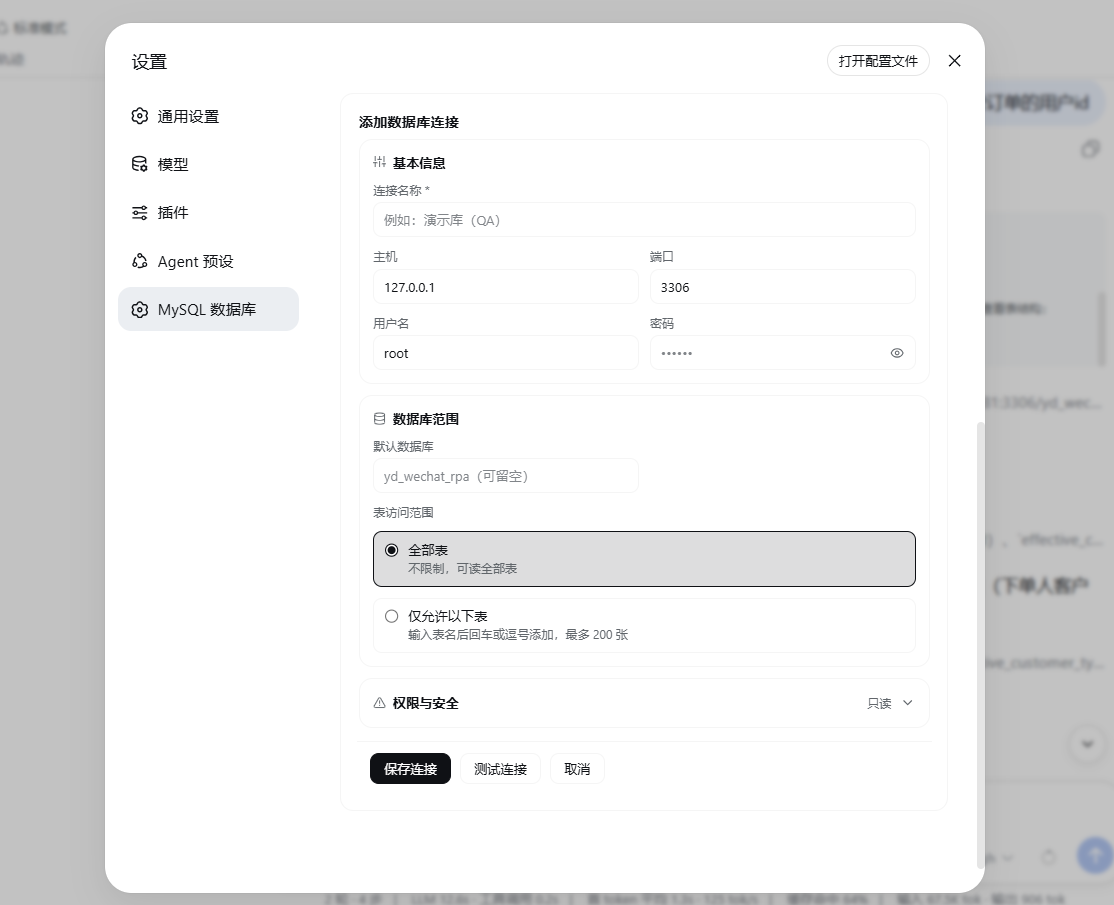
Configure a connection
The settings page groups connection details, database scope, and permissions. Read-only is the default. The add-connection form keeps 保存连接 as the primary action, while 测试连接 remains a quieter secondary action.
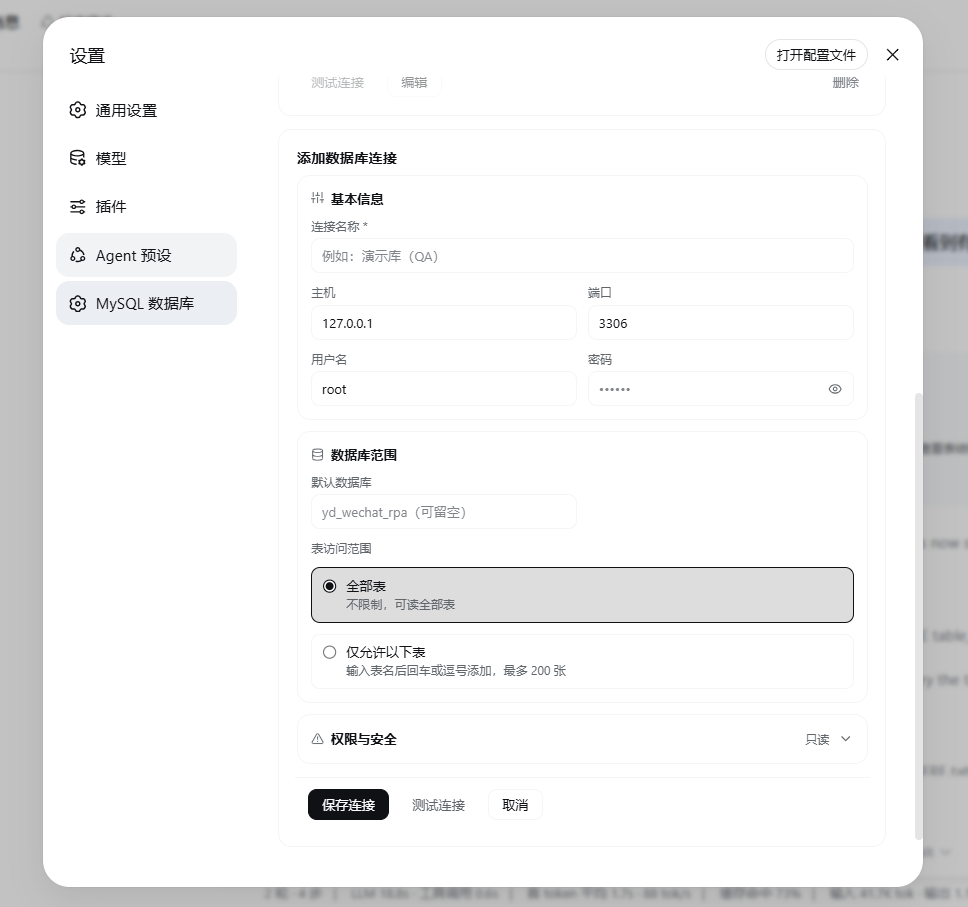
The form can be opened below the saved connection cards without leaving the settings page:
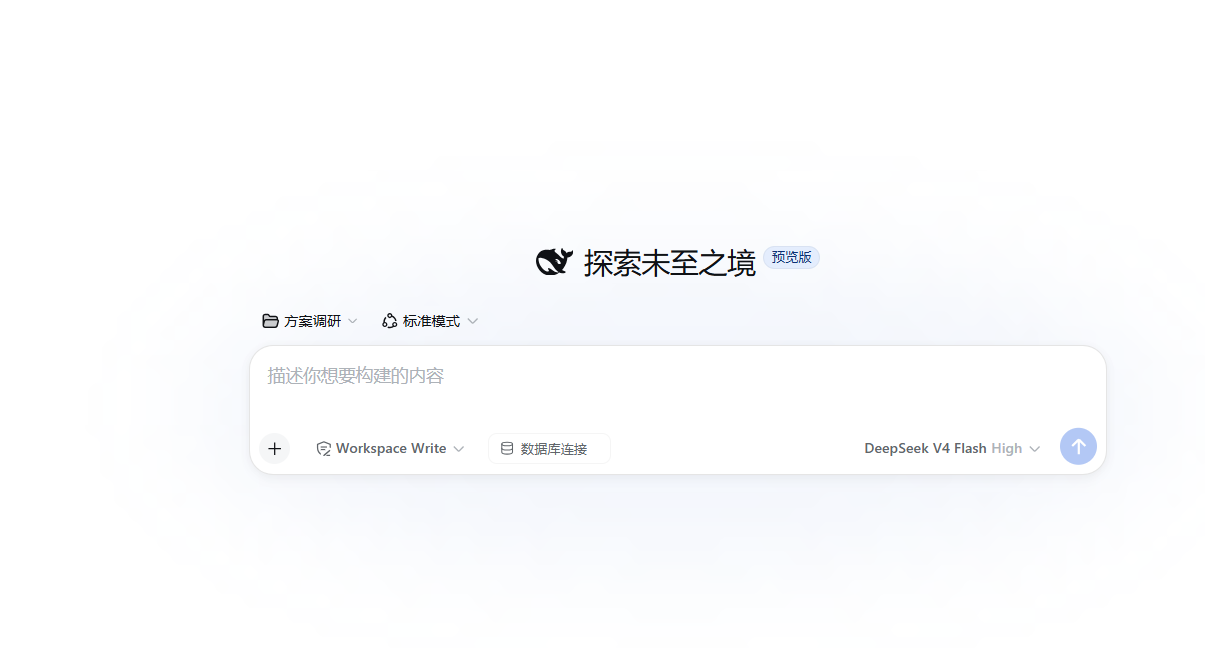
Select a connection for a session
The composer shows the database control even before a connection is selected. Its arrow points down while the picker is closed:
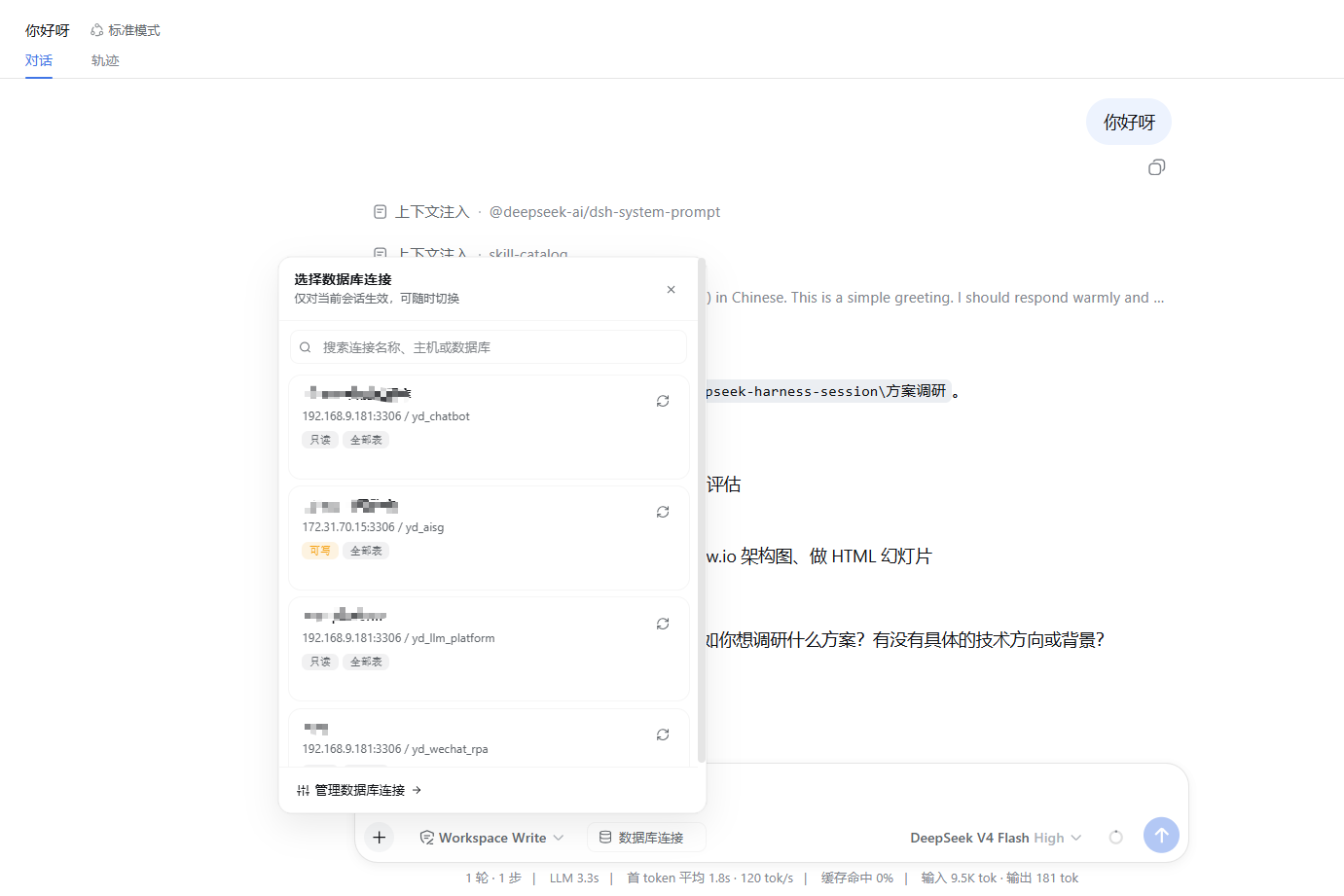
Click it to search and choose from the configured connections. The arrow points up while the list is expanded:
After a connection is selected, its name, green status dot, and down arrow appear in the composer. The selected connection is also included in the conversation context shown to the agent:

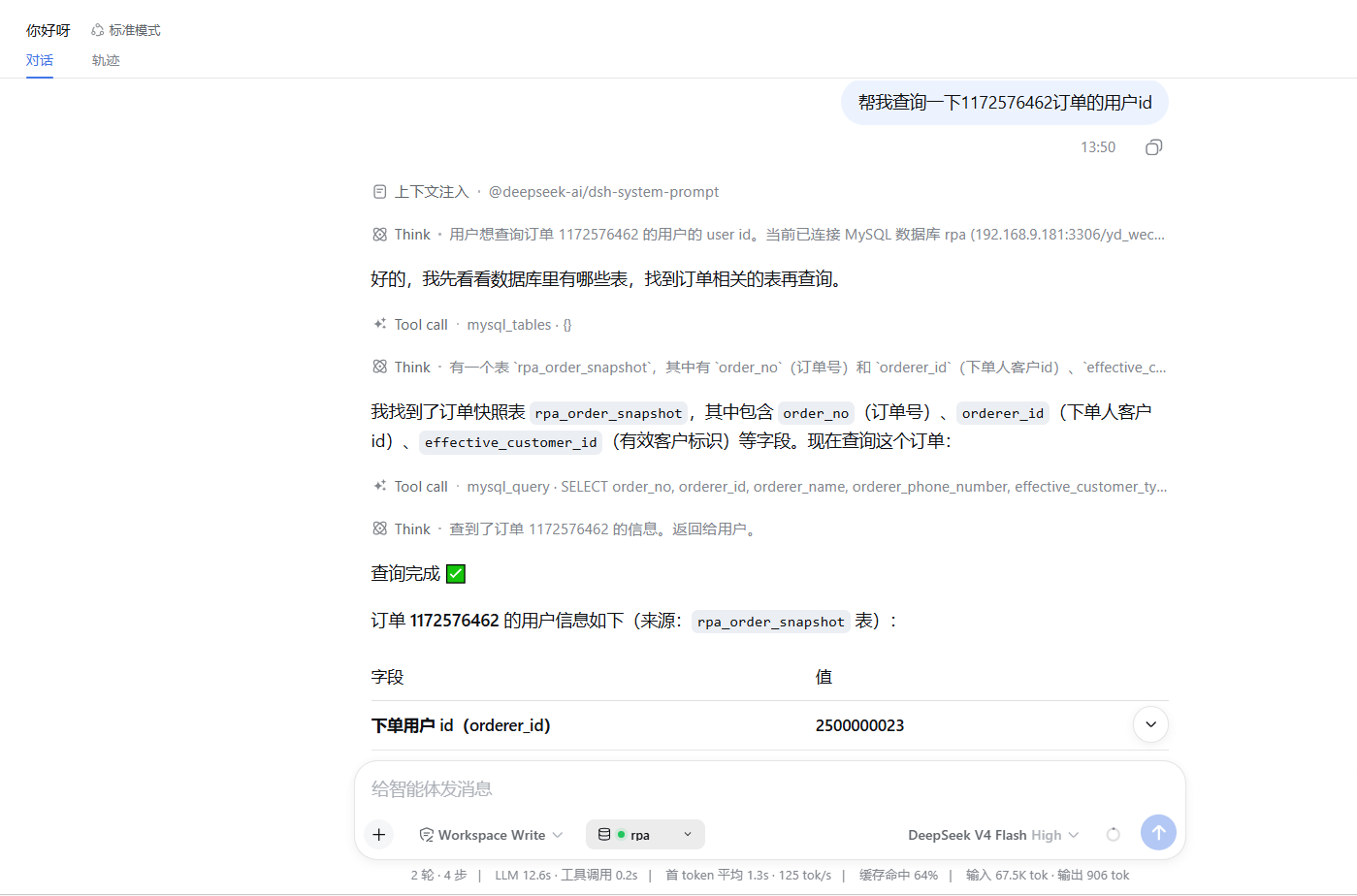
After the agent runs a read-only query, the tool result is displayed in the conversation:
Security and permissions
The plugin uses multiple guardrails, but it does not replace database permissions. Use a dedicated MySQL account with the least privileges possible; for read-only work, a SELECT-only account is recommended.
| Guardrail | What is enforced | Important boundary |
|---|---|---|
| Statement type | mysql_query accepts read statements; mysql_execute accepts only INSERT/UPDATE/DELETE. | The tool layer is not a general SQL console. |
| Write permission | mysql_execute requires the selected connection's allowWrite flag. | The switch is per connection and defaults to off. |
| DDL and multi-statement SQL | DDL, transaction/control statements, and multiple statements are rejected. | Use normal database administration tools for schema changes or transactions. |
| Table allowlist | Checks table references detected after FROM, JOIN, UPDATE, and INTO. An empty list means no configured table restriction. | This is a lexical check, not a full SQL parser. Forms such as DESCRIBE t or SHOW CREATE TABLE t do not use those reference keywords; combine the allowlist with database-level grants. |
| Result size | The serialized tool response contains at most 2,000 rows and reports truncated: true when rows were omitted. | The query is fetched before the response is truncated; this is not a server-side scan or network limit. |
| Credential exposure | Passwords are stored in local connections.json; the browser receives only hasPassword. | Query results, schema, and tool arguments are still sent to the configured LLM provider. |
Passwords are stored as plain text in $DSH_HOME/storages/dsh-mysql/connections.json. Protect this file with operating-system permissions and do not commit or share it.
Known limitations
- There is one active database selection per conversation session; selecting a connection does not change other sessions.
mysql_tablesuses the connection'sDATABASE()value, so schema discovery may be empty when no default database is configured. It does not browse arbitrary databases.- The table allowlist is intentionally lightweight and checks common table-reference positions rather than parsing every MySQL grammar form.
- The 2,000-row limit applies to the returned JSON payload after the database response has been fetched.
mysql_executedoes not provide transaction management, DDL, or a confirmation workflow. Enable write permission only for a narrowly scoped database account.- Connection configuration is TCP-oriented and has no UI for SSL/TLS, Unix sockets/named pipes, or character-set selection.
How it works
Composer / Settings UI
        │  browser slot + Typert RPC (remote.mysql.*)
        ▼
Host mysql service
        │  per-session selection + lazy mysql2 pool
        ├── local JSON: $DSH_HOME/storages/dsh-mysql/connections.json
        └── systemPrompt.context: selected connection + readable tables
- Host bundle (
lib/index.js) registers the three model tools, manages lazy mysql2 pools, persists connections, tracks the session selection, and provides themysqlservice. - Typert manifest (
lib/typert.host.js) exposes connection CRUD, testing, selection, and table-list methods to the browser throughremote.mysql.*. - Browser bundle (
lib/client.js) registers theconversation.input.leftdatabase control and thesettings.sectionconnection-management page. UI styles consume DSH--dsw-*theme tokens. - The selected connection is added through
systemPrompt.contextas a dynamic tail section, so switching connections does not rewrite the stable cached system-prompt prefix.
Migrating from a preset-embedded MySQL tool
If a preset previously embedded mysql_query or mysql_execute through a local tool row:
- Install this plugin into the profile.
- Remove the old MySQL tool row and connection configuration from the preset's
agent.cordis.yml; keep the business persona text. - Restart
dsh web, then recreate the connection in Settings → MySQL 数据库. The tool names are unchanged, so prompts that mention them continue to work.
FAQ and troubleshooting
The database button is missing
Restart the DSH Web process after installation or update. Then verify the profile composition with dsh --profile web --dump-config | findstr dsh-mysql. Make sure the plugin was installed into the same profile that you started.
“No MySQL connection is configured” or “this session has not selected a connection”
Open Settings → MySQL 数据库 and save at least one connection. In the conversation, click the database button and select a connection. A single saved connection is auto-selected, but multiple connections require an explicit per-session choice.
Connection tests fail
Check the host and port, credentials, default database, server reachability, and the MySQL account's network permissions. The plugin connects from the DSH host, not from the browser. For startup diagnostics, inspect $DSH_HOME/storages/dsh-mysql/boot.log.
The table list is empty
Set a default database in the connection form. mysql_tables queries information_schema.columns for table_schema = DATABASE() and will not enumerate another schema automatically.
A write, DDL, multi-statement, or allowlist query was rejected
Use mysql_query for one read statement and mysql_execute only for one INSERT/UPDATE/DELETE when allowWrite is enabled. Schema changes, transaction/control statements, multiple statements, and references outside the configured table scope are intentionally blocked. Remember that the allowlist is a lexical check; database-level grants remain the final boundary.
Does the browser receive my password?
No. The browser receives a safe connection view containing hasPassword, not the password value. The local JSON file still stores the password in plain text, so protect that file.
Development
Syntax-check each JavaScript file individually, run the shared-function tests, then pack a local artifact:
Get-ChildItem lib\*.js | ForEach-Object { node --check $_.FullName }
node test\shared.test.mjs
pnpm pack
Install the packed artifact into a scratch profile and verify the real bundle:
dsh plugin --profile demo add .\dsh-mysql-0.1.10.tgz
dsh --profile demo --dump-config
When releasing a new version, update the version in package.json, the $Rev value in scripts/install.ps1, the tagged install URLs in both README files, and screenshots.json if the screenshot set changes.
License
MIT. This project is not affiliated with DeepSeek. Installing the plugin runs third-party code on your machine; review the source before use.
Compatibility
Versions
| Latest version | Published | Size |
|---|---|---|
| 0.0.1 | — | — |
Comments
Loading…
Similar plugins
by lb290
Named database connections for DeepSeek Harness - configure MySQL in a settings page, then refer to them by name in chat. Read-only by default, writes opt-in per connection.
★ 0
MIT
JavaScript
Oct 17, 2026
dsh plugin --profile web add dsh-db-connectionsby blkpne
Connect DeepSeek Harness Web to MySQL, MariaDB, PostgreSQL, SQL Server, Oracle and MongoDB for schema discovery and read-only queries through session-authorized MCP tools.
★ 0
MIT
TypeScript
Oct 29, 2026
dsh plugin --profile web add dsh-databaseby mengqi1436
Chat-operated multi-database admin plugin for DeepSeek Harness: query and manage MySQL, PostgreSQL, GaussDB, MongoDB, Redis, Oracle, DM and SQLite from the conversation with project-scoped ro/rw grant
★ 4
↓ 438/wk
NOASSERTION
TypeScript
Oct 9, 2026
dsh plugin --profile web add dsh-db-toolby mr-mihu
Database access for DeepSeek Harness through the DBHub MCP server: configure MySQL, MariaDB, PostgreSQL, SQLite and SQL Server connections per workspace and environment, then let the agent configure,
★ 2
MIT
JavaScript
Oct 26, 2026
dsh plugin --profile web add dsh-dbhub-liveDeepSeek Harness (DSH) plugin that publishes the running Harness as a Model Context Protocol (MCP) server for other agent harnesses.
★ 1
MIT
JavaScript
dsh plugin --profile web add @local/dsh-mcp-serverby JD579g
DeepSeek Harness (DSH) plugin: one-click MCP deployment + built-in MCP toolkit + doctor. Windows-first, connects without restarting.
★ 0
MIT
JavaScript
Sep 28, 2026
dsh plugin --profile web add dsh-mcp-hub