

cute-fat-fish-pet
Manifest valid★ 4Blue-Haired Little Maid · A chibi blue-haired little maid desktop pet that lives on your Windows desktop: 106 hand-drawn transparent animations, companion chat powered by local Ollama or online models, optional screen-reading commentary, offline speech recognition (installer and portable versions). Free and open source under MIT. Also serves as a DeepSeek Harness desktop pet plugin (dsh-plugin). By Mikolu.
蓝毛小女仆 · Blue-Haired Little Maid
A free, open-source desktop pet for Windows: a transparent little maid who lives on your desktop.
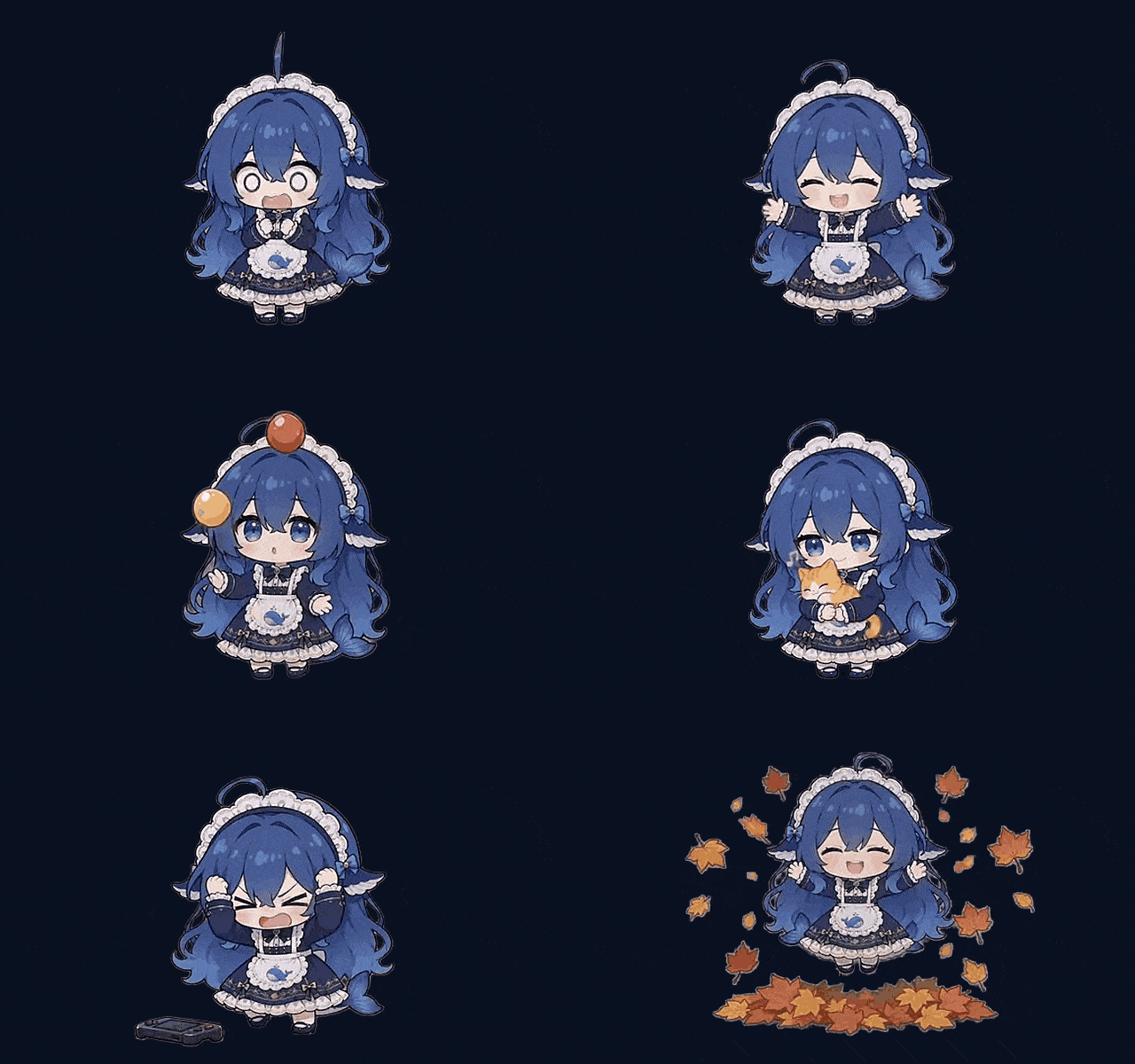
She idles, wanders around and does little animations on her own. She can chat with you, take a look at your screen and say something about it — and when you ask her to, she can open an app, a file, a folder or a web page for you, or start a screen recording.
Install · First run · Data & privacy · Build from source · Verify your download · License
English · 中文文档
About this project
蓝毛小女仆 (Blue-Haired Little Maid) is an independent desktop-pet project, developed and maintained by Mikolu.
Special thanks to PC2005-cloud, whose dsh-pet 0.3.0 provided the early foundation and the inspiration for this project.
The pet engine in src/ is that codebase, carried forward and maintained in-tree: of the 243 files in the published upstream dsh-pet@0.3.0 package, 232 are byte-identical here and 11 were changed on purpose (each one listed with sizes and reasons in docs/differences-from-upstream.md), no upstream file was dropped, and three engine files (runtime/electron-helper/obs-ctl.js, stt-worker.mjs, targets.js) are ours. Everything else in this repository — the console, the standalone runner, the build chain, the installer, the docs — is this project's own work.
There is no patching step any more: src/ is the shipped source. Building is just laying the source tree out in release shape and adding the runtimes that are not kept in git.
| Product name | 蓝毛小女仆 (Blue-Haired Little Maid) |
| Repository / package / installer name | cute-fat-fish-pet — legacy display name "Cute Fat Fish Pet" / 「可爱大肥鱼桌宠」 |
| Author / maintainer | Mikolu |
| Version | 1.2.1 |
| License | MIT — see LICENSE |
On the name. 蓝毛小女仆 is the product's name. The repository and the npm package keep the bare identifier
cute-fat-fish-pet, and the installers shipped so far still carry the older display name Cute Fat Fish Pet / 「可爱大肥鱼桌宠」 — renaming those would break existing installs, shortcuts and download links, so they stay as they are. Until the next repack, Windows still shows 「可爱大肥鱼桌宠」 on the desktop shortcut and in Settings → Apps.
Internal identifiers are kept on purpose (BlueHairMaid)
Everything the user can see has been renamed, and so has the DSH plugin package name (it collided with the upstream npm package). Everything else on the inside has not — on purpose:
| Internal identifier | Value | What breaks if it is renamed |
|---|---|---|
| App folder / APP_ID / uninstall entry | BlueHairMaid | Existing config, data, shortcuts and "Apps & features" entry no longer match — it becomes a second pet |
| Pet plugin package name (renamed 2026-10-10) | dsh-pet → cute-fat-fish-pet | Nothing user-visible: the data root and route prefix below are hard-coded strings in src/lib/, not derived from the package name, so persona and memory stay put. An already-installed copy just has to be re-added once. |
| Desktop renderer package | dsh-pet-electron-helper | The pet page's localStorage (position, size, sprite state) is lost and she is put back in the middle of the screen |
| Browser storage keys | dsh-pet-* | Same as above — all existing settings are ignored |
| Local route prefix | /dsh-pet-7340 | Incompatible with the already-shipped versions; console and pet stop understanding each other |
| User data directory | %APPDATA%\BlueHairMaid | Existing persona / memory / screen-watch state is lost |
In short: rename what is visible — plus the plugin package name, once — but never touch the identifiers that hold user data. That is what makes upgrading from 1.0.0 a no-op for the user.
The same list is in NOTICE.md (section 5), and the reasoning behind it is in docs/architecture-roadmap.zh-CN.md.
What she can do
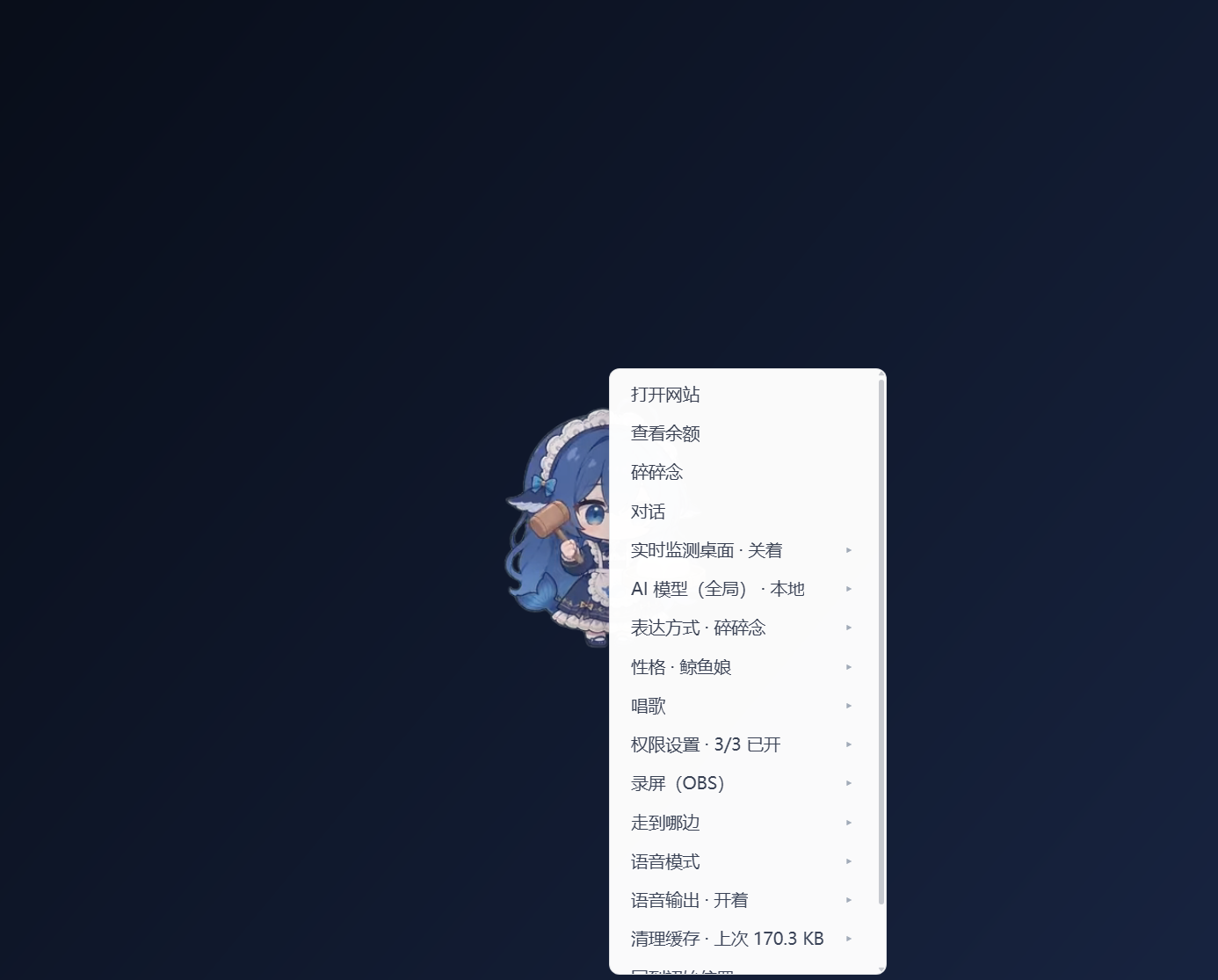
- She moves on her own — 106 hand-drawn transparent animations (VP9-alpha webm, composited onto your wallpaper with a screen blend). Idle breathing, looking around, walking to random spots, random small gestures. Animation weights and frequency are configurable.
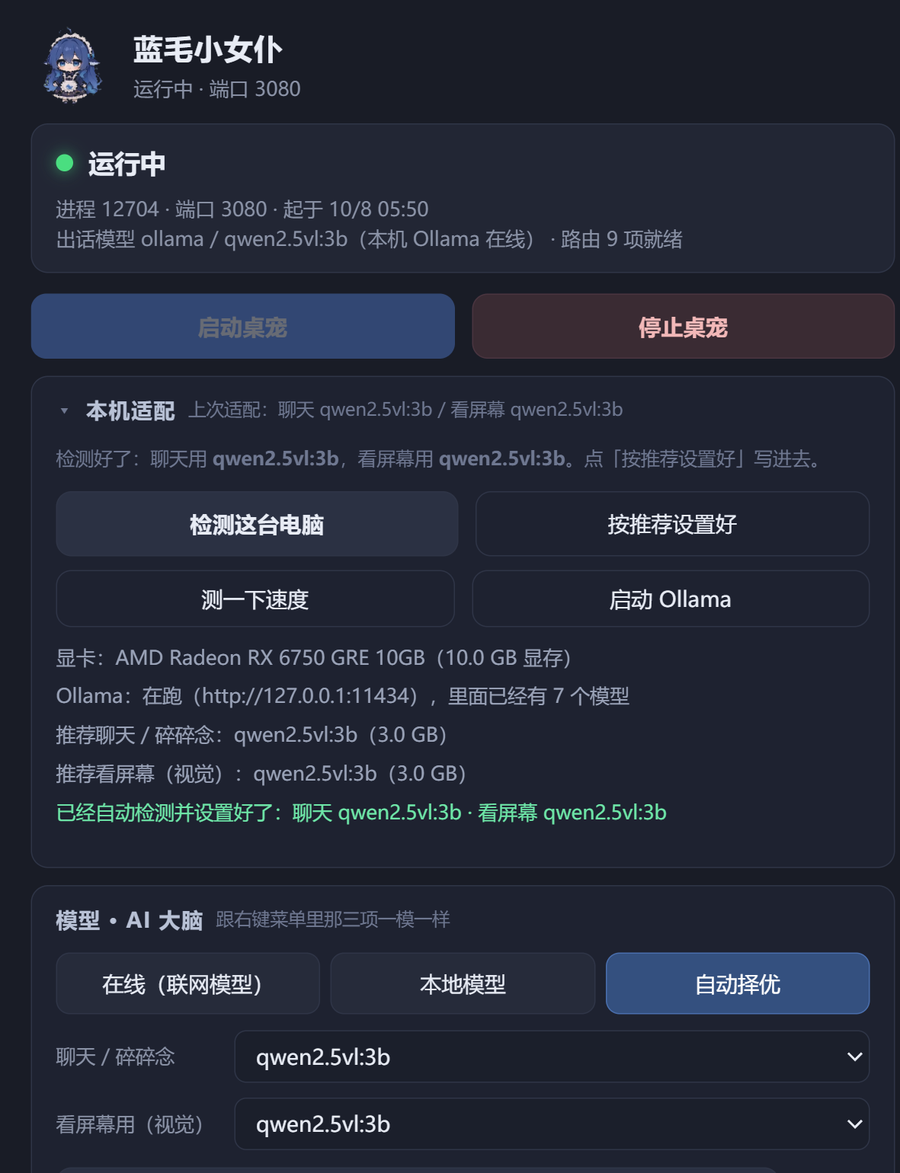
- She talks with you — click her to open the chat. Local models through Ollama or any OpenAI-compatible endpoint; the console has three modes: Local, Auto (best available) and Online.
- She can watch your screen (optional, switchable) — a screenshot every so often is handed to a vision model and she comments on it. With no vision model configured this path stays off instead of sending a random image.
- She mutters and speaks up — she fills quiet moments on her own, and can be driven by work state (task started / finished / failed).
- She can do things for you (your call) — open an app, a file, a folder or a URL; screen recording goes to OBS or to whatever software you pick, saved wherever you pick. Three permission switches turn this off completely.
- Voice — speech input runs fully offline inside the package (sherpa-onnx + SenseVoice int8); her voice uses Edge TTS + SSML, with adjustable rate and pitch (the pitch is stored in the data root).
- One single-HTML console — start / stop, status, models and "AI brain", voice, permissions, recording, logs: all in one window, no command line.
- Persona and memory — persona files, chat history and screen-watch state live in the data root; you can edit them and back the whole thing up.
Install
Option 1 — installer (recommended)
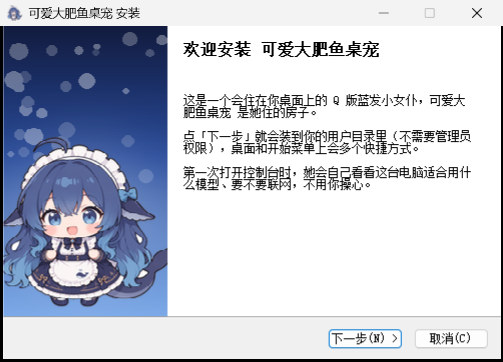
Download cute-fat-fish-pet-1.2.1-setup.exe (about 331.7 MB, NSIS) and double-click it.
Always-latest link: every release also carries a byte-identical copy without the version in its name, so this one link always points at the newest installer: https://github.com/12we21/cute-fat-fish-pet/releases/latest/download/cute-fat-fish-pet-setup.exe
- Installs to
%LOCALAPPDATA%\BlueHairMaidby default — no administrator rights needed. - Want it elsewhere (D: drive, external disk)? Change it on the "Choose install location" page. Start-menu entry and desktop shortcut are created for you.
- The package already contains the Electron runtime, the speech engine and models, and the real
node.exeused for speech recognition, so it works offline right after installing.
Option 2 — portable zip
Download cute-fat-fish-pet-1.2.1-win-x64.zip (about 397.7 MB, ~760 MB unpacked), unpack it anywhere, then pick one:
1.1.1 fixed this path end to end. Unpack the zip first (right-click → Extract All…) and only then double-click
安装.cmdinside the extracted folder. It checks that the package is complete and explains the problem in Chinese if it is not (the old one just flashed and closed), installs under the name 「可爱大肥鱼桌宠」 with the real version number, and卸载.cmdnow really removes the directory instead of leaving all 714 files behind. Details: release notes 1.2.1 · confirmed defects.
- double-click
安装.cmd— creates the shortcuts and the uninstall entry (as if it had been installed), or - double-click
standalone\start-pet.vbsto start her andstandalone\stop-pet.vbsto stop her (fully portable, writes no registry keys).
Use the second one on a USB stick. If you want her data to travel with the program directory, drop an empty portable.txt next to the executable (see Data & privacy).
Note: the files that ship inside the package keep their Chinese names and Chinese text for now (
安装.cmd,卸载.cmd,assets\使用说明.txt, …). Renaming them would change the package that is already published, so it is queued for the next release instead.
Option 3 — as a DeepSeek Harness plugin (no installer)
The pet engine in src/ is also a DeepSeek Harness plugin, so she can live inside the DSH Web UI instead of on your wallpaper:
dsh plugin --profile web add github:12we21/cute-fat-fish-pet#path:/src
What that downloads. The manifest lives in the
src/subpackage, so this fetches the whole repository tarball (about 68 MB) — the 106 animations are most of it. On a slow or throttled connection that fetch can time out. If it does, install from a local clone instead:
git clone --depth 1 https://github.com/12we21/cute-fat-fish-pet
dsh plugin --profile web add ./cute-fat-fish-pet/src
src/lib/ is committed pre-built, so there is no build step. The repository carries the dsh-plugin topic and has been submitted to the Awesome DSH Plugin directory under Just for Fun — that directory is what dshmarket and awesome-dsh-plugin.com read, while dshfind mirrors every repository carrying the topic.
This half of the project is a subset of the standalone build: all 106 animations, wandering, click reactions, chat through local Ollama or the DSH online models, and optional screen watching are in it. The offline speech recognition, the Edge TTS voice and the console window are not — those come with the installer and the zip above.
Every download comes with a .sha256
cute-fat-fish-pet-1.2.1-setup.exe.sha256 and cute-fat-fish-pet-1.2.1-win-x64.zip.sha256, in the format <SHA256> <filename>:
Get-FileHash .\cute-fat-fish-pet-1.2.1-setup.exe -Algorithm SHA256
Release file names are ASCII on purpose: GitHub Releases deletes non-ASCII characters from asset names (a Chinese name is uploaded as
-1.1.0-.exe). Chinese stays in the product name, the shortcuts and "Apps & features".
Start, stop, uninstall
- Start: double-click the desktop shortcut "可爱大肥鱼桌宠" to open the console, then press 启动桌宠 ("Start the pet"). The console does not pull her up by itself — that is deliberate, so that changing a setting does not make her pop out first.
- Stop: press stop in the console, or double-click
standalone\stop-pet.vbs. - Autostart and auto-update are not implemented yet. If you want autostart, put a shortcut to the console into your Startup folder.
- Uninstall: "可爱大肥鱼桌宠" in Settings → Apps, or
卸载.cmdin the install directory. Uninstalling does not delete your data (persona, memory, chat history stay). To remove everything, delete the data directory yourself (next section).
Updating to a newer version
There is no automatic updater yet — updating means downloading the new installer and running it over the old copy. Only program files are replaced; your data is not touched.
- Close the pet first. Right-click her tray icon → exit, or double-click
standalone\stop-pet.vbs. The installer deliberately never kills processes (it must not kill a different pet on the same PC), so whileelectron.exeis running it stops and asks you to close her. - Download the new installer — the always-latest link above, or the newest release on the releases page.
- Double-click it and click Next. The installer reads the folder used by the previous version from
HKCU\Software\Microsoft\Windows\CurrentVersion\Uninstall\BlueHairMaidand installs back into the same folder, so you do not end up with a second 761 MB copy. The desktop and Start-menu shortcuts are recreated. - Start her again from the console.
What survives: persona, memory, chat history, settings and model configuration live in the data directory (%APPDATA%\BlueHairMaid), which the installer never touches.
Portable zip: unpack the new zip over the old folder. Keep your own standalone\online.json (your online-model settings) and your portable.txt if you made one.
Scripted installs:
cute-fat-fish-pet-setup.exe /S /D=D:\path\to\install. Two things to know — silent mode does not auto-detect the previous folder, so pass/D=yourself, and it will not replace files while she is running.
What she does on first run
You do not have to configure anything. On the first start she does a "local fit" round:
- Looks at your GPU — reads the VRAM size from the registry to decide the model context size and when to unload it (the result is written to
device-profile.json). - Finds local models — lists the models already pulled into Ollama and picks one as the chat model, plus a vision model for screen watching if there is one.
- Seeds the defaults — copies the bundled default persona / animation config / screen-watch config into the data root. Only missing files are added; files you edited are never overwritten.
- Writes a run record —
runtime.json(pid, port, model, start time), removed on exit; it is the first place to look when she does not come up.
She also runs with no model at all: she will idle, wander and gesture, she just will not speak. To give her a voice, install Ollama and pull a model, or fill in an OpenAI-compatible endpoint (base URL + key + model name) under 模型 · AI 大脑 → 联网模型 in the console.
Data & privacy
Where the data lives
Treat the program directory (%LOCALAPPDATA%\BlueHairMaid) as read-only. Everything that changes lives in the user data directory, resolved in this order:
- environment variable
DSH_PET_DATA_DIR(testing / advanced use) data-root.txtin the program directory (one line: the path)portable.txtin the program directory → data goes to<program dir>\userdata\(portable mode)- default
%APPDATA%\BlueHairMaid\
%APPDATA%\BlueHairMaid\
├─ dsh-pet\
│  ├─ main-config.json          persona + pet list
│  ├─ screen-watch\state.json   screen-watch config and state, brain mode, local models
│  ├─ record.json               recording settings (which app, where to save)
│  ├─ tts-pitch.txt             voice pitch (default +0Hz)
│  └─ main-animation\           your own animation assets (used with priority if present)
├─ device-profile.json          result of the automatic first-run fit
├─ runtime.json                 run record (pid / port / model), deleted on exit
├─ console\                     console window state
└─ logs\
   ├─ runner.log / runner.err.log     host-side logs
   └─ pet-control.log                 console start/stop log
The pet page's own localStorage (position, size, sprite state) lives in %APPDATA%\dsh-pet-electron-helper — that is Electron's rule, which is why it is part of the "internal identifiers are kept" note above.
Privacy
- Screen watching is a local screenshot handed to the model you chose. Pick a local Ollama model and nothing leaves your machine; pick an online model and the image goes to the endpoint you configured. Turn it off in the console and no screenshot is taken at all.
- Speech recognition runs offline: sherpa-onnx + SenseVoice int8 are inside the package and need no network.
- Edge TTS needs the network (it uses Microsoft's online speech synthesis).
- Online model API keys are stored in plain text in
standalone\online.json(in the program directory). It is a local file meant for you only — do not send this file to anyone, and do not upload a directory that contains it. - She never phones home: no telemetry, no usage reporting. Only the online features you turn on (online models, Edge TTS) use the network.
- Uninstalling keeps your data; delete
online.jsonand the data root yourself if you want them gone.
More detail, including the local control-bridge hardening added in 1.1.0, is in SECURITY.md.
Repository layout
Source repository
.
├─ src\               shipped source: the pet engine (host side + browser side), pet page, bundled node_modules
│  ├─ lib\           index.js (host side, a Cordis plugin: name/inject/apply), client.js (browser side)
│  ├─ src\           TypeScript sources (host / client / shared); lib\ is the build output
│  ├─ assets\        animation webm, memes, images, fonts, config.jsonc
│  └─ runtime\electron-helper\   desktop renderer (transparent Electron window + its own renderer)
├─ launcher\          console: single HTML + Electron shell (main.js / pet-api.js / rec.js / paths.js)
├─ standalone\        standalone-mode runner: fake ctx (context.mjs) + a real http server (server.mjs)
│  └─ shims\          stand-ins for three DSH packages (home-paths / credentials / llm)
├─ defaults\          default files seeded into the data root on first run
├─ build\             packaging: build.mjs (lays out stage\), toolchain.mjs (locates runtimes),
│                     check-paths.mjs (privacy gate), installer.nsi, mkexe.py, mkzip.py
├─ assets\            install / uninstall scripts and the shipped text files
├─ docs\              release notes, dev log, upstream diff, roadmap, publishing, code signing, images
├─ verify.mjs         released-package self-check (tree fingerprints + privacy file check)
└─ package.json       build entry points (npm run build / exe / zip / verify / paths)
After installing
<install dir>\
├─ app\               ← src\ laid out here (the pet engine)
├─ electron\          Electron 43 runtime (not in git)
├─ node\              a real node.exe for speech recognition (not in git)
├─ speech\            sherpa-onnx engine + SenseVoice int8 model (not in git)
├─ launcher\          console
├─ standalone\        standalone runner + the two .vbs launchers
├─ defaults\          default configuration
├─ assets\            shipped text files and install/uninstall scripts
├─ 卸载.cmd           uninstall
└─ verify.mjs         self-check
Build from source
Requirements: Windows x64, Node.js 24, Python 3 (packaging scripts), NSIS 3 (to build the installer).
The three runtime pieces (~689 MB) are not in git and have to come from somewhere:
| Piece | What it is | Size |
|---|---|---|
electron\ | Electron 43.3.0 win-x64 | ~347 MB |
node\ | node v24.21.0 win-x64 (the SenseVoice native addon cannot be loaded inside Electron: External buffers are not allowed, so a real node.exe is required) | ~89 MB |
speech\ | sherpa-onnx native engine + SenseVoice int8 model | ~253 MB |
The easy way is to point the build at an already installed copy of Cute Fat Fish Pet, which has all three:
npm run toolchain                                   # show what is missing and where to get it
node build\build.mjs --toolchain <an installed Cute Fat Fish Pet directory>   # lay out stage\
npm run exe                                         # python build\mkexe.py  → release\cute-fat-fish-pet-<version>-setup.exe
npm run zip                                         # python build\mkzip.py  → release\cute-fat-fish-pet-<version>-win-x64.zip
npm run verify                                      # check the stage\ tree fingerprints (should be all OK)
npm run paths                                       # build-time privacy gate: no local absolute paths, no private dirs
The two commands used most while developing:
node build\build.mjs launcher assets   # rebuild only these blocks
node build\build.mjs --list            # show what it would do, touch nothing
Blocks: app launcher standalone defaults assets verify electron node speech.
Artifact names come from the version field in src\package.json and are ASCII-only (GitHub Releases drops non-ASCII asset names), so this version produces cute-fat-fish-pet-1.2.1-setup.exe and cute-fat-fish-pet-1.2.1-win-x64.zip.
The build contract lives in the header of
build\build.mjsand in the rootpackage.jsonscripts.build\check-paths.mjsis a build gate;--no-gateskips it (not recommended).
Tech stack
- Desktop rendering — one transparent, borderless Electron 43 window per pet; plain JS + Canvas playing VP9-alpha webm, screen-blended onto the wallpaper. The window follows the pet's bounding box and is click-through by default, becoming interactive only when the cursor is inside her body.
- Host side — one file,
src\lib\index.js, lives two lives: inside DSH it is a Cordis plugin (name/inject/apply); in standalone modestandalone\main.mjsredirects three@deepseek-ai/*packages tostandalone\shims\at run time, feeds it a "just enough" fake ctx (standalone\context.mjs) and calls the very sameapply(ctx). - Console — a single HTML file (
launcher\index.html) plus an Electron shell, IPC intopet-api.js; start/stop goes throughstandalone\main.mjs/stop-pet.mjs. - Models — local Ollama, or any OpenAI-compatible endpoint (
/chat/completions, vision throughimage_url); balance lookup uses DeepSeek's/user/balance. - Speech — sherpa-onnx + SenseVoice int8 + silero VAD for offline recognition; Edge TTS + SSML for synthesis.
- Console ↔ pet channel — a loopback control bridge, hardened in 1.1.0 with token auth and a CORS allow-list (see the release notes and SECURITY.md).
- Packaging — Node + Python scripts lay out
stage\; NSIS 3 builds the installer, a Python script builds the portable zip.
Verify your download
1.2.1 artifacts:
| File | Size (bytes) | SHA-256 |
|---|---|---|
cute-fat-fish-pet-1.2.1-setup.exe | 347864787 | 5D354375D41AD7CC6F8C1B5C87375664384E173B9AEE9520F0CEBDDDED516EC2 |
cute-fat-fish-pet-1.2.1-win-x64.zip | 417022629 | 8C36D3B89C72EC5F968473BCB48AA28C6A93FA0E311261E863D264D2025B2843 |
1.2.0 and 1.1.4 artifacts (kept for the record):
| File | Size (bytes) | SHA-256 |
|---|---|---|
cute-fat-fish-pet-1.2.0-setup.exe | 347802318 | 22DB908B29AB28E6C811FC8019E624240BAEC676E9A6D046D330EA39643CAFB4 |
cute-fat-fish-pet-1.2.0-win-x64.zip | 417016073 | 75EA491EBF46B2A4ADBDA1EE6589AC8ACEE17F1E397E0A928EC8D2110AA44502 |
cute-fat-fish-pet-1.1.4-setup.exe | 347880285 | 495F5D3506C419B7967513E3F8C73F655F108FAC965BFF58B643EE018553C5D0 |
cute-fat-fish-pet-1.1.4-win-x64.zip | 417002153 | 54F6832CCC6D609FC26497F12B54EE9DA4016E8ACA2F144246AC0F23CC9542FC |
The same hashes are in the .sha256 files next to each asset, and in the release notes.
Inside the installed package, verify.mjs re-checks the whole app\ tree, its own files and the files that must not be there:
node verify.mjs
The build also enforces this from the other side: build\check-release.mjs proves that stage\ matches the repository byte for byte.
Documentation
| Document | What is in it |
|---|---|
| docs/development-log.md | Development log: motivation → change → verification → commit, for every step of this project |
| docs/differences-from-upstream.md | Every file that differs from upstream dsh-pet 0.3.0, with sizes and SHA-256 |
| docs/release-notes-1.2.1.md | 1.2.1 release notes — the console tells you what a connection test found, behaves for a real person, and answers "online or offline?" from the configuration |
| docs/release-notes-1.2.0.md | 1.2.0 release notes — check for updates, download and install in one click |
| docs/release-notes-1.1.4.md | 1.1.4 release notes — the console keeps your API key masked while you record |
| docs/release-notes-1.1.3.md | 1.1.3 release notes — 「打开 X」 opens a website, a folder or a file, by voice as well as typed |
| docs/release-notes-1.1.2.md | 1.1.2 release notes — the online model stops saying its thinking out loud |
| docs/release-notes-1.1.1.md | 1.1.1 release notes — the portable zip installs and uninstalls on a double-click |
| docs/release-notes-1.1.0.md | 1.1.0 release notes (first public release) |
| docs/architecture-roadmap.zh-CN.md | Architecture roadmap: host-coupling removal, control-bridge security, long-term plans (Chinese) |
| docs/how-to-publish.zh-CN.md | How a release is published (Chinese) |
| docs/code-signing.zh-CN.md | Code signing: options, costs, what it would take (Chinese) |
| docs/history/ | Older release notes, kept for the record |
| SECURITY.md | Threat model and hardening of the local ports |
| CONTRIBUTING.md | How to build, test and send a change |
| NOTICE.md | Copyright, attribution and third-party components |
License & third party
- This project is released under the MIT license — see
LICENSE, which carries two copyright lines: PC2005-cloud (upstream dsh-pet) and Mikolu (this integrated release). - The upstream MIT text ships unmodified:
assets/LICENSE.txtis byte-identical to the upstream file, with the original author's attribution intact. - Third-party components (Electron / Chromium, Node.js, sherpa-onnx, the SenseVoice model, silero VAD, npm dependencies, Edge TTS, online model endpoints) are listed one by one in
assets/第三方声明.txt. Ollama is not bundled — install it yourself. - More detail: NOTICE.md.
Contact
She started as something I wrote for my own desktop. Questions, ideas, feature requests: open an issue in this repository.
If she makes your desktop a little cuter, that is enough.
Comments
Loading…