
dsh-browser-tabs
IdentifiedKeeps the DSH browser from accumulating tabs: once a configurable limit is exceeded it closes blank, error, duplicate and oldest pages, while leaving the page in use, newly opened tabs and keep-patter
dsh-browser-tabs
DSH 的浏览器标签页管家:DSH 专用 Edge(CDP 9227)里的窗口/标签页越积越多时,自动把闲置的、重复的、报错的、最老的关掉;正在看的、刚开的、命中保留规则的,一个都不动。
用途
- 浏览器标签页越开越多时自动收尾,不用手动一个个关。
- 超限后按「空白页 → 报错页 → 重复地址 → 最老的页面」的顺序关,每轮最多 3 个。
- 正在用的、2 分钟内新开的、每个窗口最新的、命中保留正则的页面不动;每个窗口至少留 1 个。
- 设置页能看当前标签页/窗口数、改阈值、预演一次或立即清理;手动清理默认先预演,不会一按就关。
What it does (EN)
Keeps the DSH browser's tab count under configurable limits. When the per-window or total limit is exceeded, it closes blank, error, duplicate and oldest pages, while protecting the page in use, tabs opened in the last two minutes, the newest tab per window, keep-pattern URLs, and at least one tab per window. A settings panel provides thresholds, a dry-run preview and manual cleanup. It closes tabs only, not browser windows.
它怎么判断
每隔 intervalMs(默认 30 秒)看一眼,但两次真正动手之间至少隔 cooldownMs(默认 90 秒)。
超限条件(满足一个就算超):
- 单个窗口超过
maxTabsPerWindow(默认 8) - 全部窗口加起来超过
maxTabsTotal(默认 12)
超了之后按这个顺序挑,每轮最多 maxClosePerRun(默认 3)个:
- 空白页 / 新标签页(
about:blank、edge://newtab) - 报错页(
error.html、chrome-error、/404) - 重复 URL(同一个地址开了多份,只留一份)
- 最老的普通页
这些永远不动:
- 页面自己说可见 / 有焦点(
document.visibilityState、document.hasFocus()) - 2 分钟内新开的(
minAgeMs) - 每个窗口最新的
keepRecentPerWindow个(默认 1) - 窗口最小化时不再整窗保护:只保留有焦点的、最新的和至少 1 个;后台自动化 120 秒内还有操作仍然让路
- 命中
keepPatterns的(默认保留douyin.com/?recommend=1) - 每个窗口至少留
minTabsPerWindow个(默认 1) - 浏览器服务 120 秒内还有操作(
$DSH_HOME/browser-service/ops.jsonl的 mtime),自动清理先让路 - 读不到“是否可见”时按“正在用”保守处理
两个工具
browser_tabs_status:只读。看现在多少标签页/窗口、超没超、每个页面为什么被保留。browser_tabs_clean:默认dryRun=true,只预演;dryRun=false才真关。force=true可以无视“浏览器刚被操作过”的保护。 手动清理不受autoClose和冷却时间限制。
设置页
设置 → 浏览器标签页。页面上能看当前标签页/窗口数、超没超上限、每个页面为什么被保留,也能直接改:
- 自动清理总开关、巡检时是否真的关
- 巡检间隔、两次清理冷却、有人在用就让路的时间窗
- 每窗口/合计上限、每轮最多关几个、新标签保护、每窗保留最新几个
- 保留正则(一行一个,命中就永远不关)
「保存设置」会写进 $DSH_HOME/browser-tabs/settings.json 并立刻重设定时器;启动时这份覆盖项优先于 cordis.patch.yml 的出厂默认。「预演一次」只算不动手,「立即清理」关之前会再确认。
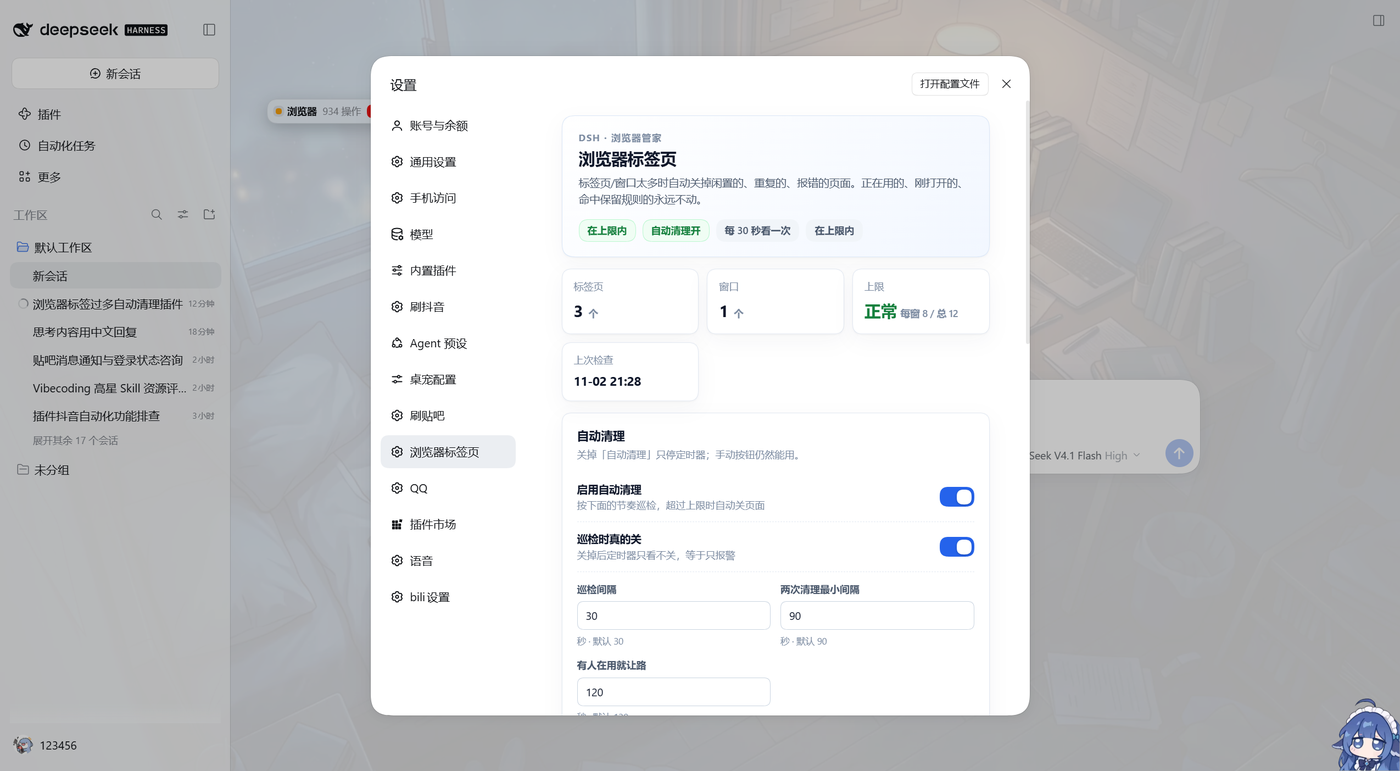
配置
默认值在 cordis.patch.yml,改完保存会热重载;设置页保存的值在 settings.json,优先级更高。常用项:
| 键 | 默认 | 说明 |
|---|---|---|
enabled | true | 总开关;false 时巡检也不跑 |
autoClose | true | false = 定时器只看不动手,只有手动工具能关 |
cdpUrl | http://127.0.0.1:9227 | DSH 浏览器的调试口 |
maxTabsPerWindow | 8 | 单窗口上限 |
maxTabsTotal | 12 | 全部窗口上限 |
maxClosePerRun | 3 | 每次最多关几个 |
minAgeMs | 120000 | 新标签保护期 |
keepRecentPerWindow | 1 | 每窗口保留最新的几个 |
keepPatterns | 抖音推荐流 | 正则数组;命中就永远不关 |
intervalMs / cooldownMs | 30000 / 90000 | 巡检间隔 / 动手冷却 |
activeGuardMs | 120000 | 浏览器服务活跃就让路的时间窗 |
closeExtraWindows | false | 预留:true 时才考虑关多余窗口(当前只报告,不关窗口) |
maxWindows 目前只作为配置保留,窗口合并没有默认开启——关窗口比关标签页重,先不自动做。
数据
都在 $DSH_HOME/browser-tabs/(本机是 D:\dsh-data\browser-tabs):
state.json:每个标签页第一次出现的时间、上次清理时间、累计关了几个history.jsonl:每次真关了页面的记录(时间、来源、关了哪些、剩多少)settings.json:设置页保存的覆盖项;删掉就回到cordis.patch.yml的默认值boot.log:插件每次加载写一行,用来确认装上了
安装 / 卸载
从插件市场:设置 → 插件市场,搜「浏览器标签页」或 dsh-browser-tabs。
从 GitHub 装:
dsh plugin --profile desktop add github:0changandui0/dsh-browser-tabs
装完把 dsh-browser-tabs 加进 profile 的 dsh.profile.bundles,热重载配置即可;设置页在「设置 → 浏览器标签页」。
临时关掉:把 cordis.patch.yml 里的 enabled 或 autoClose 改成 false,保存即可。
彻底卸载:从 profile 的 dsh.profile.bundles 删掉 dsh-browser-tabs,再删掉依赖和这个目录。
开发
cd dsh-browser-tabs
node --test test/policy.test.mjs test/settings.test.mjs
node --check index.js
node --check client.js
纯选择逻辑在 lib/policy.mjs,不碰网络/磁盘,可以单独测;设置读写/原子写在 lib/settings.mjs;CDP 在 lib/cdp.mjs;巡检在 lib/keeper.mjs;设置页在 client.js(浏览器半侧,注册 settings.section)。
改 client.js 后热重载插件、刷新页面即可;新增/修改 package.json 的 dsh.client 声明不在热重载范围内,DSH 会把包元数据缓存到下次重启。
Comments
Loading…
Similar plugins
by miao-ge
DSH plugin: browser-style project tabs in the window title bar - one tab per session, running / finished / waiting-for-approval badges, drag to reorder, restored across restarts.
★ 0
MIT
JavaScript
Oct 5, 2026
dsh plugin --profile web add dsh-project-tabsby Gnatnaituy
A browser panel in DSH's right sidebar: browse a site through a per-origin loopback proxy, pick elements into [label][DOMn] references, with tabs, page zoom, phone/tablet viewport preview and saved lo
★ 0
MIT
JavaScript
Oct 6, 2026
dsh plugin --profile web add dsh-sidebar-browserby seekerwxy
Browser-style session tab bar for DeepSeek Harness (DSH): one tab per opened session at the very top of the web app — click to switch, close, and start new sessions. 浏览器式会话标签页导航栏.
★ 0
MIT
JavaScript
Aug 15, 2026
dsh plugin --profile web add dsh-session-tabsby harmless0819-dev
Close / restart DSH buttons in Settings > General, plus an opt-out auto-close that waits until every browser page has stopped beaconing.
★ 0
MIT
JavaScript
Sep 21, 2026
dsh plugin --profile web add dsh-power-controlsDSH 的浏览器:登录一次,它就用你的账号替你办事(查后台/填表/抓列表/多标签);要登录、验证码、弹框会停下来等你,绝不替你点「确定」;你最小化它就不吵你,AI 在哪动手你随时看得见
★ 2
MIT
TypeScript
dsh plugin --profile web add dsh-browser-playwright-codexby thezavtrak-a11y
DeepSeek Harness Web UI plugin: browser-style tabs for open Sessions - switch, close, reorder by drag, and tear a tab off into a separate window.
★ 0
MIT
JavaScript
Oct 4, 2026
dsh plugin --profile web add dsh-session-tabs